NetWorker:REST API 要求失敗,並顯示錯誤訊息:HTTP 狀態 404 - 找不到「要求的資源無法使用」
Сводка: NetWorker REST 應用程式發展介面 (API) 查詢失敗,並顯示錯誤訊息:「HTTP 狀態 404 - 找不到」要求的資源無法使用。源伺服器沒有找到目標資源的當前表示形式,或者不願意透露存在該表示形式。
Данная статья применяется к
Данная статья не применяется к
Эта статья не привязана к какому-либо конкретному продукту.
В этой статье указаны не все версии продуктов.
Симптомы
NetWorker REST API 要求失敗,並顯示錯誤訊息:HTTP 狀態 404 - 找不到「要求的資源無法使用」
[root@NETWORKER_SERVER]:~# curl -ik GET -u **userid**:'***Password***' -H "Content-Type: application/json" 'https://NETWORKER_SERVER:9090/nwrestapi/v3/global/clients'
curl: (6) Could not resolve host: GET; Name or service not known
HTTP/1.1 404
Content-Type: text/html;charset=utf-8
Content-Language: en
Content-Length: 790
Date: Tue, 04 Jul 2023 12:11:41 GMT
Server: NSR SERVICES for Authentication


<!doctype html><html lang="en"><head><title>HTTP Status 404 – Not Found</title><style type="text/css">body {font-family:Tahoma,Arial,sans-serif;} h1, h2, h3, b {color:white;background-color:#525D76;} h1 {font-size:22px;} h2 {font-size:16px;} h3 {font-size:14px;} p {font-size:12px;} a {color:black;} .line {height:1px;background-color:#525D76;border:none;}</style></head><body><h1>HTTP Status 404 – Not Found</h1><hr class="line" /><p><b>Type</b> Status Report</p><p><b>Message</b> The requested resource [/nwrestapi/v3/global/clients] is not available</p><p><b>Description</b> The origin server did not find a current representation for the target resource or is not willing to disclose that one exists.</p><hr class="line" /><h3>Apache Tomcat/9.0.52</h
NetWorker 伺服器安裝遺失 nwrestapi 目錄。
Linux:
Windows :
/nsr/authc/webapps/nwrestapi/
Windows :
C:\Program Files\EMC NetWorker\nsr\authc-server\tomcat\webapps\nwrestapi
的 restapi.log 不存在或未更新:
Linux:
Windows :
/nsr/logs/restapi/restapi.log
Windows :
C:\Program Files\EMC NetWorker\nsr\logs\restapi\restapi.log
Причина
可使用 nwrestapi 路徑不存在。REST API 查詢找不到任何端點,也無法關聯其應如何呈現來自其他 NetWorker 資料庫的資料。
Разрешение
nwrestapi 會與 NetWorker 一起設定 authc 使用 Java Runtime Environment (JRE) 的服務。建議使用 NetWorker 執行時間環境 (NRE),以避免在設定時發生潛在的 Java 相關問題 authc。您可以從 Dell 支援 NetWorker 驅動程式與下載 頁面下載最新的 NRE 套裝。
Linux:
- 登入 NetWorker 伺服器並切換至 root:
sudo su -
- 確認 NRE 是否已安裝,以及 NetWorker 設定使用哪個 Java 例項:
rpm -qa | grep nre
cat /nsr/authc/conf/installrc

[root@networker-mc]:~# rpm -qa | grep nre
nre-8.0.15-1.x86_64
[root@networker-mc]:~#
[root@networker-mc]:~# cat /nsr/authc/conf/installrc
JAVA_HOME=/opt/nre/java/latest
注意: 安裝了多個 Java 實例。例如,NRE 和 Oracle JRE 都可以安裝在伺服器上。上述步驟可確認 NetWorker 使用的 Java 安裝。
- 執行下列指令檔以重新設定 NetWorker
authc伺服器。
/opt/nsr/authc-server/scripts/authc_configure.sh

[root@networker-mc]:~# /opt/nsr/authc-server/scripts/authc_configure.sh

Specify the directory where the Java Standard Edition Runtime Environment (JRE) software is installed [/opt/nre/java/latest]:

The installation process will install an Apache Tomcat instance. For optimum security, EMC NetWorker Authentication Service will use a non-root user (nsrtomcat) to start the Apache Tomcat instance.
If your system has special user security requirements, ensure that proper operational permissions are granted to this non-root user (nsrtomcat).
Please refer to NetWorker Installation Guide.

WARNING: Port 9090 is already in use.

Do you wish to specify a different port number [y]? n

The Apache Tomcat will use "networker-mc.emclab.local" as the host name.
The Apache Tomcat will use "9090" as the port number.

The NetWorker Authentication Service requires a keystore file to configure encryption and to provide SSL support.

EMC recommends that you specify a keystore password that has a minimum of six characters.

Do you want to use the existing keystore /nsr/authc/conf/authc.keystore [y]?

Specify password for the existing keystore:
The install will use the existing certificate "emcauthctomcat" for Apache Tomcat.
The install will use the existing certificate "emcauthcsaml" for Authentication Service.

Creating the installation log in /opt/nsr/authc-server/logs/install.log.

Performing initialization. Please wait...

The installation completed successfully.
注意: 需要重新啟動 NetWorker 服務才能重新載入
authc。這可以通過以下方式完成: systemctl 命令:
systemctl stop networker
and
systemctl start networker
- 確認已建立以下資料夾:
/nsr/authc/webapps/nwrestapi

[root@networker-mc]:~# ls -l /nsr/authc/webapps/nwrestapi/
total 0
drwx------. 2 nsrtomcat nsrtomcat  44 Jul  6 12:22 META-INF
drwx------. 3 nsrtomcat nsrtomcat  21 Jul  6 12:22 v1
drwx------. 3 nsrtomcat nsrtomcat  21 Jul  6 12:22 v2
drwx------. 3 nsrtomcat nsrtomcat  21 Jul  6 12:22 v3
drwx------. 6 nsrtomcat nsrtomcat 107 Jul  6 12:22 WEB-INF
- 如果
nwrestapi目錄已建立,請執行 REST API 查詢。
Windows :
- 確認 NRE 是否已安裝,以及 NetWorker 設定使用哪個 Java 例項:
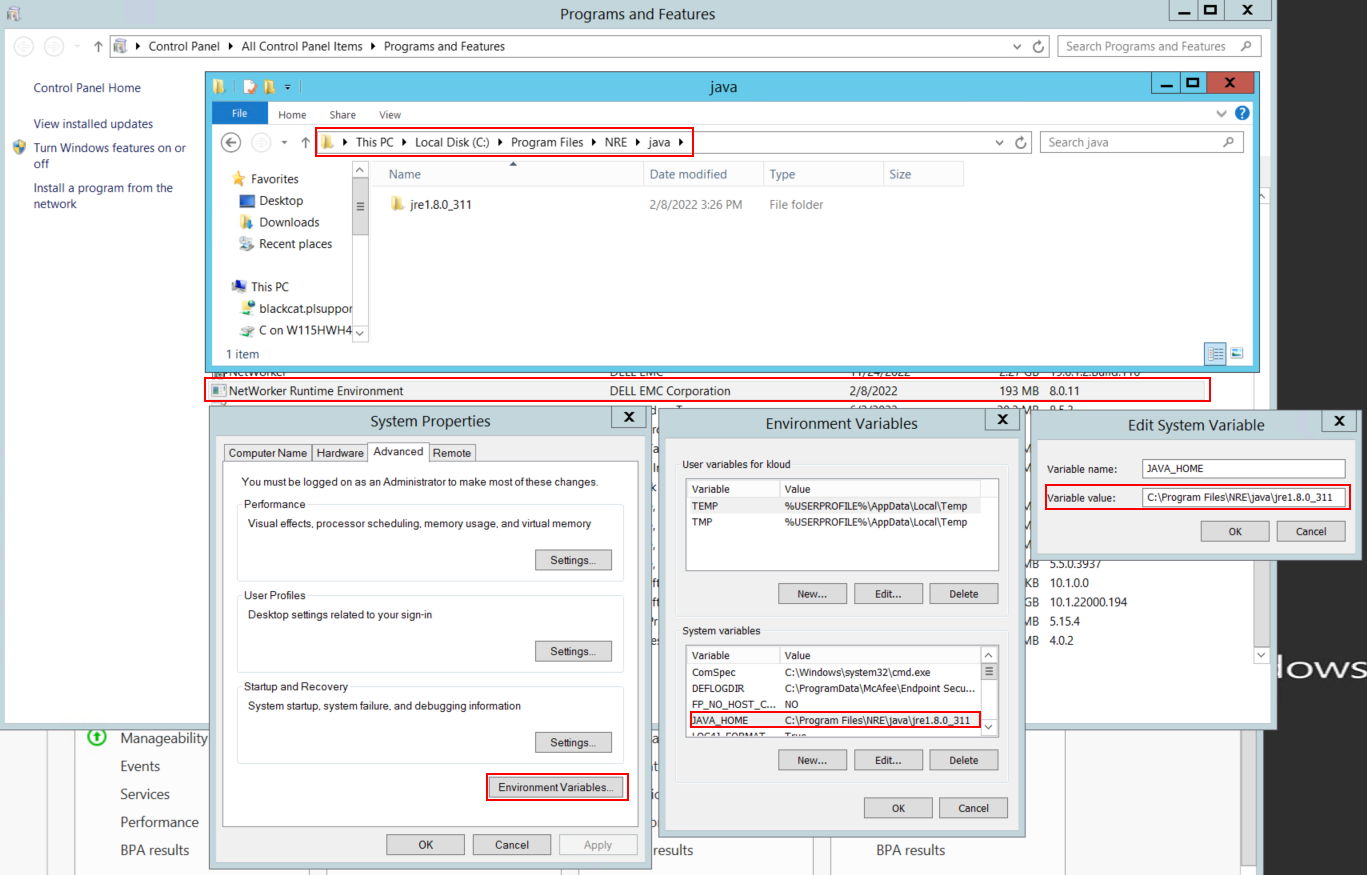
圖 1: 確認 NetWorker 使用的 Java 例項。變數可能顯示為 JAVA_HOME 或 NSR_JAVA_HOME。
注意: 安裝了多個 Java 實例。例如,NRE 和 Oracle JRE 都可以安裝在伺服器上。上述步驟可確認 NetWorker 使用的 Java 安裝項目。
- 解除安裝 NetWorker 套裝。這不會移除任何 NetWorker 資料庫或組態資源。
- 在現有的安裝路徑上重新安裝 NetWorker。重新安裝 NetWorker 會重新設定 NetWorker 的驗證服務。
- 確認下列路徑存在:
C:\Program Files\EMC NetWorker\nsr\authc-server\tomcat\webapps\nwrestapi
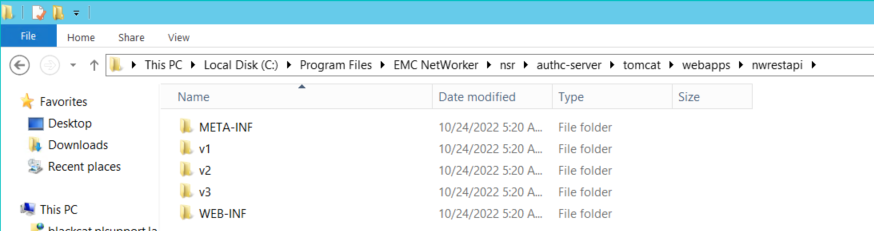
圖 2:確認 nwrestapi 路徑已存在。
- 如果
nwrestapi目錄已建立,請執行 REST API 查詢。
Дополнительная информация
Затронутые продукты
NetWorkerПродукты
NetWorker Family, NetWorker SeriesСвойства статьи
Номер статьи: 000215602
Тип статьи: Solution
Последнее изменение: 29 Jun 2026
Версия: 9
Получите ответы на свои вопросы от других пользователей Dell
Услуги технической поддержки
Проверьте, распространяются ли на ваше устройство услуги технической поддержки.