Dell Unity:同期ありのフェールオーバー後のレプリケーション再開にフル同期が表示される
Сводка: Dell Unity OE 5.0.xで、同期ありのフェールオーバー操作の後に表示される再開確認メッセージに、選択したすべてのレプリケーション セッションに対して全同期が開始されるという誤った内容が表示されます。これはユーザー インターフェイスのメッセージングに関する問題であり、実際のレプリケーション動作には影響しません。Dell Unityの開発チームが問題を特定しました。Dell Unity OE 5.1の修正が予定されています。この修正では、再開サマリー メッセージには、実行中のレプリケーション操作が正しく反映されます。 ...
Симптомы
Dell Unity OE 5.0.xでは、同期ありのフェールオーバーを実行した後のレプリケーション セッションの再開オプションに、影響を受けるすべてのレプリケーション セッションに対して全同期が開始されることを示す確認メッセージが表示されます。
このメッセージはUnity OE 5.0.xの新機能として導入されたもので、予期される同期動作をユーザーに通知します。このメッセージは完全同期が行われることを示していますが、Dell Unityの開発チームはこの動作を特定し、今後のリリースで修正する予定です。
このメッセージは、同期ありのフェールオーバー操作の後にレプリケーションを再開するときに、Unity OE 5.0.xを実行しているすべてのDell Unityアレイで表示されることがあります。
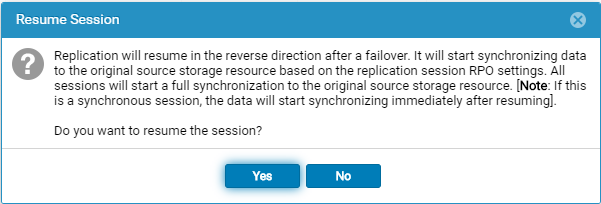
同期ありのフェールオーバー操作の後に再開オプションを選択すると、次のメッセージが表示されます。
Replication will resume in the reverse direction after a failover. It will start synchronizing data to the original source storage resource based on the replication session RPO settings. All sessions will start a full synchronization to the original source storage resource. [Note: If this is a synchronous session, the data will start synchronizing immediately after resuming].

Do you want to resume the session?
Причина
再開サマリー メッセージが正しくありません。同期ありのフェールオーバーを実行した後、[再開]を選択すると表示される確認メッセージは、すべてのレプリケーション セッションで全同期が開始されることを示します。ただし、このメッセージは実際のレプリケーション動作を正確に反映したものではありません。
この問題は、ユーザー インターフェイスに表示されるメッセージに限定されており、完全同期が発生することを示すものではありません。Dell Unity開発チームは、これをUnity OE 5.0.xの問題として特定し、修正に取り組んでいます。
Разрешение
再開サマリー メッセージは正しくありません。今後のUnity OEリリースで修正される予定です。
現在のメッセージは、すべてのレプリケーション セッションに対して 全同期 が開始されることを示しています。これは表示のみの問題であり、実行される実際のレプリケーション操作を反映したものではありません。
正しいメッセージは次のとおりです。
フェールバック確認メッセージ
Failback will perform a synchronization from the destination storage resource to the source storage resource, block access to the destination storage resource to allow it to be used for replication, and change the source storage resource access to read/write mode. Replication will then resume. The synchronization could be either delta or full synchronization depending on the replicated snapshots. This operation will be lengthy if a full synchronization is needed during failback.
When the failback operation is complete, you can then connect your hosts to the source storage resource.
Note: Before you begin, you should block writes to the destination storage resource because it will be placed in read-only mode.
フェールオーバー時の再開の確認
Replication will resume in the reverse direction after a failover. It will start synchronizing data to the original source storage resource based on the replication session RPO settings.
All sessions will start a synchronization to the original source storage resource. The synchronization could be either delta or full synchronization depending on the replicated snapshots.
Note: If this is a synchronous session, the data will start synchronizing immediately after resuming. Do you want to resume the session?