Экспорт журналов событий Windows
Сводка: Узнайте, как экспортировать журналы Event Viewer в Windows 11 или Windows 10. В этом руководстве объясняется, как сохранять журналы с помощью средства просмотра событий.
Данная статья применяется к
Данная статья не применяется к
Эта статья не привязана к какому-либо конкретному продукту.
В этой статье указаны не все версии продуктов.
Инструкции
- Нажмите на клавишу Windows.
- Введите
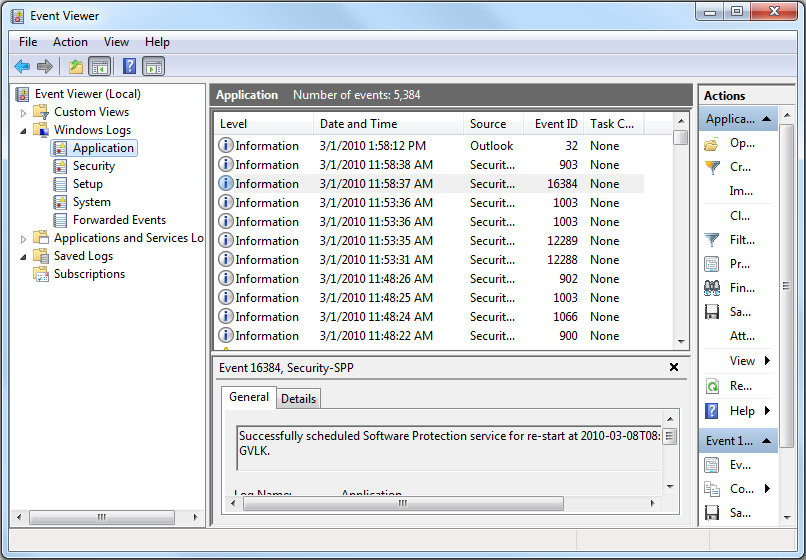
Event Viewer, а затем выберите в списке Просмотр событий . - На левой панели выберите тип журнала для экспорта.
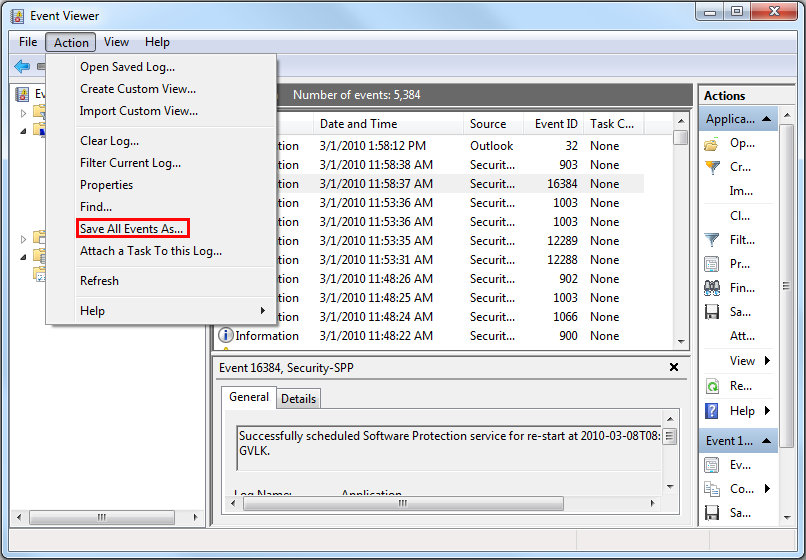
- Сохраните журнал, нажав Действие и затем выбрав Сохранить все события как.
Дополнительные сведения см. в разделе Как сохранить журналы
Сведения о журналах событий BIOS для ноутбуков Dell см. в разделе Журналы событий BIOS и ведение диагностических журналов на ноутбуках Dell.
Дополнительная информация
Рекомендуемые статьи
Ниже приведены некоторые рекомендуемые статьи по этой теме, которые могут вас заинтересовать.
Затронутые продукты
Alienware, Dell All-in-One, Dell Pro All-in-One, Dell Pro Max Micro, Dell Pro Max Slim, Dell Pro Max Tower, Dell Pro Micro, Dell Pro Slim, Dell Pro Tower, Dell Slim, Dell Tower, Inspiron, Legacy Desktop Models, OptiPlex, Vostro, XPS, G Series
, G Series, Alienware, Dell Plus, Dell Pro, Dell Pro Max, Dell Pro Plus, Dell Pro Premium, Inspiron, Latitude, Dell Pro Rugged, Vostro, XPS, Legacy Laptop Models, Fixed Workstations, Mobile Workstations, Dell Pro Max Micro XE FCM2250, Dell Pro Max Slim XE FCS1250, Dell Pro Max Tower T2 XE FCT2250, Dell Pro Max 16 XE MC16250, Dell Pro Micro Plus XE QBM1250, Dell Pro Slim Plus XE5 QBS1250, Dell Pro Tower Plus XE5 QBT1250
...
Свойства статьи
Номер статьи: 000124382
Тип статьи: How To
Последнее изменение: 19 Apr 2026
Версия: 9
Получите ответы на свои вопросы от других пользователей Dell
Услуги технической поддержки
Проверьте, распространяются ли на ваше устройство услуги технической поддержки.