AppSync: Uploading .xml license file in UI receives error: Adding the license failed due to "Invalid license file"
Сводка: Uploading .xml license file in UI receives error: Adding the license failed due to "Invalid license file".
Данная статья применяется к
Данная статья не применяется к
Эта статья не привязана к какому-либо конкретному продукту.
В этой статье указаны не все версии продуктов.
Симптомы
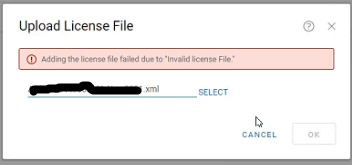
In AppSync UI, when uploading .xml license in Settings > License > Upload, receive an error:
Adding the license failed due to "Invalid license file"
Причина
The first scenario seen was the entire <lockingID> section was missing from the license file.
There should be a lockingID section like the following:
<LockingIds>

	<LockingId>

		<LockingIdCode>HOSTID</LockingIdCode>

		<LockingIdValue>value</LockingIdValue>

	</LockingId>

</LockingIds>
The second scenario seen was the LockingIdCode being inappropriately found to be XIOD like so:
<LockingId>

	<LockingIdCode>XIOID</LockingIdCode>
When it should be HOSTID
<LockingId>

	<LockingIdCode>HOSTID</LockingIdCode>
Разрешение
The internal licensing generation mechanism is updated to ensure the Locking ID section is populated.
A new license is needed. Obtain a new license from the licensing team.
Дополнительная информация
AppSync 4.2 and later supports XML type licenses.
Затронутые продукты
AppSyncСвойства статьи
Номер статьи: 000193800
Тип статьи: Solution
Последнее изменение: 10 Sep 2025
Версия: 4
Получите ответы на свои вопросы от других пользователей Dell
Услуги технической поддержки
Проверьте, распространяются ли на ваше устройство услуги технической поддержки.