NetWorker: vProxy Appliance Does Not Apply Network Parameters on Deployment
Сводка: vProxy appliance does not apply or retain network parameters.
Данная статья применяется к
Данная статья не применяется к
Эта статья не привязана к какому-либо конкретному продукту.
В этой статье указаны не все версии продуктов.
Симптомы
The NetWorker VMware Protection (NVP) vProxy appliance deploys successfully but did not apply network parameters set during the deployment.
Причина
There is a duplicate IP address. Another device has been assigned the same address as the vProxy appliance.
Разрешение
- On the vProxy appliance, check the status of the
wickeddservice with the below command. Wickedd is the network management service used on the vProxy appliance.
NOTE: If the vProxy is not accessible over SSH, use VMware web client to console connect to the vProxy.
systemctl status wickedd
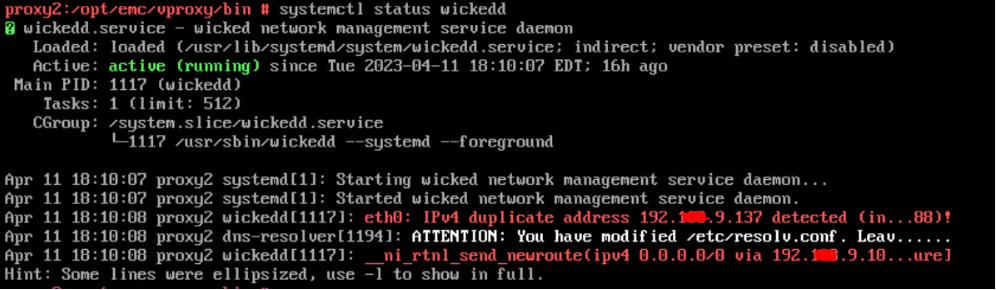
Figure 1: Message Results of
wickedd Command
To see the full messages, use the following
wickedd command:
systemctl -l status wickedd
(lower case L)
Example:

Figure 2: Message Results of Extended
wickedd Command
Write down the MAC address and work with network administrator to find the duplicate IP and resolve or assign a different IP address to the vProxy.
- Resolve duplicate IP address issue in the networking environment.
- Reconfigure the vProxy's network parameters using:
/opt/emc/vproxy/bin/network_config.sh <interface> <FQDN> <IP Address> <Netmask> <Gateway> <DNS List (comma separated)>
For more information, see: NVP vProxy: How to manually change the vProxy Appliance network interface settings
Затронутые продукты
NetWorkerПродукты
NetWorker Family, NetWorker SeriesСвойства статьи
Номер статьи: 000212275
Тип статьи: Solution
Последнее изменение: 27 Feb 2026
Версия: 3
Получите ответы на свои вопросы от других пользователей Dell
Услуги технической поддержки
Проверьте, распространяются ли на ваше устройство услуги технической поддержки.