Data Protection Advisor (DPA): Error message ‘Error 401: Unauthorized Action’ appears in Gui
Сводка: Error message ‘Error 401: Unauthorized Action’ appears in Gui
Данная статья применяется к
Данная статья не применяется к
Эта статья не привязана к какому-либо конкретному продукту.
В этой статье указаны не все версии продуктов.
Симптомы
User sees an error message on the DPA GUI and has to log back in again:
Error 401: Unauthorized Action
Причина
This error happens when a user is logged into the DPA GUI for hours at a time and the open session is being closed due to inactivity or some other environment factor closes the session.
Разрешение
The error can be ignored as it has no impact on DPA functionality.
User can log in to DPA again and continue as normal.
The following setting can be configured on the GUI to force a clean logoff after a specific period:
Administration > User & Security > Security Settings.
The Session Expiration parameter can be set to example for 6 hours (default is off):
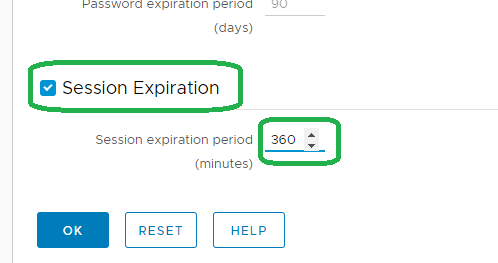
Note: The above feature was introduced on 18.2.
Please contact DELL Technical Support for further information.
User can log in to DPA again and continue as normal.
The following setting can be configured on the GUI to force a clean logoff after a specific period:
Administration > User & Security > Security Settings.
The Session Expiration parameter can be set to example for 6 hours (default is off):
Note: The above feature was introduced on 18.2.
Please contact DELL Technical Support for further information.
Затронутые продукты
Data Protection AdvisorПродукты
Data Protection AdvisorСвойства статьи
Номер статьи: 000173588
Тип статьи: Solution
Последнее изменение: 05 May 2026
Версия: 4
Получите ответы на свои вопросы от других пользователей Dell
Услуги технической поддержки
Проверьте, распространяются ли на ваше устройство услуги технической поддержки.