Dell Unity : Impossible d’accéder à l’interface de gestion Unity à l’aide de https://FQDN ou https://ip.address (corrigible par l’utilisateur)
Сводка: Impossible d’accéder à l’interface de gestion Unity à l’aide de https://FQDN ou https://ip.address L’accès à Unity s’effectue à l’aide de https://FQDN/?casHome=LOCAL et de https://ip.address/?casHome=LOCAL ...
Данная статья применяется к
Данная статья не применяется к
Эта статья не привязана к какому-либо конкретному продукту.
В этой статье указаны не все версии продуктов.
Симптомы
Impossible d’accéder à l’interface de gestion Unity à l’aide de https://FQDN ou d’un accès https://ip.address
à Unity à l’aide de https://FQDN/?casHome=LOCAL et de https://ip.address/?casHome=LOCAL
à Unity à l’aide de https://FQDN/?casHome=LOCAL et de https://ip.address/?casHome=LOCAL
Причина
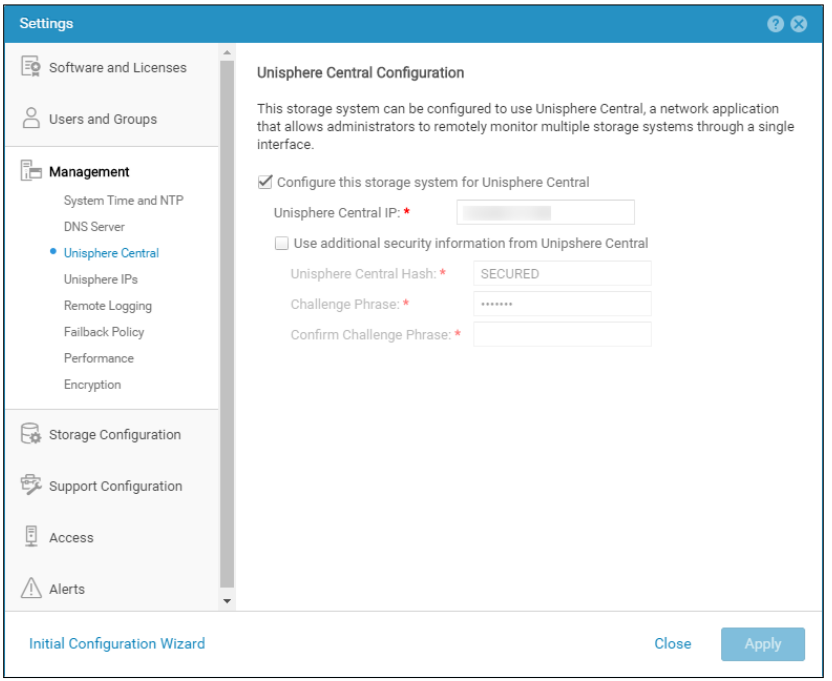
Unisphere Central est activé sur Unity même si Unisphere Central n’est pas utilisé.
Разрешение
Cochez la case « Configurer ce système de stockage pour Unisphere Central » uniquement si Unisphere Central est en cours d’utilisation. Si ce n’est pas le cas, supprimez la vérification permettant d’activer Unisphere Central.
Затронутые продукты
Dell EMC UnityСвойства статьи
Номер статьи: 000205133
Тип статьи: Solution
Последнее изменение: 15 May 2026
Версия: 6
Получите ответы на свои вопросы от других пользователей Dell
Услуги технической поддержки
Проверьте, распространяются ли на ваше устройство услуги технической поддержки.