NetWorker message "workflow Server backup missed" when Server Protection Policy workflows run
Сводка: The daemon.log logs a message "workflow Server backup missed" when the Server Protection Policy workflows run.
Данная статья применяется к
Данная статья не применяется к
Эта статья не привязана к какому-либо конкретному продукту.
В этой статье указаны не все версии продуктов.
Симптомы
- The
daemon.rawlogs a message "workflow Server backup missed" when the Server Protection Policy workflows run.- Linux:
/nsr/logs/daemon.raw - Windows (Default):
C:\Program Files\EMC NetWorker\nsr\logs\daemon.raw - NetWorker: How to use nsr_render_log to render .raw log files
- Linux:
- The Server backup workflow completes without errors.
- The rest of the workflows under Server Protection Policy complete without errors.
- There is no corrupted policy resource in the
nsrdb\dbgfolder.- Linux:
/nsr/res/nsrdb/dbg - Windows (Default):
C:\Program Files\EMC NetWorker\nsr\res\nsrdb\dbg
- Linux:
- The Server Protection Policy workflows start twice in a day.
Причина
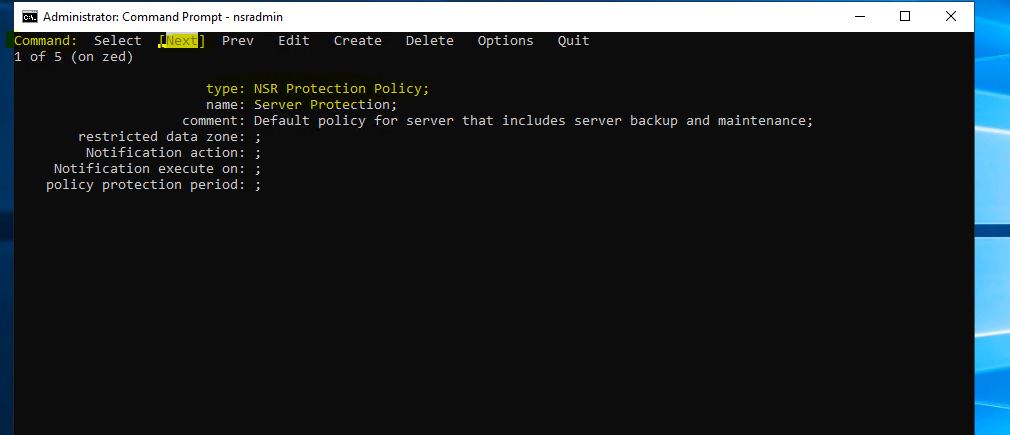
There are two identical (duplicate) Server Protection Policies. The duplicate is not visible from the NetWorker Management Console (NMC), but can be displayed with a nsradmin query.
Разрешение
Delete the duplicate policies in nsrdb with the nsradmin command in offline mode.
- Before making any changes, create a copy of the
nsrdbfolder:
Linux: /nsr/res/nsrdb
Windows: C\Program Files\EMC NetWorker\nsr\res\nsrdb
- Stop the NetWorker service on the NetWorker server.
Linux:
Windows:
systemctl stop networker
Windows:
net stop nsrd
- At the command-line run:
nsradmin -d <full path to>nsrdb
- At the
nsradminprompt, type "visual." Choose the "Select" Command. Press Enter.
Press the arrow key until the NSR Protection Policy is highlighted. Press Enter.
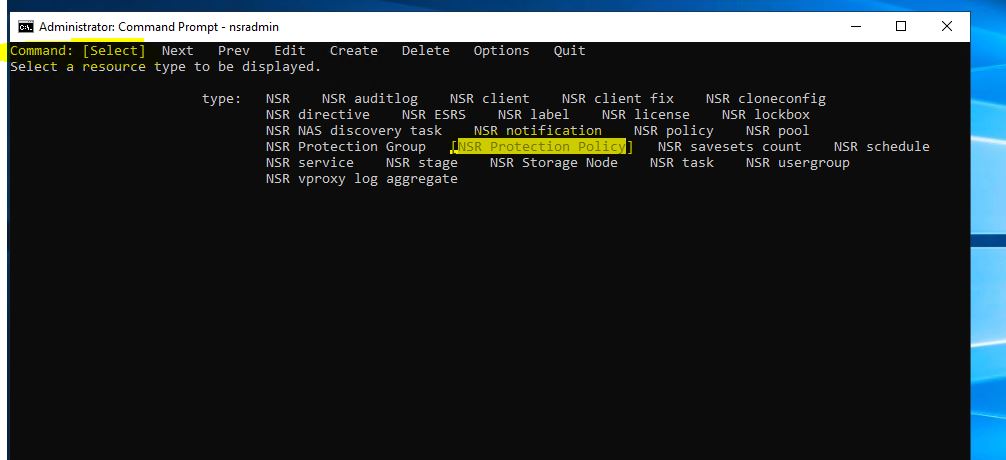
- Use the Next option to identify the duplicate Server Protection Resource.
- Use the keyboard arrow keys to highlight Delete, then press Enter.
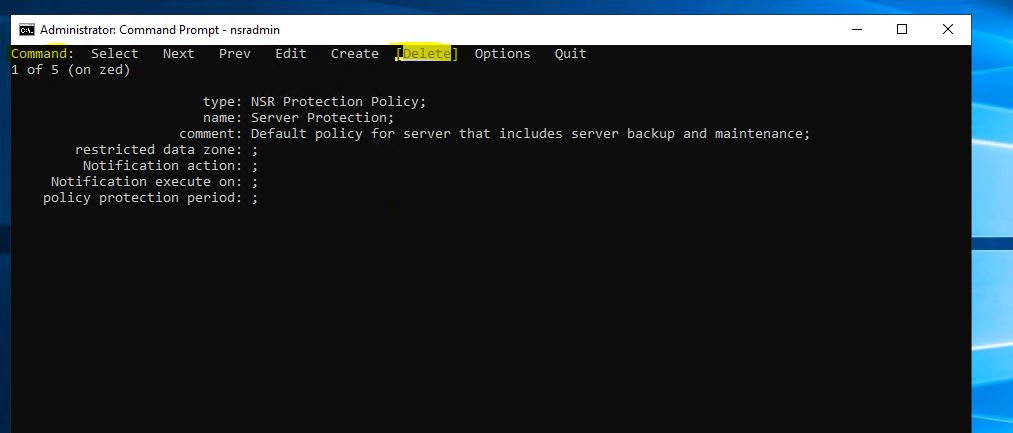
- Press the arrow key to highlight Quit and press Enter to exit from the
nsradminprompt. - Start the NetWorker service.
Linux:
Windows:
systemctl start networker
Windows:
net start nsrd
NOTE: If any issues are observed, stop NetWorker services and revert to the
nsrdb copy created in step 1. Then start services again.
Затронутые продукты
NetWorkerПродукты
NetWorker FamilyСвойства статьи
Номер статьи: 000219404
Тип статьи: Solution
Последнее изменение: 10 Mar 2026
Версия: 3
Получите ответы на свои вопросы от других пользователей Dell
Услуги технической поддержки
Проверьте, распространяются ли на ваше устройство услуги технической поддержки.