Avamar: How to Apply the "Avamar troubleshooting hierarchy" Approach Correctly
Zhrnutie: This article aims to guide to the correct troubleshooting prioritization when multiple issues are concurrently affecting the Avamar product.
Tento článok sa vzťahuje na
Tento článok sa nevzťahuje na
Tento článok nie je viazaný na žiadny konkrétny produkt.
V tomto článku nie sú uvedené všetky verzie produktov.
Pokyny
The approach of the Avamar troubleshooting hierarchy:
Note: Keep this hierarchy in mind whenever working on a grid that has encountered multiple issues.
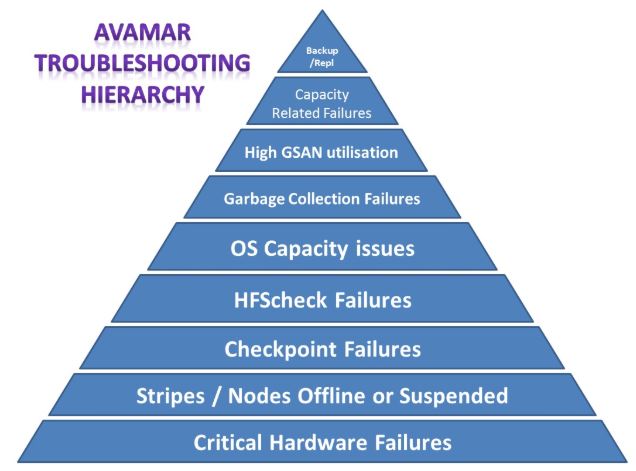
- While reviewing the proactive check results and when troubleshooting multiple Avamar issues, understanding how the various issues and failures affect one another.
- The resolution to many issues depends on underlying operations completing successfully.
For example:
- If checkpoint validation (
hfscheck) is failing, the checkpoint overhead building up on the system increases the operating system capacity utilization. - This increase in operating system capacity utilization causes garbage collection to fail once the operating system capacity utilization reaches the
disknogclimit. - The garbage collection failure, in turn, leads to high GSAN capacity utilization and sooner or later, the system goes into admin mode.
- The underlying
hfscheckissue must be resolved first to free up enough operating system capacity to allow garbage collection to run before resolving the issue with GSAN capacity utilization.
- If there are multiple issues, they must be worked through and resolved in the order listed below in order (and return the Avamar grid back into a healthy state).
- Correcting each issue in this list requires that all the issues above it be resolved first.
Note: Keep this hierarchy in mind whenever working on a grid that has encountered multiple issues.
Hierarchy of Avamar Needs:
- Critical hardware failures
- Stripes or nodes offline or suspended
- Checkpoint failures
hfscheckfailures- Operating system capacity issues (high
fs-percent-full,freespaceunbalanceissues or stripe pool exhaustion) - Garbage collection failing or failing to run
- High GSAN capacity utilization
- Capacity-related backup failures (For example, where the server has reached the
diskreadonlythreshold)
Once the above hierarchy has been satisfied, additional considerations may be present (for example, a long-running hfscheck may cause operational issues on the system) but it is always critical to move down through this hierarchy first in order to ensure that a sick grid becomes a healthy grid as quickly as possible.
Here is a graphical representation of which type of issue must be addressed first based on the Avamar priority, starting from the bottom and working upwards:
Ďalšie informácie
Related articles:
Dotknuté produkty
AvamarProdukty
AvamarVlastnosti článku
Číslo článku: 000013832
Typ článku: How To
Dátum poslednej úpravy: 31 okt 2025
Verzia: 7
Nájdite odpovede na svoje otázky od ostatných používateľov spoločnosti Dell
Služby podpory
Skontrolujte, či sa na vaše zariadenie vzťahujú služby podpory.