Dell Encryption scales improperly with UI resolution
Zhrnutie: Dell Encryption (formerly Dell Data Protection | Encryption) scales improperly on 4k displays when scaling is set to 250% in Windows 10.
Tento článok sa vzťahuje na
Tento článok sa nevzťahuje na
Tento článok nie je viazaný na žiadny konkrétny produkt.
V tomto článku nie sú uvedené všetky verzie produktov.
Symptómy
Note:
- As of May 2022, Dell Endpoint Security Suite Enterprise has reached End of Maintenance. For more information, reference Product Life Cycle (End of Support / End of Life) Policy for Dell Data Security
- As of January 2019, Dell Endpoint Security Suite Pro has reached End of Service. For more information, reference Product Life Cycle (End of Support / End of Life) Policy for Dell Data Security
- As of February 2018, Dell Data Protection | Security Tools has reached End of Service. For more information, reference Product Life Cycle (End of Support / End of Life) Policy for Dell Data Security
- Reference Endpoint Security for additional information about current products.
Affected Products:
- Dell Encryption Enterprise
- Dell Encryption Personal
- Dell Endpoint Security Suite Enterprise
- Dell Data Protection | Enterprise Edition
- Dell Data Protection | Personal Edition
- Dell Endpoint Security Suite Pro
- Dell Data Protection | Security Tools
Affected Versions:
- v8.10 and 8.17
Affected Operating Systems:
- Windows 10 (RTM, 1511, 1607, 1703)
Príčina
Not Applicable
Riešenie
Note: This issue has been resolved in v8.18.
On certain devices that are shipped with UHD (4k) screens, and the UI scaling within Windows 10 is set to 250%, the UI may display improperly and be difficult to navigate within the Dell Data Security Console application.
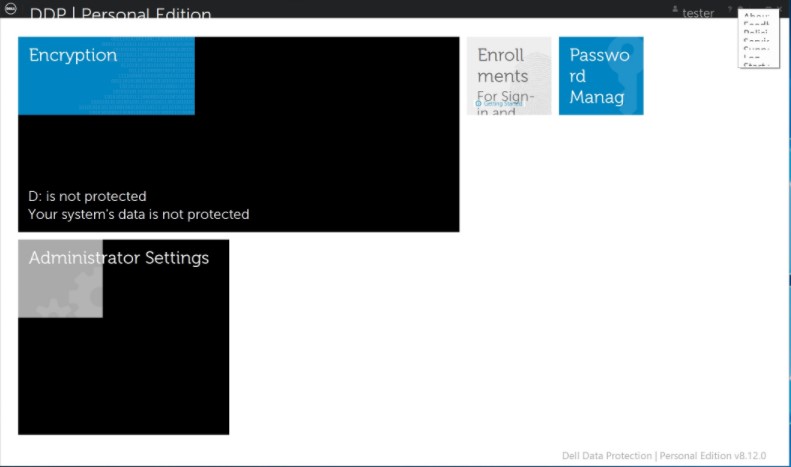
This can be temporarily resolved by running the Dell Data Security Console application in Compatibility Mode for Windows 8.
To enable compatibility mode:
- Right-click the icon and select Properties.

- Select the Compatibility Tab.

- Check that the box for Compatibility mode is labeled Run this program in compatibility mode for: And leave the setting on Windows 8.

- Click Apply and then OK to enforce the changes.
To contact support, reference Dell Data Security International Support Phone Numbers.
Go to TechDirect to generate a technical support request online.
For additional insights and resources, join the Dell Security Community Forum.
Dotknuté produkty
Dell Encryption, Dell Endpoint Security Suite Pro, Dell Endpoint Security Suite EnterpriseVlastnosti článku
Číslo článku: 000124977
Typ článku: Solution
Dátum poslednej úpravy: 18 jún 2024
Verzia: 12
Nájdite odpovede na svoje otázky od ostatných používateľov spoločnosti Dell
Služby podpory
Skontrolujte, či sa na vaše zariadenie vzťahujú služby podpory.