DPA: Error message 'Error 401: Unauthorized Action' appears in UI
Zhrnutie: A 401 Unauthorized Action error appears in the Data Protection Advisor (DPA) UI after a user stays logged in for many hours; it is caused by the session being automatically closed due to inactivity. ...
Tento článok sa vzťahuje na
Tento článok sa nevzťahuje na
Tento článok nie je viazaný na žiadny konkrétny produkt.
V tomto článku nie sú uvedené všetky verzie produktov.
Symptómy
User sees an error message on the DPA UI and has to log back in again:
Error 401: Unauthorized Action Príčina
This error happens when a user is logged into the DPA UI for hours at a time and the open session is being closed due to inactivity or some other environment factor closes the session.
Riešenie
The error can be ignored as it has no impact on DPA functionality.
User can log in to DPA again and continue as normal.
The following setting can be configured on the UI to force a clean logoff after a specific period:
Administration > User & Security > Security Settings
The Session Expiration parameter can be set to example for 6 hours (the default is off):
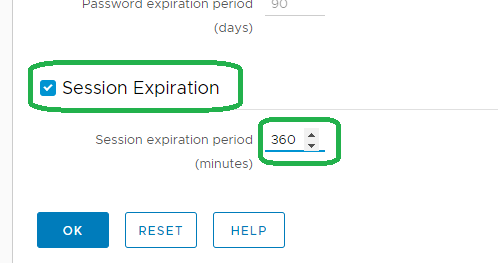
Note: The above feature was introduced on 18.2.
Contact support for more information.
Contact support for more information.
Dotknuté produkty
Data Protection AdvisorProdukty
Data Protection AdvisorVlastnosti článku
Číslo článku: 000173588
Typ článku: Solution
Dátum poslednej úpravy: 10 jún 2026
Verzia: 5
Nájdite odpovede na svoje otázky od ostatných používateľov spoločnosti Dell
Služby podpory
Skontrolujte, či sa na vaše zariadenie vzťahujú služby podpory.