Dell Precision and OptiPlex Optional Module Information
Zhrnutie: This article contains information about the optional port module cards available for Dell Precision and OptiPlex systems.
Tento článok sa vzťahuje na
Tento článok sa nevzťahuje na
Tento článok nie je viazaný na žiadny konkrétny produkt.
V tomto článku nie sú uvedené všetky verzie produktov.
Symptómy
Príčina
No cause information is available.
Riešenie
Optional Port Module Card
Some Dell Precision and OptiPlex systems have the possibility of installing an optional port module card. This could be for an additional VGA, HDMI, USB-C, DVI, Serial Port, and so forth. This is because the systems do not have these ports available on the system board.
Check the Service Manual for your system model to verify if this option is available:
Installing and Removing the Module Card
The following steps are an example of how to install or remove the module card.
Note: Steps for more module cards will be added at a future time.
Installing the Module Card:
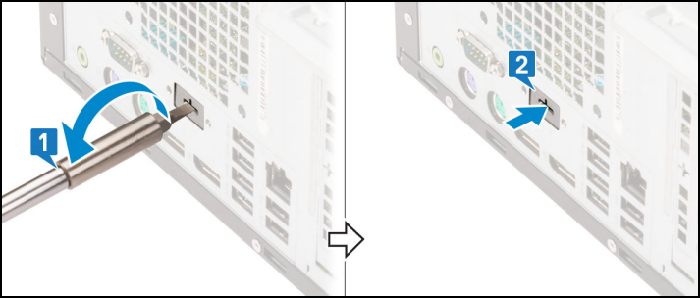
- To remove the metal bracket, insert a flat-head screwdriver in the hole of bracket [1], push the bracket to release the bracket [2], and lift the bracket out from the system.
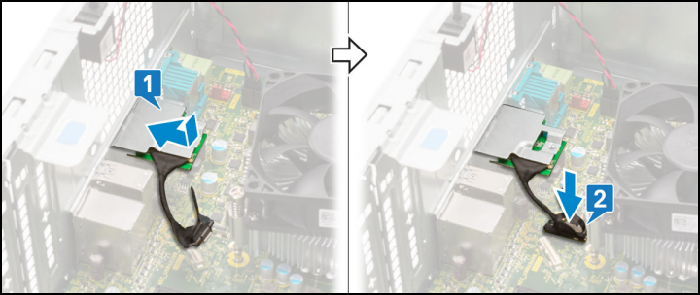
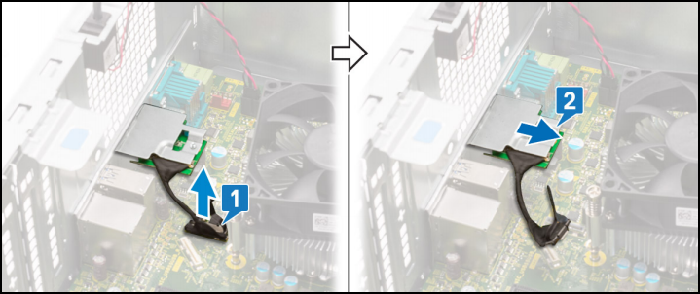
- Insert the VGA module into its slot from the inside of your computer [1]. Connect the VGA cable to the connector on the system board [2].
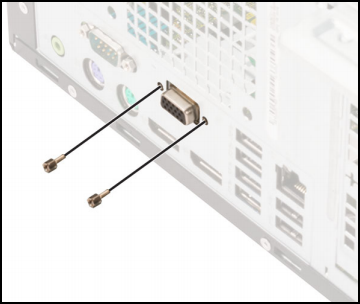
- Replace the two (M3X3) screws to secure the optional VGA module to the system.
Removing the Module Card:
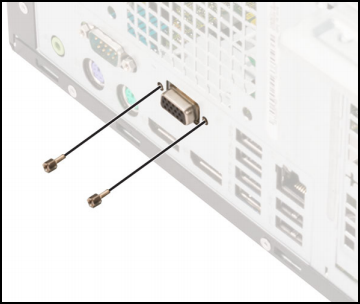
- Remove the two (M3X3) screws that secure the optional VGA module to the system.
- Disconnect the VGA cable from the connector on the system board [1]. Remove the VGA module from the system [2].
For information about purchasing these cards, contact Dell Sales Support.
Dotknuté produkty
OptiPlex, Fixed WorkstationsVlastnosti článku
Číslo článku: 000177676
Typ článku: Solution
Dátum poslednej úpravy: 06 máj 2026
Verzia: 9
Nájdite odpovede na svoje otázky od ostatných používateľov spoločnosti Dell
Služby podpory
Skontrolujte, či sa na vaše zariadenie vzťahujú služby podpory.