Dell Unity: Tenants usage, how to create and apply (User Correctable)
Zhrnutie: Unity supports the ability to host multiple tenants on a single system for service providers who would like to isolate group of VLANs from the rest, also tenants helps admins as NAS servers belonging to same tenant will have the tenant's name visible beside each NAS server which eases the NAS servers grouping and classification. NAS servers created with access to the tenant will have access to the VLANs included in the tenant. Dell Unity’s flexible pool-based architecture also enables the ability to separate each tenant onto their own pools for separation at the drive level, if necessary. ...
Pokyny
Steps to create a Tenant and assign it to a NAS server upon creating it:
To apply the Tenant feature a tenant needs to be created first before creating the associated NAS servers.
To start creating tenants open Unisphere>Storage>File and go to the Tenants tab.

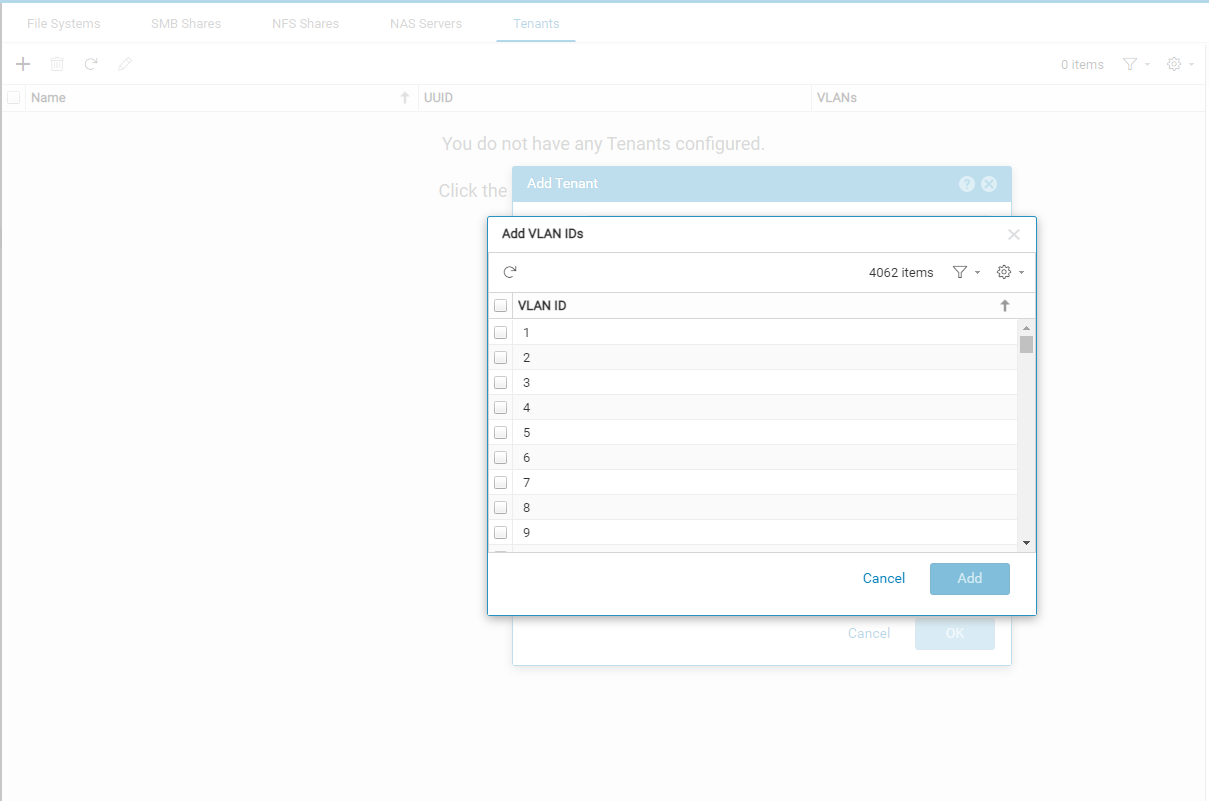
Click on + to add a Tenant and a new window will appear as below:

Add the desired VLANs to be grouped under this Tenant.
Note: those VLANs wont be available for any NAS server not associated with that Tenant.


Now while creating a NAS server you can choose a Tenant as below:
Note: Choosing a tenant will lead to having only the added VLANs (associated with that tenant) possible for the NAS server, also any created NAS server without being associated with the tenant will not have access to those VLANs.

As seen below the only available VLANs are from 1-6 (the ones included for that Tenant) :

Once done with creating the NAS server we can see the Tenant's name appearing beside the NAS server which would ease the classification of NAS servers for admins :

Note: NAS servers created before creating the Tenant cant be edited and associated with the newly created Tenant.
A NAS server created with no Tenants can't be edited later on.
Ďalšie informácie
For more info concerning Unity File check the below NAS capabilities PDF:
https://www.delltechnologies.com/asset/en-us/products/storage/industry-market/h15572-dell_emc_unity-nas_capabilities.pdf