Shrink Microsoft SQL Server Transaction Log Safely and Effectively
Zhrnutie: Learn how to shrink Microsoft SQL Server transaction logs using SSMS or TSQL. Fix log file bloat, avoid disk issues, and maintain optimal database performance.
Tento článok sa vzťahuje na
Tento článok sa nevzťahuje na
Tento článok nie je viazaný na žiadny konkrétny produkt.
V tomto článku nie sú uvedené všetky verzie produktov.
Symptómy
Microsoft SQL Server Database log files grow to large file sizes. SQL Server database goes offline and is unavailable if the Transaction Log drive location runs out of space.
Príčina
The most common cause of Microsoft SQL Server Transaction Logs to grow continuously is when the Database Recovery Model is set to Full or Bulk Logged. When using the Full or Bulk-Logged recovery model and the log file is not backed up, it continues to grow. File corruption may also occur resulting in the Transaction Log growing to sizes larger than expected relative to database transaction activity.
Riešenie
When the SQL Server Transaction log has file sizes threatening to take up all available disk space, the file should be reduced with a shrink log operation. The steps below can be used to shrink the size of SQL Server Transaction Logs.
Use SQL Server Studio Management.
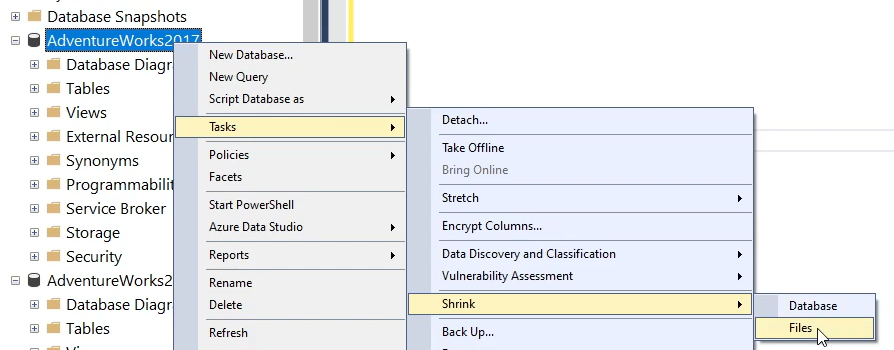
- Right-click the database with Transaction Log that must shrink. Select Tasks > Shrink > Files.
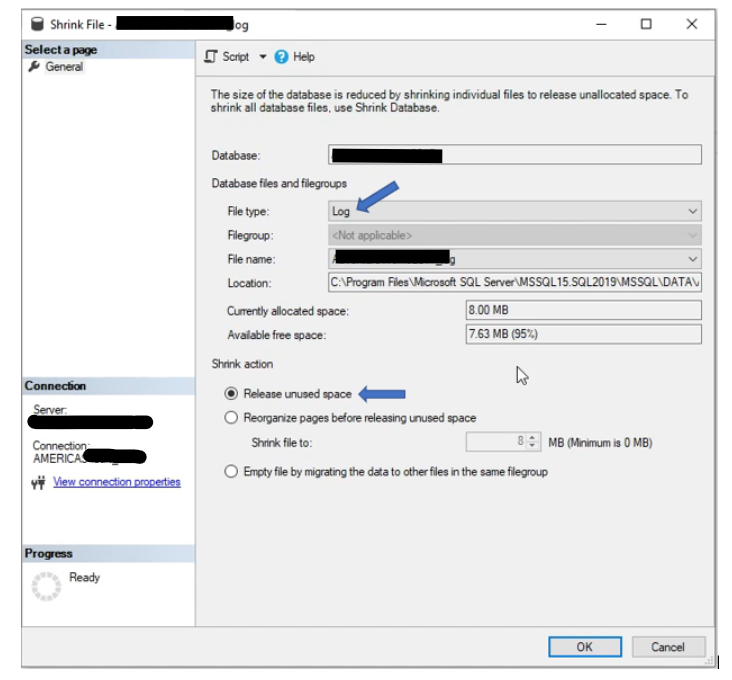
- The interface that comes up gives options for the file shrink operation. Make the selection options below:
File type - In the drop-down field, pick Log.
Release unused space - Select the radio button.
Click OK to complete the file shrink.
- Run the TSQL statement below to shrink the designated database log file, replace the database log name with the name of the database log being shrunk:

- If the Transaction Log does not shrink successfully with the command above, the step below should allow the shrinking of the log. Replace database name and log file names where necessary.
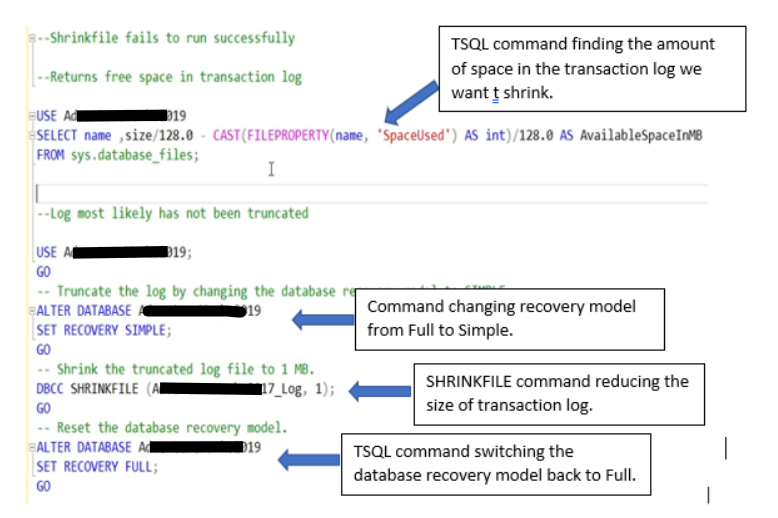
NOTE: A common reason the SQL Server Transaction log does not shrink is that there is not enough space in the log to allow the shrink operation.
FAQs:
- How to increase the size of log file in SQL Server?
Follow the Microsoft article Increase the size of a database 
ALTER permission on the database)
-
What are the disadvantages of shrinking database in SQL Server?
While shrinking a SQL log file can free up space, it can have negative consequences on database performance and fragmentation. It is best to address the root cause of excessive database growth and avoid frequent shrinking operations.
See Microsoft article Manage file space for databases in Azure SQL Managed Instance for more information about SQL log file shrinking.
See Microsoft article Manage file space for databases in Azure SQL Managed Instance for more information about SQL log file shrinking.
Ďalšie informácie
Shirking Your Microsoft SQL Server Transaction Log File
Duration: 00:07:55 (hh:mm:ss)
When available, closed caption (subtitles) language settings can be chosen using the CC icon on this video player.
Dotknuté produkty
Dell Quickstart Data Warehouse Appliance, Microsoft Windows Server 2016, Microsoft Windows Server 2019, Microsoft Windows Server 2022, Microsoft Windows 2012 Server R2, Prosupport for Microsoft SoftwareVlastnosti článku
Číslo článku: 000196817
Typ článku: Solution
Dátum poslednej úpravy: 12 jún 2025
Verzia: 9
Nájdite odpovede na svoje otázky od ostatných používateľov spoločnosti Dell
Služby podpory
Skontrolujte, či sa na vaše zariadenie vzťahujú služby podpory.