NetWorker: Restore performed through NetWorker User reports the error "Please Specify AM or PM" When attempting to change browse time.
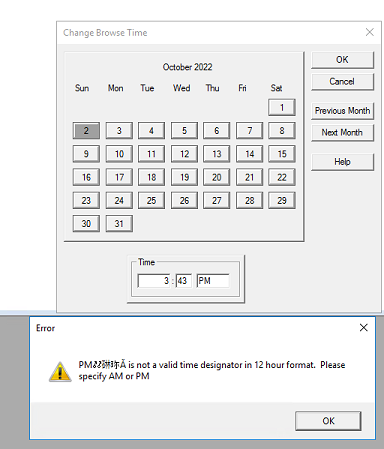
Zhrnutie: A recovery is being performed from the NetWorker User software, when attempting to change browse time an error appears stating: "PM@#$%# is not a valid time designation in 12-hour format. Please Specify AM or PM" ...
Tento článok sa vzťahuje na
Tento článok sa nevzťahuje na
Tento článok nie je viazaný na žiadny konkrétny produkt.
V tomto článku nie sú uvedené všetky verzie produktov.
Symptómy
- A restore is being performed using the NetWorker User program.
- The following error when changing browse time using 12-hour format.
Príčina
Code defect. Observed using NetWorker 19.7.0.1 client on Windows Server 2016. NetWorker 19.7 is End of Support Life (EOSL).
Riešenie
This issue was not observed when using NetWorker 19.11.0 (or later) client on Windows Server 2022 or 2025. This issue is unlikely on current NetWorker releases and operating systems. If encountered, use the workaround below.
Workaround:
- From NetWorker User, select View->Change Browse Time
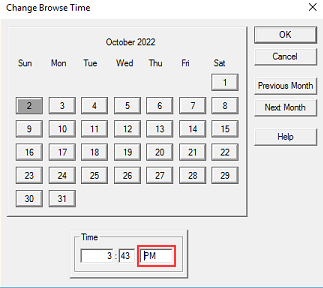
- Specify a time (in a 12-hour format) that you would like to set the browse period to. Insert a space before AM or PM.
- Click Ok
- The browse time should now reflect the time that is specified.
Dotknuté produkty
NetWorker Family, NetWorkerProdukty
NetWorker SeriesVlastnosti článku
Číslo článku: 000201625
Typ článku: Solution
Dátum poslednej úpravy: 30 dec 2025
Verzia: 3
Nájdite odpovede na svoje otázky od ostatných používateľov spoločnosti Dell
Služby podpory
Skontrolujte, či sa na vaše zariadenie vzťahujú služby podpory.