OptiPlex 3000 Thin Client Windows IoT Default Admin Password
Zhrnutie: This article discusses the default password for the OptiPlex 3000 Thin Client Windows IoT admin account.
Tento článok sa vzťahuje na
Tento článok sa nevzťahuje na
Tento článok nie je viazaný na žiadny konkrétny produkt.
V tomto článku nie sú uvedené všetky verzie produktov.
Pokyny
OptiPlex 3000 Thin Client user signs out of the computer and needs a password to regain access to the computer. The admin needs the Windows IoT admin password to log in to the admin account.
The default password for the Admin account is Admin#<Service tag in capital letters> of the device. The default password for the User account is User#<Service tag in capital letters> of the device.
Reference the Windows 10 IoT Enterprise LTSC 2021 for OptiPlex 3000 Thin Client Administrator’s Guide:
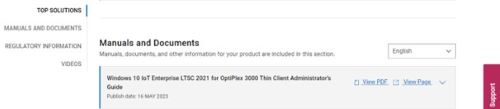
- Click Getting Started in the Table of Contents.
- Click Automatic and manual login.
Note: The default password can be used to sign in to the admin account if the password has not been changed.
Dotknuté produkty
OptiPlex 3000 Thin ClientVlastnosti článku
Číslo článku: 000214259
Typ článku: How To
Dátum poslednej úpravy: 18 máj 2026
Verzia: 8
Nájdite odpovede na svoje otázky od ostatných používateľov spoločnosti Dell
Služby podpory
Skontrolujte, či sa na vaše zariadenie vzťahujú služby podpory.