NVP-vProxy: How-To Remove the Dell EMC NetWorker plug-in from vCenter Server
Zhrnutie: NetWorker vProxy plug-in for vCenter "Dell EMC NetWorker" can be used to manage Virtual Machine (VM) backups and restores from the vSphere client. To remove the Dell EMC NetWorker plug-in from your vCenter server, follow these steps. ...
Tento článok sa vzťahuje na
Tento článok sa nevzťahuje na
Tento článok nie je viazaný na žiadny konkrétny produkt.
V tomto článku nie sú uvedené všetky verzie produktov.
Pokyny
Before you begin, take a snapshot/backup of the vCenter server before making changes.
This KB is for removing the vProxy based "Dell EMC NetWorker" vSphere plug-in. For instructions on removing the legacy "EMC Backup and Recovery" plug-in, see NetWorker: How-To Remove VBA EMC Backup and Recovery (EBR) plug-in from vCenter Server
- Log in to the vCenter mob extension manager at
https://<vCenter FQDN or IP>/mob/?moid=ExtensionManager- Use your normal vCenter web client credentials
- Unregister the following plug-in extensions:
com.dell.emc.nwcom.emc.networker.backupcom.emc.networker.recovercom.emc.vproxy.visdTo remove the extension, click Invoke Method after entering the extension name in the string field. A message appears stating Method Invocation Result: Void.
Example: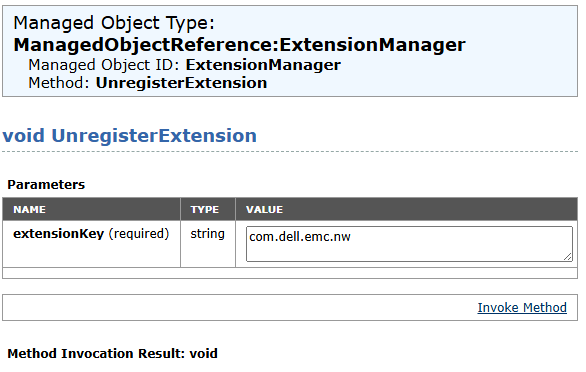
- Check the following locations on the vCenter server, remove any entries associated with
DellorEMC.
WARNING: Double check all commands before removing files from the vCenter server. This process must be completed by the VMware vCenter Administrator.
/etc/vmware-vpx/locale//etc/vmware-vpx/extensions//etc/vmware/vsphere-ui/vc-packages/vsphere-client-serenity//etc/vmware/vsphere-ui/cmCatalog/
Example of vCenter 8.0.3 with NetWorker 19.12.x plug-in installed:
root@vcsa [ ~ ]# ls -ltr /etc/vmware-vpx/extensions/ | grep "com.emc\|com.dell"
drwxr-xr-x. 3 vpxd cis  4096 Jun 10  2024 com.emc.networker.backup
drwxr-xr-x. 3 vpxd cis  4096 Jun 10  2024 com.emc.networker.recover
drwxr-xr-x  3 vpxd cis  4096 Sep  3 21:31 com.emc.vproxy.visd
drwxr-xr-x  3 vpxd cis  4096 Jan  9 21:15 com.dell.emc.nw

root@vcsa [ ~ ]# ls -l /etc/vmware-vpx/locale/ | grep "com.emc\|com.dell"
-rw-r--r--  1 vpxd root   40151 Feb  3 14:50 com.dell.emc.nw_catalog.zip
-rw-r--r--. 1 vpxd root     372 Feb  3 14:48 com.emc.networker.backup_catalog.zip
-rw-r--r--. 1 vpxd root     377 Feb  3 14:48 com.emc.networker.recover_catalog.zip
-rw-r--r--  1 vpxd root     325 Sep  3 21:31 com.emc.vproxy.visd_catalog.zip

root@vcsa [ ~ ]# ls -ltr /etc/vmware/vsphere-ui/vc-packages/vsphere-client-serenity | grep com.dell*
drwxr-xr-x 2 vsphere-ui users 4096 Feb  3 14:51 com.dell.emc.nw-19.12.0.82

root@vcsa [ ~ ]# ls -l /etc/vmware/vsphere-ui/cmCatalog/ | grep "dell\|emc"
-rw-r--r-- 1 vsphere-ui users   40151 Feb  3 15:03 com.vmware.cis.com.dell.emc.nw.zip
-rw-r--r-- 1 vsphere-ui users     372 Feb  3 15:03 com.vmware.cis.com.emc.networker.backup.zip
-rw-r--r-- 1 vsphere-ui users     377 Feb  3 15:03 com.vmware.cis.com.emc.networker.recover.zip
-rw-r--r-- 1 vsphere-ui users     325 Jan 15 15:20 com.vmware.cis.com.emc.vproxy.visd.zip
- Restart the vSphere web client service
service-control --stop vsphere-uiservice-control --start vsphere-uiservice-control --status vsphere-ui
- Clear browser cache and cookies
- Open a fresh browser.
- Log back into vCenter web client at
https://<vCenter FQDN or IP>
NOTE: For further assistance, engage with VMware support, removing a vCenter plugin occurs directly within VMware without NetWorker server functionality or involvement.
Ďalšie informácie
Articles specific to plugin installation issues:
- NetWorker: vCenter plug-in and VCUI login fail with "vCenter not registered with NetWorker server"
- NVP-vProxy: Unable to install vCenter plug-in after replacing NetWorker certificate
- NVP vProxy: vSphere Web Client Plugin Reports Successful Installation, But Does Not Appear
- NVP: Unable to install vCenter plugin in a multihomed environment
- NVP-vProxy Plugin Install from NMC fails with message failed to install vCenter plug-in
Dotknuté produkty
NetWorkerProdukty
NetWorker FamilyVlastnosti článku
Číslo článku: 000222946
Typ článku: How To
Dátum poslednej úpravy: 20 máj 2026
Verzia: 4
Nájdite odpovede na svoje otázky od ostatných používateľov spoločnosti Dell
Služby podpory
Skontrolujte, či sa na vaše zariadenie vzťahujú služby podpory.