Error When Setting Up the Dell Optimizer Application in the SCCM Task Sequence
Zhrnutie: This article provides information about an error with the Dell Optimizer software and System Center Configuration Manager (SCCM) deployment.
Tento článok sa vzťahuje na
Tento článok sa nevzťahuje na
Tento článok nie je viazaný na žiadny konkrétny produkt.
V tomto článku nie sú uvedené všetky verzie produktov.
Symptómy
Dell Optimizer Error
You may see that you got an error "Code 7" when you try to deploy a Dell Optimizer application with Task Sequence.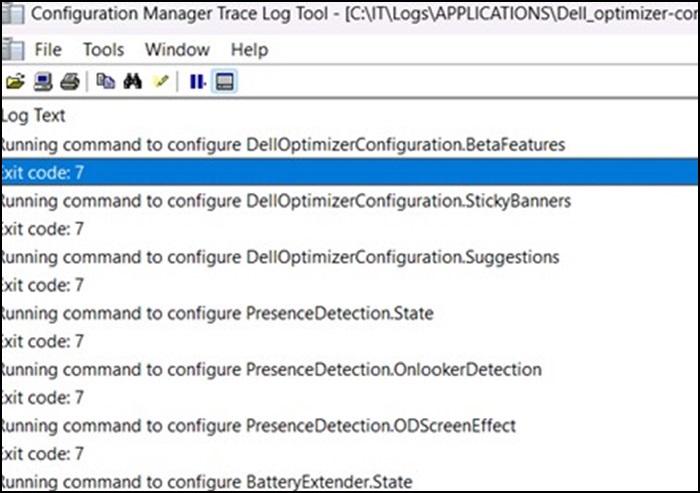
Príčina
This is working by design.
Riešenie
It is working as designed, as a service is required to initialize within the Operating System. The Dell optimizer cannot be deployed using a Task Sequence, but the application can be injected into the base Operating System (OS WIM).
The recommendation is to have the application deploy after the Task Sequence has completed.
Dotknuté produkty
Alienware, Dell All-in-One, Dell Pro All-in-One, Dell Pro Max Micro, Dell Pro Max Slim, Dell Pro Max Tower, Dell Pro Micro, Dell Pro Slim, Dell Pro Tower, Dell Slim, Dell Tower, Inspiron, OptiPlex, Vostro, XPS, G Series, G Series, Alienware
, Dell Plus, Dell Pro, Dell Pro Max, Dell Pro Plus, Dell Pro Premium, Inspiron, Latitude, Dell Pro Rugged, Vostro, XPS, Fixed Workstations, Mobile Workstations, Dell Pro Max Micro XE FCM2250, Dell Pro Max Slim XE FCS1250, Dell Pro Max Tower T2 XE FCT2250, Dell Pro Max 16 XE MC16250, Dell Pro Micro Plus XE QBM1250, Dell Pro Slim Plus XE5 QBS1250, Dell Pro Tower Plus XE5 QBT1250
...
Vlastnosti článku
Číslo článku: 000227659
Typ článku: Solution
Dátum poslednej úpravy: 21 máj 2026
Verzia: 3
Nájdite odpovede na svoje otázky od ostatných používateľov spoločnosti Dell
Služby podpory
Skontrolujte, či sa na vaše zariadenie vzťahujú služby podpory.