VxRail: vCenter vSphere Client Refresh Button Spinning Continually
Zhrnutie: The vSphere Client’s refresh icon never stops rotating because the system is enrolled in VMware Customer Experience Improvement Program while all external network access is blocked.
Tento článok sa vzťahuje na
Tento článok sa nevzťahuje na
Tento článok nie je viazaný na žiadny konkrétny produkt.
V tomto článku nie sú uvedené všetky verzie produktov.
Symptómy
The refresh button in the vSphere Client on vCenter servers constantly spins.

Príčina
The issue is caused by being joined to the VMware Customer Experience Improvement Program (CEIP), but having all VMware sites/Internet access blocked.
Riešenie
To resolve this issue, leave the CEIP and restart the vCenter server to clear up the issue.
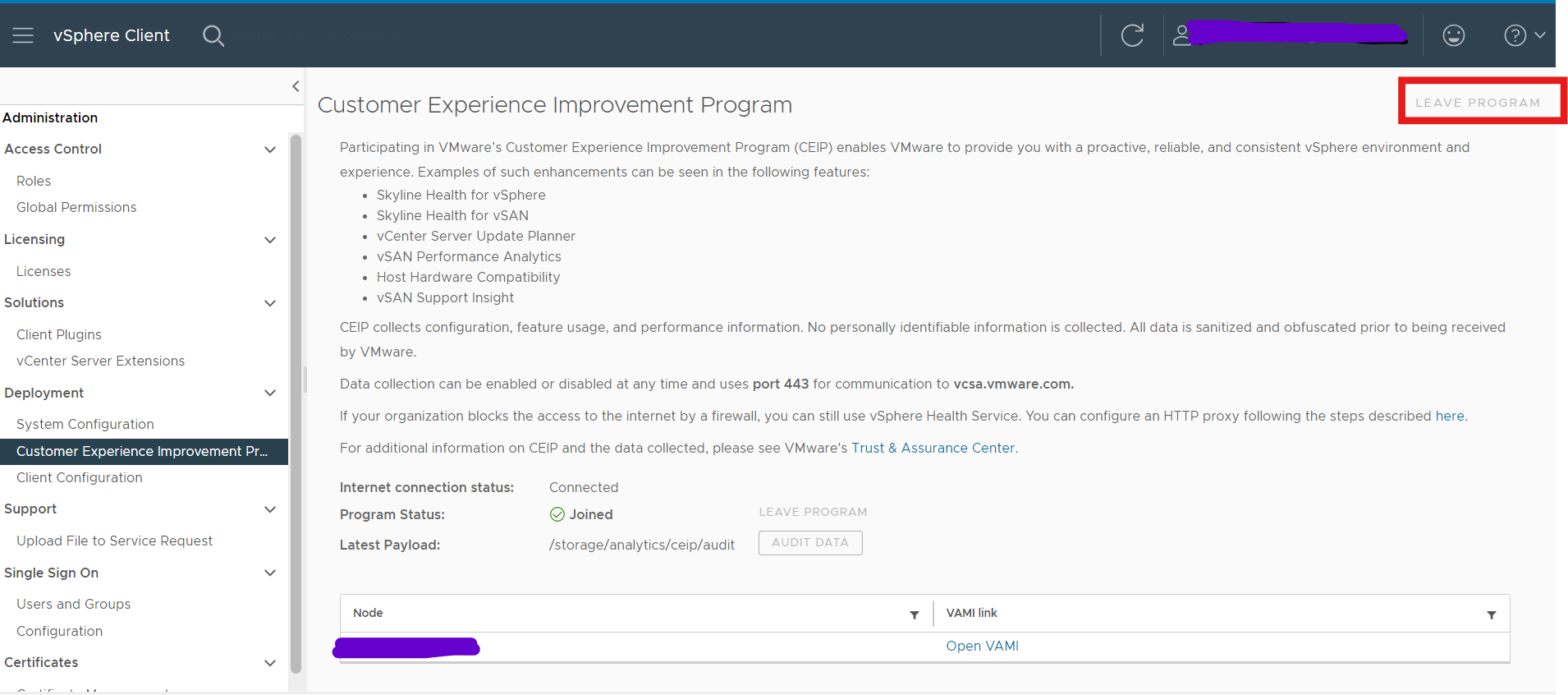
- Log in to vCenter Server by using the credentials of the administrator account.
- On the vSphere Client home page, click Administration.
- Under Deployment, click Customer Experience Improvement Program
- Click Join to join the CEIP or Leave CEIP to leave the Program.
- Restart vCenter server
Dotknuté produkty
VxRail, VxRail Appliance Family, VxRail Appliance Series, VxRail SoftwareVlastnosti článku
Číslo článku: 000228894
Typ článku: Solution
Dátum poslednej úpravy: 05 aug 2026
Verzia: 2
Nájdite odpovede na svoje otázky od ostatných používateľov spoločnosti Dell
Služby podpory
Skontrolujte, či sa na vaše zariadenie vzťahujú služby podpory.