Data Domain: Unable to enable CloudIQ/APEX AIOps CyberSecurity feature from the DD GUI
Zhrnutie: When trying to enable CloudIQ/APEX AIOps CyberSecurity feature the "Accept" button remains greyed out Note: Plan for fix in future DDOS
Tento článok sa vzťahuje na
Tento článok sa nevzťahuje na
Tento článok nie je viazaný na žiadny konkrétny produkt.
V tomto článku nie sú uvedené všetky verzie produktov.
Symptómy
When trying to enable CloudIQ/APEX AIOps CyberSecurity feature the "Accept" button remains greyed out.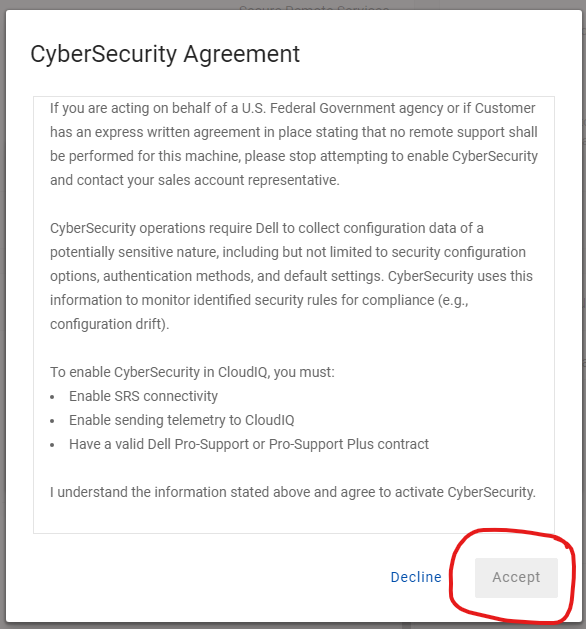
Príčina
This behavior can be due to current resolution and zoom setting for the particular system.
Riešenie
Try increasing the zoom on the screen so that a scroll bar appears inside the terms and agreement box. Please find the below snip, the screen is at 150% zoom, after scrolling to the bottom the Accept button will get enabled.
For further assistance, please call into Support.
Dotknuté produkty
Data Domain, APEXVlastnosti článku
Číslo článku: 000283891
Typ článku: Solution
Dátum poslednej úpravy: 11 feb 2025
Verzia: 1
Nájdite odpovede na svoje otázky od ostatných používateľov spoločnosti Dell
Služby podpory
Skontrolujte, či sa na vaše zariadenie vzťahujú služby podpory.