ZIP Extraction Failure for Large VHD Files Using Windows Explorer
Zhrnutie:
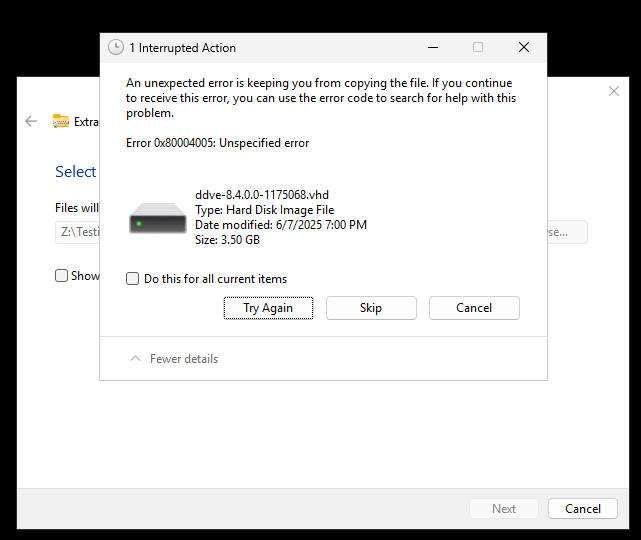
When attempting to extract a large ZIP files using Windows File Explorer, the extraction process fails with an unspecified error: Error 0x80004005: Unspecified error
Data error:
.vhd
...
Symptómy
-
File Explorer completes the extraction process but displays "Data error" during the process.
-
The
.vhd(Virtual Hard Disk) file fails to extract or copy correctly. -
ZIP size and contents appear normal.
-
No issue observed using PowerShell or third-party extraction tools.
Príčina
Windows File Explorer has limitations when handling large .ZIP archives containing large VHD files (typically >3GB). This often results in incomplete extraction or copy failures due to:
-
File size limitations in the integrated extractor
-
Compression inconsistencies
-
Lack of robust error correction during extraction
Riešenie
To extract these ZIP files successfully, use one of the following alternative methods:
PowerShell Command
Example
(Microsoft/Third Party Tool) PowerShell: Expand-Archive -Path "C:\8.4\ddve-hyperv-8.4.0.0-1175068.zip" -DestinationPath "C:\8.4\Extracted\"
Other Extraction tools
Check for a company approved professional extract utility to Extract/Expand the file.
Third party UI and CLI tools