PowerEdge: PXE boot failure when an Unavailable Boot Entry is present
Zhrnutie: PowerEdge 14G, 15G, 16G, and 17G servers skip Preboot eXecution Environment (PXE) boot when an "Unavailable" entry is last in the boot order.
Tento článok sa vzťahuje na
Tento článok sa nevzťahuje na
Tento článok nie je viazaný na žiadny konkrétny produkt.
V tomto článku nie sú uvedené všetky verzie produktov.
Symptómy
Systems exhibit the following behavior:
- PowerEdge 14G, 15G, 16G, and 17G servers fail to boot from PXE devices.
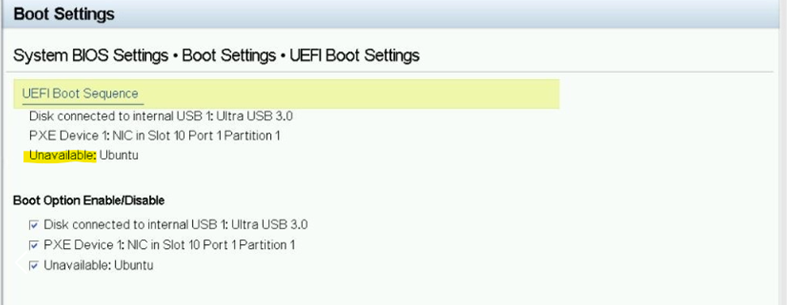
- The failure occurs when an
Unavailableboot entry is present as the last item in the boot sequence. - The system skips the PXE device and boots from the first available boot device.
Example as below:
Príčina
When there is an Unavailable device, the system BIOS skips the PXE boot device and boots with the first boot device.
Riešenie
The next BIOS release includes the fix.
Here is the BIOS release schedule:
| 14G | June 2026 |
| 15G | March 2026 |
| 16G | March 2026 |
| 17G | March 2026 |
Short‑Term Workaround: Remove the Unavailable Boot Options.
- Reboot the server and press F2 (or F11) during POST to open the Boot Manager.
- Navigate to One‑Shot UEFI Boot Menu.
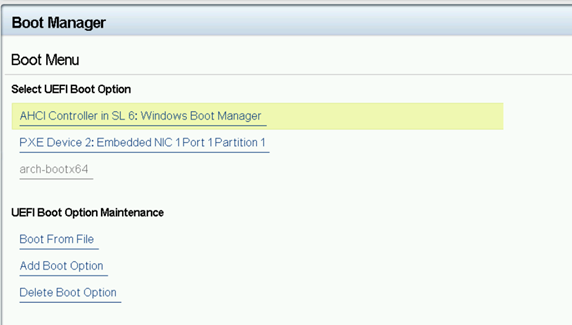
- Select Delete Boot Option.
- Highlight each entry labeled
Unavailable. Choose Commit Change and Exit to delete it.
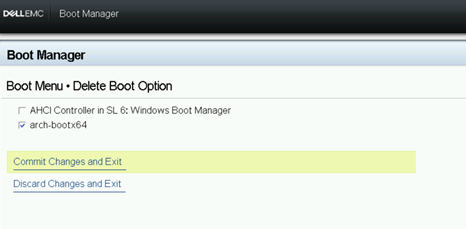
- Return to the boot order screen and place the PXE device in the wanted position.
After the BIOS update is applied, the short‑term workaround is no longer required.
Dotknuté produkty
Rack Servers, Tower ServersVlastnosti článku
Číslo článku: 000396285
Typ článku: Solution
Dátum poslednej úpravy: 24 máj 2026
Verzia: 3
Nájdite odpovede na svoje otázky od ostatných používateľov spoločnosti Dell
Služby podpory
Skontrolujte, či sa na vaše zariadenie vzťahujú služby podpory.