PowerScale:AD sudo 命令在升级后停止工作
Zhrnutie: 升级 PowerScale OneFS 时,sudo 命令会请求输入密码三次,然后无法执行命令,并显示“sudo:3 次错误的密码尝试”
Tento článok sa vzťahuje na
Tento článok sa nevzťahuje na
Tento článok nie je viazaný na žiadny konkrétny produkt.
V tomto článku nie sú uvedené všetky verzie produktov.
Symptómy
“系统管理员”角色中的 Active Directory 用户(在此例中 AD 用户名为“PowerScale”)仍允许进入 SSH,命令失败,如下所示:
cluster-1# ssh DOMAIN\\PowerScale@cluster-1
(DOMAIN\PowerScale@cluster-1) Password:
PowerScale OneFS 9.12.0.1
Could not chdir to home directory /ifs/home/DOMAIN/PowerScale: No such file or directory
cluster-1% sudo -s

We trust you have received the usual lecture from the local System
Administrator. It usually boils down to these three things:

    #1) Respect the privacy of others.
    #2) Think before you type.
    #3) With great power comes great responsibility.

For security reasons, the password you type will not be visible.

Password:
Sorry, try again.
Password:
Sorry, try again.
Password:
sudo: 3 incorrect password attempts
cluster0-1%
错误 /var/log/auth.log 类似于:
2026-01-09T14:08:46.964341-05:00 <4.6> isi-9510-1(id1) sshd[9292]: Accepted keyboard-interactive/pam for DOMAIN\PowerScale from 10.20.48.1 port 31599 ssh2
2026-01-09T14:09:02.165862-05:00 <4.1> isi-9510-1(id1) sudo[9315]: DOMAIN\PowerScale : 3 incorrect password attempts ; TTY=pts/1 ; PWD=/ ; USER=root ; COMMAND=/bin/zs
Príčina
sudo 更新导致大写的 Active Directory 用户名失败。请注意,这仅适用于需要 Active Directory 用户获得密码提示的环境,无密码 sudo 命令应该不受影响。受密码保护的提示在 'isi_visudo' 喜欢这个:
DOMAIN\\powerscale ALL=(ALL) PASSWD: ALLRiešenie
PowerScale 工程部门已发现此问题,并正在开发永久修复方法。用户可以编辑 Active Directory 中的用户名,使其全部小写:
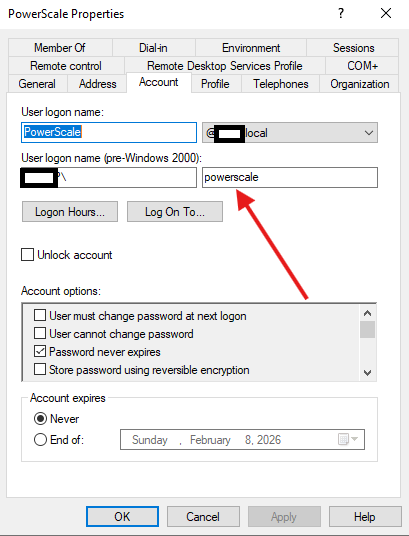
与任何 Active Directory 编辑一样,可能需要一些时间才能传播。如果用户仍无法正常工作,请启动日志收集并联系 PowerScale 支持。
Vlastnosti článku
Číslo článku: 000413077
Typ článku: Solution
Dátum poslednej úpravy: 12 jan 2026
Verzia: 1
Nájdite odpovede na svoje otázky od ostatných používateľov spoločnosti Dell
Služby podpory
Skontrolujte, či sa na vaše zariadenie vzťahujú služby podpory.