Data Science Software Application Stops Responding When Installing
Zhrnutie: Information about install issues with the Data Science Software (DSS) application in Ubuntu 24.04.
Tento článok sa vzťahuje na
Tento článok sa nevzťahuje na
Tento článok nie je viazaný na žiadny konkrétny produkt.
V tomto článku nie sú uvedené všetky verzie produktov.
Symptómy
When you install the DSS application, it stops responding on the "Waiting for GPU operator validations to pass…" screen for over 48 hours. This happens after connecting to the Internet and clicking "Install" to set up the Dell Data Science software stack.
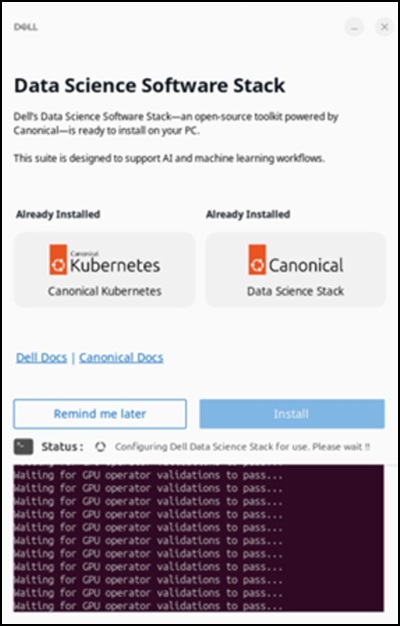
Affected Systems:
- Precision 5860 Tower
- Precision 7875 Tower
- Precision 7960 Rack
- Precision 7960 Tower
- Dell Pro Max Micro FCM2250
- Dell Pro Max Slim FCS1250
- Dell Pro Max Tower T2 FCT2250
Affected Operating System:
- Ubuntu 24.04
Príčina
Network restrictions within the China region limit access to the Snap Store and prevents a successful download of the DSS application.
Riešenie
Using a Virtual Private Network (VPN) is recommended to ensure that the download completes successfully. After connecting to the VPN, click the "Install" option in the DSS application.

Dotknuté produkty
Dell Pro Max Micro FCM2250, Dell Pro Max Slim FCS1250, Dell Pro Max Tower T2 FCT2250, Precision 5860 Tower, Precision 7960 Rack, Precision 7875 Tower, Precision 7960 TowerVlastnosti článku
Číslo článku: 000453914
Typ článku: Solution
Dátum poslednej úpravy: 02 júl 2026
Verzia: 2
Nájdite odpovede na svoje otázky od ostatných používateľov spoločnosti Dell
Služby podpory
Skontrolujte, či sa na vaše zariadenie vzťahujú služby podpory.