NetWorker: File-system recovery is failing with error "file Index is missing"
Summary: File system recovery is failing with error "file Index is missing Please contact the system administrator to recover or re-create the index."
Bu makale şunlar için geçerlidir:
Bu makale şunlar için geçerli değildir:
Bu makale, belirli bir ürüne bağlı değildir.
Bu makalede tüm ürün sürümleri tanımlanmamıştır.
Symptoms
An error is returned stating that the file index is missing when performing file level recovery of a NetWorker client from the NetWorker Management Console (NMC):
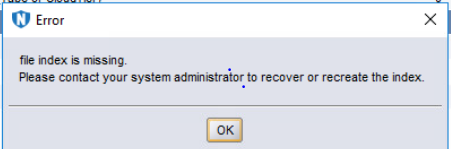
Figure 1: Error Message: File Index is Missing.
Cause
The client file index folder is missing or empty:
Linux: /nsr/index/CLIENT-NAME
Windows: C:\Program Files\EMC NetWorker\nsr\index\CLIENT-NAME
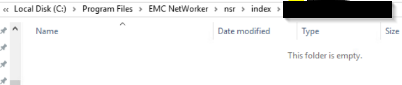
Figure 2: Screenshot of Missing Client File Index Folder
Resolution
On the NetWorker server, open an admin prompt and run as root:
nsrck -L7 client-name
NOTE: Client-name should match how the client name is specified in Clients tab of NetWorker Management Console; optionally the nsraldb on the NetWorker client also shows this. On the NetWorker client, open an admin prompt and run as root:
nsradmin -p nsrexecd "nsrla"
Monitor the nsrck command output for any errors. Once completed, the client index folder should be repopulated and the data restore can be performed.
Additional Information
This is not applicable to file level recoveries of VMware Virtual Machines backed up using the NetWorker VMware Protection (NVP) vProxy appliance.
Etkilenen Ürünler
NetWorker FamilyMakale Özellikleri
Article Number: 000200061
Article Type: Solution
Son Değiştirme: 19 Mar 2025
Version: 4
Sorularınıza diğer Dell kullanıcılarından yanıtlar bulun
Destek Hizmetleri
Aygıtınızın Destek Hizmetleri kapsamında olup olmadığını kontrol edin.