Applications displaying squares and "random" characters instead of text after enabling System Data Encryption
Summary: This article provides information about applications displaying squares and "random" characters instead of text, after enabling System Data Encryption (SDE).
Ця стаття стосується
Ця стаття не стосується
Ця стаття не стосується якогось конкретного продукту.
У цій статті зазначено не всі версії продукту.
Symptoms
Affected Products:
- Dell Data Protection | Encryption
Affected Versions:
- v8.12 and 8.13
On-screen text can be displayed as squares or other random characters. This occurs when using a non-Latin script and language, such as Arabic, when System Data Encryption (SDE) is also enabled.
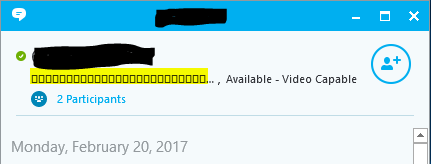
Figure 1: (English Only) On-Screen text appears as squares and other random characters
Cause
Not Applicable
Resolution
Work around:
Reboot the computer.
Resolution:
Upgrade the client to v8.15 or later or apply the following exclusion to the SDE Encryption rules for the affected device:
-^3C:\Windows\Globalization
To contact support, reference Dell Data Security International Support Phone Numbers.
Go to TechDirect to generate a technical support request online.
For additional insights and resources, join the Dell Security Community Forum.
Продукти, яких це стосується
Dell EncryptionВластивості статті
Article Number: 000124728
Article Type: Solution
Востаннє змінено: 11 квіт. 2024
Version: 9
Отримайте відповіді на свої запитання від інших користувачів Dell
Служба підтримки
Перевірте, чи послуги служби підтримки поширюються на ваш пристрій.