Dell Unity: How to Reboot a Storage Processor (User Correctable).
摘要: How to safely reboot a Storage Processor.
本文适用于
本文不适用于
本文并非针对某种特定的产品。
本文并非包含所有产品版本。
说明
Rebooting a Storage Processor (SP) can safely resolve minor problems with the SP, its components, or the system software on the SP.
CAUTION
When an SP reboots, it stops servicing I/O to hosts. In virtual deployments, data is unavailable during an SP reboot. In physical deployments, all NAS servers on the SP fail over to the other SP, if it is healthy. By default, when the SP has finished rebooting, the NAS servers fail back to it. If the Failback Policy is disabled, all NAS servers owned by the rebooting SP will not failback automatically. Once the SP is back online, NAS Servers will remain on the peer SP. Performance can be impacted when all NAS servers reside on a single SP. You can manually fail back the NAS servers when both SPs are online.
On Unisphere:
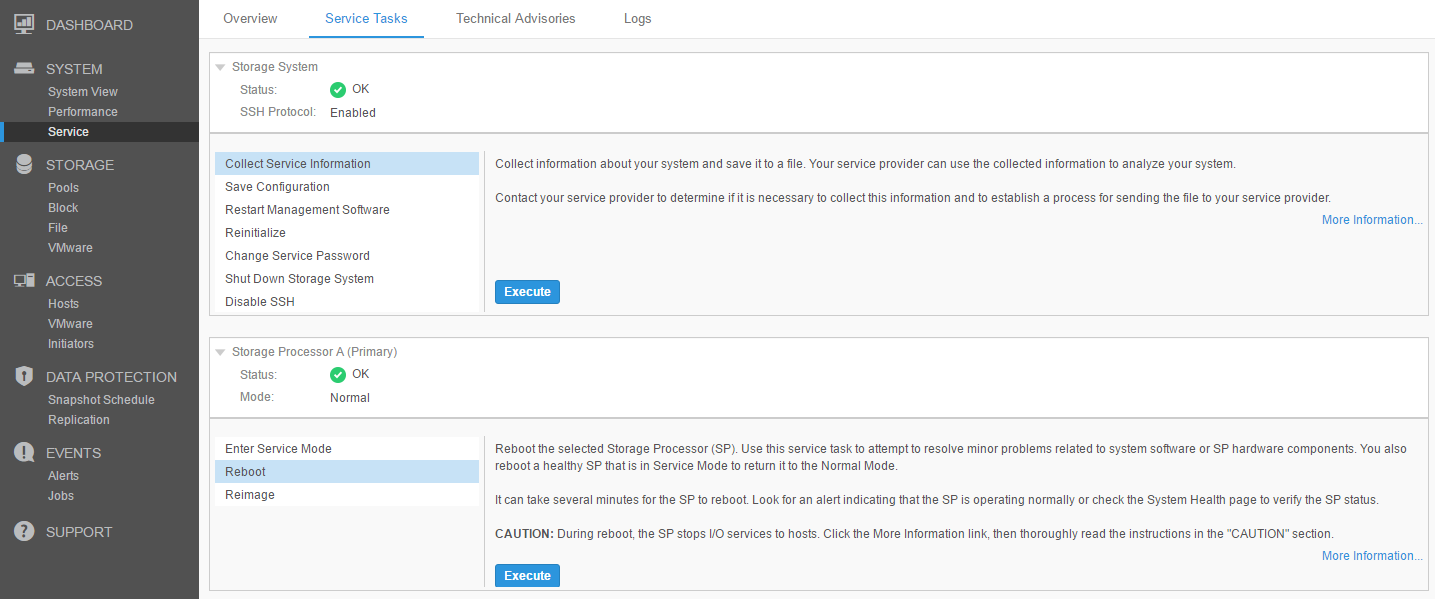
1.Execute the Reboot task and confirm.
2.Wait around 20 minutes while the SP reboots.
3.SP reboot is completed when the Mode field displays Normal.
Bear in mind that the Unisphere UI may not refresh automatically. If prompted, reload the Unisphere UI. Or reload the UI manually.
In virtual deployments, you can monitor the reboot by using the VMware console. For information, see the VMware documentation.
2.Wait around 20 minutes while the SP reboots.
3.SP reboot is completed when the Mode field displays Normal.
Bear in mind that the Unisphere UI may not refresh automatically. If prompted, reload the Unisphere UI. Or reload the UI manually.
In virtual deployments, you can monitor the reboot by using the VMware console. For information, see the VMware documentation.
On SSH:
- Issue the command:
svc_shutdown --reboot spx, where spx is spa or spb, depending if the SP to be rebooted is SP A or SP B. - SP Boot can be monitored from the surviving SP with the following command:
svc_diag --monitor-peer - The following KB article can be followed for further information on how to monitor the SP boot sequence.
其他信息
受影响的产品
Dell EMC Unity Family产品
Dell EMC Unity Family |Dell EMC Unity All Flash, Dell EMC Unity Family, Dell EMC Unity Hybrid文章属性
文章编号: 000004451
文章类型: How To
上次修改时间: 11 4月 2025
版本: 5
从其他戴尔用户那里查找问题的答案
支持服务
检查您的设备是否在支持服务涵盖的范围内。