ECS: ECS SNMP 트랩을 구성하는 방법
摘要: SNMP 트랩은 ECS의 수명주기 노드 중 하나에 의해 생성됩니다. 다음 KB는 활성 수명주기 노드를 식별하고 테스트 알림을 생성하여 트랩 이벤트를 생성하는 방법을 보여줍니다.
本文适用于
本文不适用于
本文并非针对某种特定的产品。
本文并非包含所有产品版本。
说明
SNMP 트랩은 ECS의 수명주기 노드 중 하나에 의해 생성됩니다. 다음 KB는 활성 수명주기 노드를 식별하고 테스트 알림을 생성하여 트랩 이벤트를 생성하는 방법을 보여줍니다.
SNMP 트랩 전송을 구성하고 다시 생성하려면 다음을 수행합니다.
참고: Lifecycle Server 노드는 앙상블로 동기화되어 있고 모든 노드에는 노드 및 리소스의 상태를 업데이트할 패브릭 에이전트가 있으므로 트랩이 발생할 수 있습니다.
ECS 3.1 관리 가이드 트랩에 대한 추가 정보:
ECS 3.7 관리 가이드(dell.com)(149-155페이지)
대부분의 모니터링 솔루션에서 OID 변환에 MIB 필요:
https://dl.dell.com/downloads/DL79351_ECS-MIB.mib
SNMP 트랩 전송을 구성하고 다시 생성하려면 다음을 수행합니다.
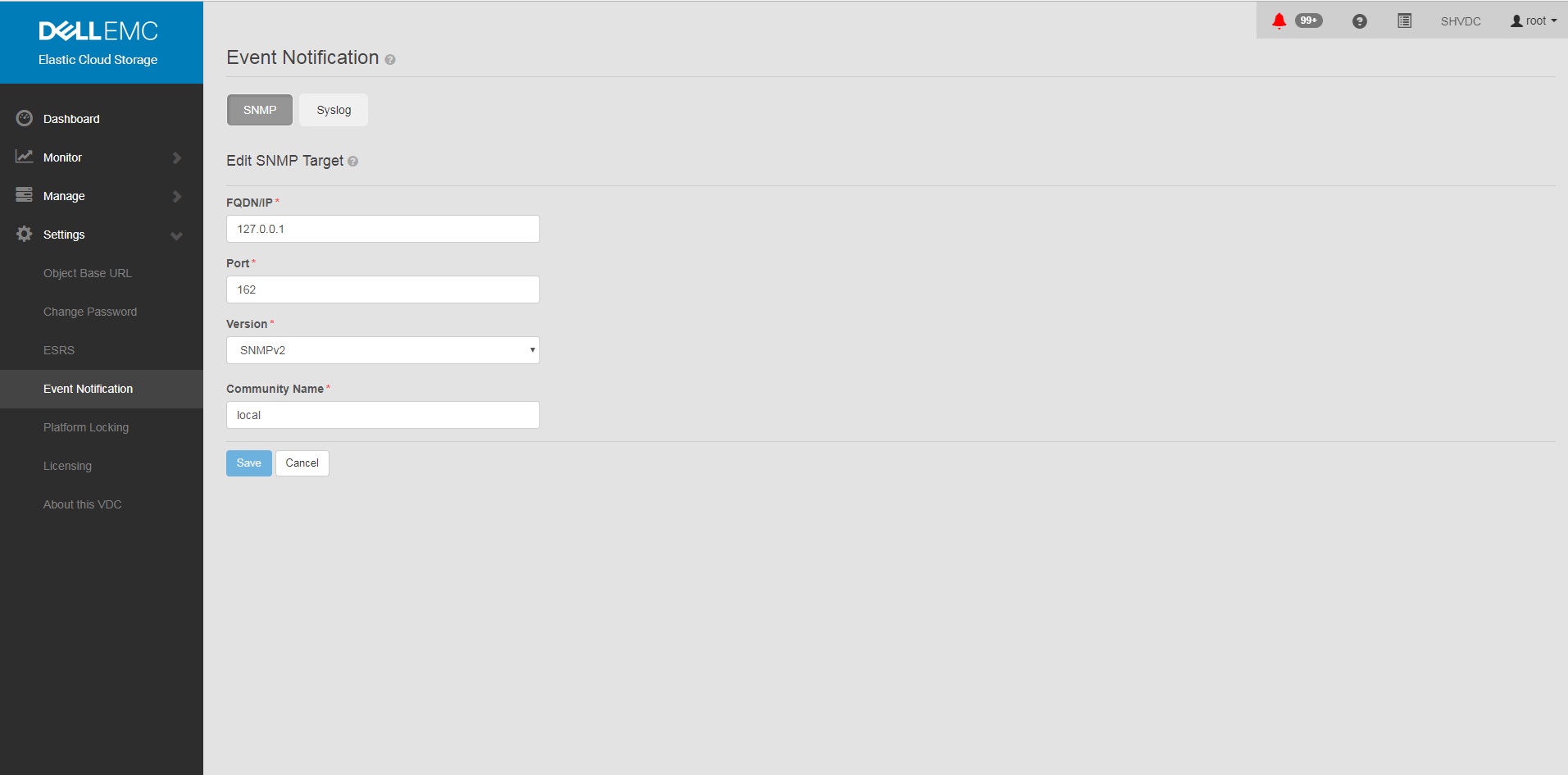
- GUI에서 SNMP를 <트랩 수신기 주소로> 설정
a. GUI
의 설정 b. Event Notification
c. SNMP
d를 선택합니다. 새 타겟
FQDN/IP = <트랩 수신기 주소>
포트= 162
버전= SNMPv2
커뮤니티 이름= <커뮤니티 문자열>
저장
의 설정 b. Event Notification
c. SNMP
d를 선택합니다. 새 타겟
FQDN/IP = <트랩 수신기 주소>
포트= 162
버전= SNMPv2
커뮤니티 이름= <커뮤니티 문자열>
저장
예:
- UI에서 트랩 구성을 추가한 후 ECS에서 구성이 설정되었는지 확인합니다.
명령:
예:
# sudo /opt/emc/caspian/fabric/cli/bin/fcli-internal lifecycle alert.snmpconfiguration
예:
Node 1:~ # sudo /opt/emc/caspian/fabric/cli/bin/fcli-internal lifecycle alert.snmpconfiguration
{
  "status": "OK",
  "etag": 73523,
  "snmp_configuration": {
    "engine_id": "80001370010A20A9799527B54B",
    "snmp_targets": [{
      "version": "v2",
      "port": 162,
      "hostname": "127.0.0.1",
      "community": "local",
      "username": "",
      "target_id": "816bd926-147e-4309-bf69-492eea94fc7a",
      "authentication_protocol": "",
      "privacy_protocol": ""
    }]
  }
}
- test alert 명령을 실행하여 알림 및 SNMP 트랩을 생성합니다.
Command(올바른 사용자 및 암호로 변경해야 함):
예:
# TOKEN=$(curl -iks https://localhost:4443/login -u '<User:Password>' | grep X-SDS-AUTH-TOKEN);echo $TOKEN;curl -ks -H "$TOKEN" -H "Content-Type: application/json" -d '{"user_str": "ECS Test Alert", "contact": "ecsadmin@company.com"}' https://localhost:4443/vdc/callhome/alert | xmllint --format -;curl -vk -H "$TOKEN" "https://localhost:4443/logout"
예:
admin@provo:~> TOKEN=$(curl -iks https://localhost:4443/login -u 'root:ChangeMe' | grep X-SDS-AUTH-TOKEN);echo $TOKEN;curl -ks -H "$TOKEN" -H "Content-Type: application/json" -d '{"user_str": "ECS Test Alert", "contact": "ecsadmin@company.com"}' https://localhost:4443/vdc/callhome/alert | xmllint --format -;curl -vk -H "$TOKEN" "https://localhost:4443/logout"
X-SDS-AUTH-TOKEN: BAAcSWx4M3IvY0p6VFBCTUtTaE9zdmFVSVFZNFdNPQMAjAQASHVybjpzdG9yYWdlb3M6VmlydHVhbERhdGFDZW50ZXJEYXRhOmZkYzJhMDg2LTQzMGEtNGU3ZC04ZmNiLTU2MDA3ZDFmOWU4NgIADTE1NTM1NDgzNjk5ODEDAC51cm46VG9rZW46YzQ3ZmUwYzYtZjg3Ni00OTE5LWJkMWYtZDgyMjYwN2I2MmIwAgAC0A8=
<?xml version="1.0" encoding="UTF-8" standalone="yes"?>
<alert>
  <acknowledged>false</acknowledged>
  <type>Notify</type>
  <description>ECS Test Alert: ecsadmin@company.com</description>
  <id>urn:storageos:Alert:bbb02b69-0169-1355-a40a-c1f3512e51cd</id>
  <namespace/>
  <severity>INFO</severity>
  <symptomCode>999</symptomCode>
  <timestamp>2019-03-26T20:27:58</timestamp>
</alert>
* SSL connection using TLSv1.2 / ECDHE-RSA-AES256-GCM-SHA384
* Server certificate:
*        subject: CN=localhost
*        start date: 2018-02-28 10:53:28 GMT
*        expire date: 2028-02-26 10:53:28 GMT
*        issuer: CN=localhost
*        SSL certificate verify result: self signed certificate (18), continuing anyway.
* SSLv2, Unknown (23):
> GET /logout HTTP/1.1
> User-Agent: curl/7.37.0
> Host: localhost:4443
> Accept: */*
> X-SDS-AUTH-TOKEN: BAAcSWx4M3IvY0p6VFBCTUtTaE9zdmFVSVFZNFdNPQMAjAQASHVybjpzdG9yYWdlb3M6VmlydHVhbERhdGFDZW50ZXJEYXRhOmZkYzJhMDg2LTQzMGEtNGU3ZC04ZmNiLTU2MDA3ZDFmOWU4NgIADTE1NTM1NDgzNjk5ODEDAC51cm46VG9rZW46YzQ3ZmUwYzYtZjg3Ni00OTE5LWJkMWYtZDgyMjYwN2I2MmIwAgAC0A8=
>
* SSLv2, Unknown (23):
< HTTP/1.1 200 OK
< Date: Tue, 26 Mar 2019 20:27:58 GMT
< Content-Type: application/xml
< Content-Length: 95
< Connection: keep-alive
<
* Connection #0 to host localhost left intact
<?xml version="1.0" encoding="UTF-8" standalone="yes"?><LoggedOut><user>root</user></LoggedOut>
- 로그 항목의 날짜가 가장 최근 날짜이므로 다음 명령을 실행하여 트랩이 클러스터의 다른 수명주기 노드에서 나갔는지 확인합니다.
명령:
예(노드 3이 트랩 전송을 기록함):
# domulti 'grep -i snmp /opt/emc/caspian/fabric/agent/services/fabric/lifecycle/log/lifecycle.log'
예(노드 3이 트랩 전송을 기록함):
admin@provo:~> domulti 'grep -i snmp /opt/emc/caspian/fabric/agent/services/fabric/lifecycle/log/lifecycle.log | grep 2017-12-11'
192.168.219.1
========================================

192.168.219.2
========================================

192.168.219.3
========================================
2017-12-11 18:10:48,849 1419726792 [qtp1183213894-166677] DEBUG com.emc.caspian.fabric.lifecycle.alert.snmp.TrapSenderV2::<init> (line: 51)  - 36827218-dcc3-4d44-b843-1fdcedc3899c Created trap sender SnmpV2CTarget[hostname=127.0.0.1, port=162, version=v2]
2017-12-11 18:10:48,856 1419726799 [qtp1183213894-166677] DEBUG com.emc.caspian.fabric.lifecycle.alert.snmp.TrapSenderV2::sendTrap (line: 85)  - 36827218-dcc3-4d44-b843-1fdcedc3899c Sent trap: pdu TRAP[requestID=143015719, errorStatus=Success(0), errorIndex=0, VBS[1.3.6.1.2.1.1.3.0 = 113 days, 3:54:55.25; 1.3.6.1.6.3.1.1.4.1.0 = 1.3.6.1.4.1.1139.102.1.1; 1.3.6.1.4.1.1139.102.0.1.1 = Mon Dec 11 18:10:48 UTC 2017; 1.3.6.1.4.1.1139.102.0.1.2 = Info; 1.3.6.1.4.1.1139.102.0.1.3 = 999; 1.3.6.1.4.1.1139.102.0.1.4 = ECS Test Alert: ecsadmin@company.com]], target: CommunityTarget[address=127.0.0.1/162,version=1,timeout=5000,retries=2,securityLevel=1,securityModel=1,securityName=local,preferredTransports=null], snmp: org.snmp4j.Snmp@6e6f15f3, transport: org.snmp4j.transport.DefaultUdpTransportMapping@122299ef
2017-12-11 18:10:48,857 1419726800 [qtp1183213894-166677] INFO com.emc.caspian.fabric.lifecycle.alert.snmp.SnmpAgent::sendAlert (line: 400)  - 36827218-dcc3-4d44-b843-1fdcedc3899c Sent alert Event[symptomCode=999, category=CONFIGURATION, severity=INFO, status=UNKNOWN, component=Object, componentId=, subComponent=Notify, subComponentId=, callHome=true, firstTime=1513015848814, lastTime=1513015848814, count=0, eventData=, description=ECS Test Alert: ecsadmin@company.com, channel=ALL] to SNMP target: SnmpV2CTarget[hostname=127.0.0.1, port=162, version=v2]

192.168.219.4
========================================
grep: /opt/emc/caspian/fabric/agent/services/fabric/lifecycle/log/lifecycle.log: No such file or directory
- 두 번째 putty 창에서 가장 최근 로그에서 확인된 노드에 ssh를 실행하고 다음을 실행합니다.
명령:
# tcpdump udp -i any port 162
- 기본 창에서 다음 명령을 실행하여 테스트 트랩을 생성합니다.
Command(올바른 사용자 및 암호로 변경해야 함):
예:
# TOKEN=$(curl -iks https://localhost:4443/login -u '<User:Password>' | grep X-SDS-AUTH-TOKEN);echo $TOKEN;curl -ks -H "$TOKEN" -H "Content-Type: application/json" -d '{"user_str": "ECS Test Alert", "contact": "ecsadmin@company.com"}' https://localhost:4443/vdc/callhome/alert | xmllint --format -;curl -vk -H "$TOKEN" "https://localhost:4443/logout"
예:
admin@provo:~> TOKEN=$(curl -iks https://localhost:4443/login -u 'root:ChangeMe' | grep X-SDS-AUTH-TOKEN);echo $TOKEN;curl -ks -H "$TOKEN" -H "Content-Type: application/json" -d '{"user_str": "ECS Test Alert", "contact": "ecsadmin@company.com"}' https://localhost:4443/vdc/callhome/alert | xmllint --format -;curl -vk -H "$TOKEN" "https://localhost:4443/logout"
X-SDS-AUTH-TOKEN: BAAcUWtmaTU0OEo0M21EYW1oSHVLa2dacFUyVTFjPQMAjAQASHVybjpzdG9yYWdlb3M6VmlydHVhbERhdGFDZW50ZXJEYXRhOjI1ZTU1NDY3LWNiMTMtNGM5NC05NGZjLWMzNjBjYjRhNjExYgIADTE1MTI4OTA0NjExODQDAC51cm46VG9rZW46MTYzNzA2ZTgtNTI1Zi00NjgwLWJkYmItZjYyYWM0MjQ1YzViAgAC0A8=
<?xml version="1.0" encoding="UTF-8" standalone="yes"?>
<alert>
  <acknowledged>false</acknowledged>
  <type>Notify</type>
  <description>ECS Test Alert: ecsadmin@company.com</description>
  <id>urn:storageos:Alert:46c9fdf1-0160-13fc-b8df-7c7be33092f3</id>
  <namespace/>
  <severity>INFO</severity>
  <symptomCode>999</symptomCode>
  <timestamp>2017-12-11T18:15:31</timestamp>
</alert>
- 두 번째 창에서 수명주기 노드에서 트랩이 실행되는 것을 볼 수 있습니다. 트랩이 표시되지 않으면 응답하는 Zookeeper 노드가 변경되었을 수 있으므로 4단계의 로그를 다시 확인합니다.
예시(이 경우 트랩 생성 시 노드 3을 트랩 전송 노드로 식별):
admin@murray:~> tcpdump udp -i any port 162
tcpdump: verbose output suppressed, use -v or -vv for full protocol decode
listening on any, link-type LINUX_SLL (Linux cooked), capture size 262144 bytes
18:15:37.050102 IP localhost.33530 > localhost.snmptrap:  C="local" V2Trap(198)  system.sysUpTime.0=977758344 S:1.1.4.1.0=E:1139.102.1.1 E:1139.102.0.1.1="Mon Dec 11 18:15:37 UTC 2017" E:1139.102.0.1.2="Info" E:1139.102.0.1.3="999" E:1139.102.0.1.4="ECS Test Alert: ecsadmin@company.com"
참고: Lifecycle Server 노드는 앙상블로 동기화되어 있고 모든 노드에는 노드 및 리소스의 상태를 업데이트할 패브릭 에이전트가 있으므로 트랩이 발생할 수 있습니다.
ECS 3.1 관리 가이드 트랩에 대한 추가 정보:
ECS 3.7 관리 가이드(dell.com)(149-155페이지)
대부분의 모니터링 솔루션에서 OID 변환에 MIB 필요:
https://dl.dell.com/downloads/DL79351_ECS-MIB.mib
受影响的产品
ECS Appliance产品
ECS Appliance Hardware Gen1 U-Series, ECS Appliance Software with Encryption, ECS Appliance Software without Encryption文章属性
文章编号: 000019915
文章类型: How To
上次修改时间: 18 1月 2023
版本: 3
从其他戴尔用户那里查找问题的答案
支持服务
检查您的设备是否在支持服务涵盖的范围内。