IDPA: How to find basic system information, Serial number, and Service tag
摘要: This article will guide you to find out Integrated Data Protection Appliance (IDPA) basic information such as IDPA Model, Serial Number, Components Version, IP Address, FQDNs, LDAP, Service Tag Information, and other Information ...
本文适用于
本文不适用于
本文并非针对某种特定的产品。
本文并非包含所有产品版本。
说明
Issue:
There are two ways to gather this information:

- How to gather basic system information & details from an IDPA appliance.
- All Integrated Data Protection Appliances (IDPA's)
- All Software versions
- IDPA Serial Number (Serial Number can also be found on Product Serial Number Tag at the back of an IDPA. The Serial Number has part number beginning with 900-xxx-xxx)
- PowerEdge Service Tag
- IDPA Model Number
- Component Serial Numbers (Avamar, DPA and Data Domain)
- Component Versions (Avamar, DD, DPSearch, DPA and DPC)
- FQDN of all components
- LDAP/AD Information
- NDMP Accelerator Node Information (if enabled)
- vCenter Information
- ESXi Information
- Site ID
- Timezone
- SMTP Server Details
- SNMP Details
- IDPA Hostname and IP
There are two ways to gather this information:
- ACM Dashboard (GUI)
ACM Dashboard:
- Log in to the ACM Dashboard (https://<hostname or IP>:8543/dataprotection/#/dashboard)
- Click on the Top-Right Corner PDF Image button to download the "Integrated Data Protection Appliance Configuration" PDF file.
- SSH on ACM CLI
SSH on ACM CLI:
- SSH (e.g. via PuTTY) to the ACM Machine
- Run the command:
cat /usr/local/dataprotection/var/configmgr/server_data/config/DataProtectionConfiguration.xml
其他信息
Please refer this video:
Product Serial Number Tag (PSNT):
The IDPA Serial Number has Part Number beginning with 900-xxx-xxx

Dell Service Tag:
The Service Tag can be found in 4 ways:


Product Serial Number Tag (PSNT):
The IDPA Serial Number has Part Number beginning with 900-xxx-xxx
Dell Service Tag:
The Service Tag can be found in 4 ways:
- Plastic Tag on the server
Plastic Pull-Tags on the front of the system
as seen here on IDPA 5x00/8x00
- iDRAC dashboard (GUI)
iDRAC (GUI) Dashboard
- iDRAC CLI (racadm)
SSH Console
racadm getsvctag
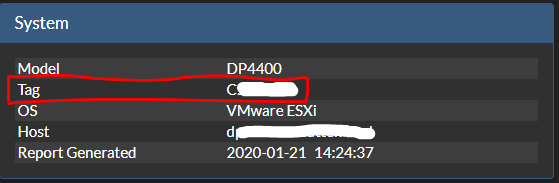
- In TSR Logs
From TSR logs:
KB article 524081: Data Domain: How to gather TSR logs on PowerProtect DD3300 | DD6900 | DD9400 | DD9900 | x400 | DP4400 (Only registered Dell Customers can access the content on the article link via Dell.com/support)
受影响的产品
Integrated Data Protection Appliance Family产品
Integrated Data Protection Appliance Family, PowerProtect Data Protection Hardware, Integrated Data Protection Appliance Software文章属性
文章编号: 000020686
文章类型: How To
上次修改时间: 12 11月 2021
版本: 5
从其他戴尔用户那里查找问题的答案
支持服务
检查您的设备是否在支持服务涵盖的范围内。