ECS: How to add external key management servers for key management
摘要: When adding a new external key server, the Server Host Name must match the SAN name in the SSL certificate when querying the EKM Server's Hostname/IP.
本文适用于
本文不适用于
本文并非针对某种特定的产品。
本文并非包含所有产品版本。
说明
When adding a new external key server the filed in the Server Host Name must match the SAN name provided in the SSL certificate when querying the Hostname/IP of EKM Server.
- Collect the needed Subject Alternate Name (SAN) from the secure certificate provided by the EKM address being used.
Command:
# sudo openssl s_client -connect <External Key Server Address>:5696 < /dev/null| openssl x509 -noout -text | grep DNS:
Example:
admin@node1:~>sudo openssl s_client -connect <External Key Server Address>:5696 < /dev/null| openssl x509 -noout -text | grep DNS:
DNS:ekm.server.org.local
- In the server, add configuration add the SAN address collected from step 1.
Navigation:
Key Management > New External Key Server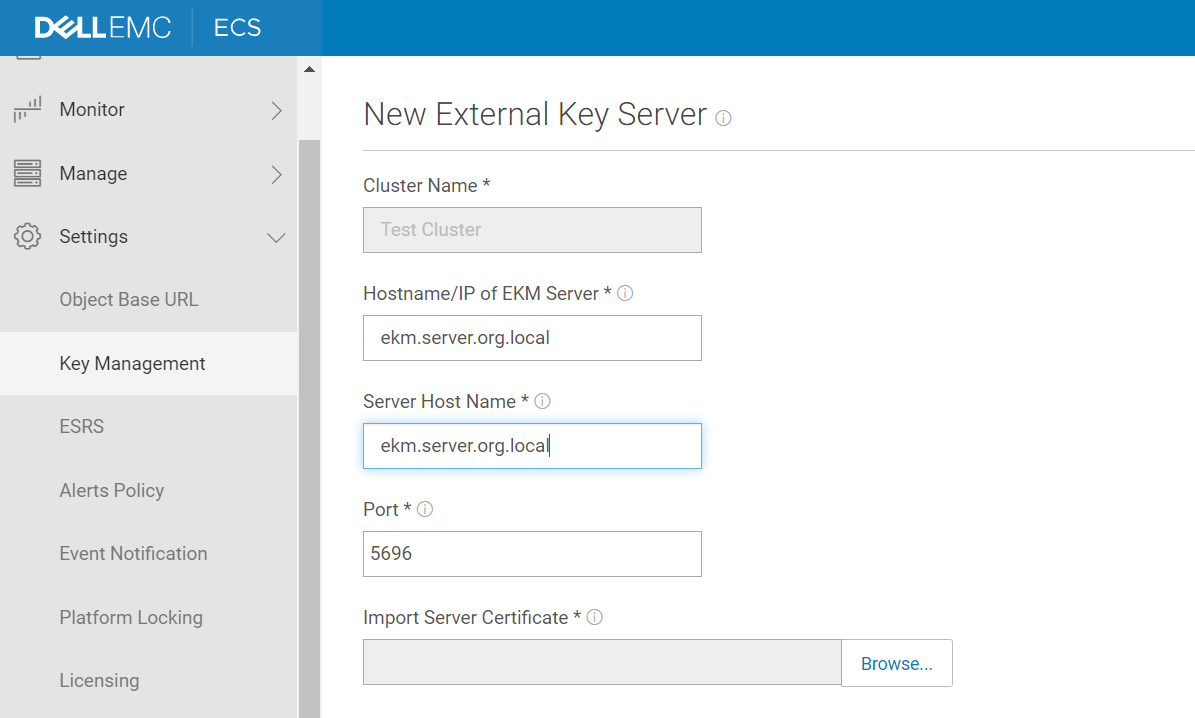
- If we encounter the following error after trying to save the request, confirm the SAN names in the certificate from step 1, and an alternate must be used from that list.
Example:
Once we have completed the configuration tasks to add the external key server the new server adds to the cluster instance ready for activation.
受影响的产品
ECS Appliance产品
ECS Appliance, ECS Appliance Hardware Series, ECS Appliance Software with Encryption, ECS Appliance Software without Encryption文章属性
文章编号: 000022633
文章类型: How To
上次修改时间: 29 3月 2025
版本: 5
从其他戴尔用户那里查找问题的答案
支持服务
检查您的设备是否在支持服务涵盖的范围内。