Dell EMC Unity: SP LED status indicators - Understanding colors and states for troubleshooting
摘要: Dell EMC Unity: SP LED status indicators - Understanding colors and states for troubleshooting
本文适用于
本文不适用于
本文并非针对某种特定的产品。
本文并非包含所有产品版本。
说明
Note: When a position is given for LEDs, keep in mind that it is based on the physical view of SPA. SPB is viewed upside down, so the relative LED position is different for SPB. The three LEDs are located just below the Torque-limiting Thumbscrew (on SPA in this picture).
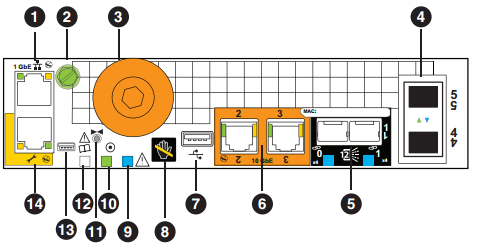


Picture retrieved from the doc "Unity Hybrid and Unity All Flash Hardware Information Guide" (P/N 302-002-563) which can be found is the support pages.
Front of DPE:
-- DPE will show Amber fault light; Blue LED for Power On; Disk Drive Ready LED Blue On; Disk Drive Amber fault LED
Picture retrieved from the doc "Unity Hybrid and Unity All Flash Hardware Information Guide" (P/N 302-002-563) which can be found is the support pages.
Front of DPE:
-- DPE will show Amber fault light; Blue LED for Power On; Disk Drive Ready LED Blue On; Disk Drive Amber fault LED
| WARNING: If the LED status does not match Unisphere (i.e. if the SP Fault LED indicates an error, yet no error can be found), STOP. Do not proceed with your activity. Contact Dell Technical Support before proceeding. In certain cases, the SP can show amber fault lights, but Unisphere will report that the system is fully up and healthy. Dell Technical Support should be engaged in order to investigate this reported condition before proceeding with your activity. |
其他信息
Note: If the SPs are connected to a network that automatically provides for IPv6 addresses, and an IPv6 address is acquired, then the LEDs will not blink in this fashion. Technically, the LED does not extinguish until the Configuration Wizard is run after the IP has already been set.
受影响的产品
Dell EMC Unity Family产品
Dell Unity 300, Dell EMC Unity 300F, Dell EMC Unity 400, Dell EMC Unity 400F, Dell EMC Unity 500, Dell EMC Unity 500F, Dell EMC Unity 600, Dell EMC Unity 600F, Dell EMC Unity Family |Dell EMC Unity All Flash, Dell EMC Unity Family
, Dell EMC Unity Hybrid
...
文章属性
文章编号: 000022658
文章类型: How To
上次修改时间: 13 8月 2025
版本: 4
从其他戴尔用户那里查找问题的答案
支持服务
检查您的设备是否在支持服务涵盖的范围内。