NetWorker: Client can override settings that does not apply to schedule if the level is set to skip at action level
摘要: The action property "Client Can Override" has been set but does not apply if the action schedule is set to skip.
本文适用于
本文不适用于
本文并非针对某种特定的产品。
本文并非包含所有产品版本。
症状
The Policy->Workflow->Action contains a client override option. Client override is enabled, showing "Client Can Override."

When Client Can Override is enabled, the Client resource values for Schedule, Pool, Retention policy, and Storage Node attributes override the equivalent Action resource attributes.
原因
NetWorker is working by design. If the NetWorker policy action schedule is set to Skip backup level, the Client can Override option is not honored.
解决方案
For NetWorker to consider the Client Can Override option, change the action schedule to a different level.
If the client should be skipped, define the skip level schedule at client properties.
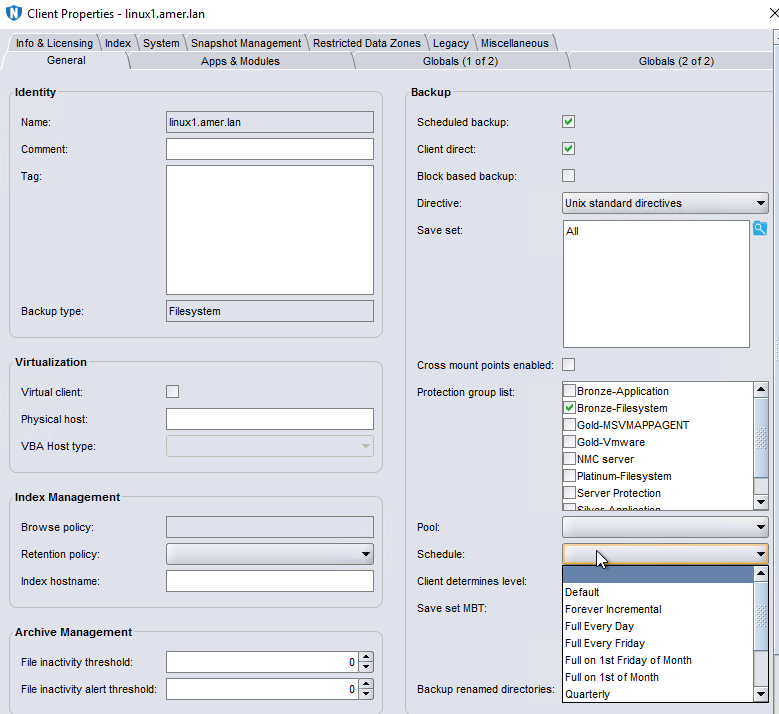
There are some default schedules defined. Custom schedules can be created under Protection->Schedules. Once created the scheduled is listed as an option in the Schedule drop-down in the client properties.
其他信息
Client Overrides and scheduling is detailed further in the NetWorker Administration Guide, available through: https://www.dell.com/support/home/product-support/product/networker/docs
受影响的产品
NetWorker产品
NetWorker Family, NetWorker Series文章属性
文章编号: 000032150
文章类型: Solution
上次修改时间: 14 3月 2025
版本: 4
从其他戴尔用户那里查找问题的答案
支持服务
检查您的设备是否在支持服务涵盖的范围内。