NVP-vProxy:FLR 還原失敗,並顯示錯誤「無法取得分割區資訊:結束狀態 2」
摘要: VM 檔案層級還原 (FLR) 在掛接作業期間失敗,並顯示錯誤:「無法取得分割區資訊:結束狀態 2」
本文适用于
本文不适用于
本文并非针对某种特定的产品。
本文并非包含所有产品版本。
症状
- 執行 FLR 的虛擬機器 (VM) 已將未分割的硬碟新增至該虛擬機器。
- NetWorker VMware Protection 整合是透過 vProxy 裝置進行設定。
- NetWorker 19.7.0.x (vProxy 4.3.0-22) 和先前版本。
- 正在環境中執行虛擬機器 (VM) FLR 還原,失敗並出現以下錯誤:
掛載失敗後卸載:無法取得分割區資訊:結束狀態 2
159373:nsrvproxy_flr: vProxy Log: 2019/01/08 14:56:38 TRACE:  [@(#) Build number: 246] /dev/loop0
159373:nsrvproxy_flr: vProxy Log: 2019/01/08 14:56:38 TRACE:  [@(#) Build number: 246] ====End of output from '/sbin/losetup'.
159373:nsrvproxy_flr: vProxy Log: 2019/01/08 14:56:40 TRACE:  [@(#) Build number: 246] ====Executing [/sbin/blkid -c /dev/null /dev/loop0]
159373:nsrvproxy_flr: vProxy Log: 2019/01/08 14:56:40 TRACE:  [@(#) Build number: 246] /dev/loop0: PTUUID="00041d0c" PTTYPE="dos"
159373:nsrvproxy_flr: vProxy Log: 2019/01/08 14:56:40 TRACE:  [@(#) Build number: 246] ====End of output from '/sbin/blkid'.
159373:nsrvproxy_flr: vProxy Log: 2019/01/08 14:56:40 TRACE:  [@(#) Build number: 246] Attached VMDK 'vm-422-disk-key-2000-flat.vmdk' at '/dev/loop0' with partitions [/dev/loop0p3 /dev/loop0p2 /dev/loop0p1]
159373:nsrvproxy_flr: vProxy Log: 2019/01/08 14:56:40 TRACE:  [@(#) Build number: 246] ====Executing [/sbin/losetup --find --show -P /opt/emc/vproxy/runtime/state/flr/temp/nfs-905033c8-d093-46c7-a8b3-ea9722b76eeb/vm-422-disk-key-2001-flat.vmdk]
159373:nsrvproxy_flr: vProxy Log: 2019/01/08 14:56:40 TRACE:  [@(#) Build number: 246] /dev/loop2
159373:nsrvproxy_flr: vProxy Log: 2019/01/08 14:56:40 TRACE:  [@(#) Build number: 246] ====End of output from '/sbin/losetup'.
159373:nsrvproxy_flr: vProxy Log: 2019/01/08 14:56:42 TRACE:  [@(#) Build number: 246] ====Executing [/sbin/blkid -c /dev/null /dev/loop2]
159373:nsrvproxy_flr: vProxy Log: 2019/01/08 14:56:42 TRACE:  [@(#) Build number: 246] ====Executing [/sbin/losetup -d /dev/loop2]
159373:nsrvproxy_flr: vProxy Log: 2019/01/08 14:56:44 TRACE:  [@(#) Build number: 246] ====Executing [/sbin/losetup --find --show -P /opt/emc/vproxy/runtime/state/flr/temp/nfs-905033c8-d093-46c7-a8b3-ea9722b76eeb/vm-422-disk-key-2001-flat.vmdk]
159373:nsrvproxy_flr: vProxy Log: 2019/01/08 14:56:44 TRACE:  [@(#) Build number: 246] /dev/loop2
159373:nsrvproxy_flr: vProxy Log: 2019/01/08 14:56:44 TRACE:  [@(#) Build number: 246] ====End of output from '/sbin/losetup'.
159373:nsrvproxy_flr: vProxy Log: 2019/01/08 14:56:46 TRACE:  [@(#) Build number: 246] ====Executing [/sbin/blkid -c /dev/null /dev/loop2]
159373:nsrvproxy_flr: vProxy Log: 2019/01/08 14:56:46 TRACE:  [@(#) Build number: 246] Removing 1 temporary loop devices
159373:nsrvproxy_flr: vProxy Log: 2019/01/08 14:56:46 TRACE:  [@(#) Build number: 246] ====Executing [/sbin/losetup -d /dev/loop0]
159373:nsrvproxy_flr: vProxy Log: 2019/01/08 14:56:46 TRACE:  [@(#) Build number: 246] ====Executing [/sbin/pvscan --cache]
159373:nsrvproxy_flr: vProxy Log: 2019/01/08 14:56:46 TRACE:  [@(#) Build number: 246] File descriptor 10 (socket:[4601043]) leaked on pvscan invocation. Parent PID 2560: /opt/emc/vproxy/bin/vflrd
159373:nsrvproxy_flr: vProxy Log: 2019/01/08 14:56:46 TRACE:  [@(#) Build number: 246]   /dev/loop1: read failed after 0 of 4096 at 10737352704: Input/output error
159373:nsrvproxy_flr: vProxy Log: 2019/01/08 14:56:46 TRACE:  [@(#) Build number: 246]   /dev/loop1: read failed after 0 of 4096 at 10737410048: Input/output error
159373:nsrvproxy_flr: vProxy Log: 2019/01/08 14:56:46 TRACE:  [@(#) Build number: 246]   /dev/loop1: read failed after 0 of 4096 at 0: Input/output error
159373:nsrvproxy_flr: vProxy Log: 2019/01/08 14:56:46 TRACE:  [@(#) Build number: 246]   /dev/loop1: read failed after 0 of 4096 at 4096: Input/output error
159373:nsrvproxy_flr: vProxy Log: 2019/01/08 14:56:46 TRACE:  [@(#) Build number: 246] ====End of output from '/sbin/pvscan'.
159373:nsrvproxy_flr: vProxy Log: 2019/01/08 14:56:46 ERROR:  [@(#) Build number: 246] Unable to unmount '/opt/emc/vproxy/runtime/state/flr/temp/nfs-905033c8-d093-46c7-a8b3-ea9722b76eeb': device or resource busy
159373:nsrvproxy_flr: vProxy Log: 2019/01/08 14:56:46 INFO:   [@(#) Build number: 246] Unmounting after mount failure: Unable to get partition information: exit status 2
原因
VM 有一個未分割/格式化的磁片連接到它。
作業系統命令可用來驗證未格式化的磁片:
作業系統命令可用來驗證未格式化的磁片:
- fdisk -l
- file -sL /dev/sd*
- lsblk
- blkid
<VM_Name>:~ # fdisk -l
Disk /dev/sdb: 10 GiB, 10737418240 bytes, 20971520 sectors
Units: sectors of 1 * 512 = 512 bytes
Sector size (logical/physical): 512 bytes / 512 bytes
I/O size (minimum/optimal): 512 bytes / 512 bytes

Disk /dev/sda: 30 GiB, 32212254720 bytes, 62914560 sectors
Units: sectors of 1 * 512 = 512 bytes
Sector size (logical/physical): 512 bytes / 512 bytes
I/O size (minimum/optimal): 512 bytes / 512 bytes
Disklabel type: dos
Disk identifier: 0x00041d0c

Device     Boot    Start      End  Sectors Size Id Type
/dev/sda1           2048  4208639  4206592   2G 82 Linux swap / Solaris
/dev/sda2  *     4208640 29382655 25174016  12G 83 Linux
/dev/sda3       29382656 62914559 33531904  16G 83 Linux

<VM_Name>:~ #  file -sL /dev/sd*
/dev/sda:  DOS/MBR boot sector
/dev/sda1: Linux/i386 swap file (new style), version 1 (4K pages), size 525823 pages, no label, UUID=0ce67b73-cf94-4511-84f6-572201fd8491
/dev/sda2: DOS/MBR boot sector
/dev/sda3: SGI XFS filesystem data (blksz 4096, inosz 512, v2 dirs)
/dev/sdb:  data
<VM_Name>:~ # lsblk
NAME            MAJ:MIN RM  SIZE RO TYPE MOUNTPOINT
sda               8:0    0   16G  0 disk
├─sda1            8:1    0    1G  0 part /boot
└─sda2            8:2    0   15G  0 part
  ├─centos-root 253:0    0 13.4G  0 lvm  /
  └─centos-swap 253:1    0  1.6G  0 lvm  [SWAP]
sdb               8:16   0    1G  0 disk
sr0              11:0    1 1024M  0 rom

<VM_Name>:~ # blkid
/dev/sda1: UUID="0ce67b73-cf94-4511-84f6-572201fd8491" TYPE="swap" PARTUUID="00041d0c-01"
/dev/sda2: UUID="8375d6ba-626d-43ef-a881-82230d4b84a5" UUID_SUB="b333cada-c2fe-48aa-8a24-f6f839a0c46a" TYPE="btrfs" PTTYPE="dos" PARTUUID="00041d0c-02"
/dev/sda3: UUID="6514e3e9-5bea-467f-8f73-479a71380753" TYPE="xfs" PARTUUID="00041d0c-03"
/dev/sr0: UUID="2017-07-12-03-04-39-00" LABEL="SLE-12-SP3-Server-DVD-x86_640473" TYPE="iso9660" PTUUID="1285b34e" PTTYPE="dos"
在上述命令中,我們可以看到一個裝置 (/dev/sdb) 已連接至虛擬機器,但其沒有格式化、分割區或資料。
解决方案
解決方案:
已發佈程式碼修正程式,以略過未格式化的磁片。
- 將 NetWorker 伺服器升級至 19.7.0.x 或更新版本。
- 將 vProxies 升級到 4.3.0-29 或更新版本。
- 如何升級 vProxy 應用裝置: HTTPs://www.dell.com/support/kbdoc/000197385/
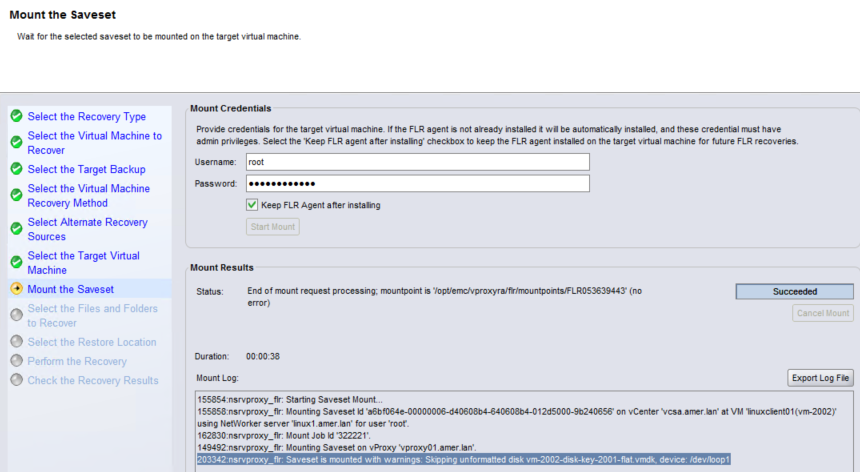
執行 FLR 時,報告其跳過了未格式化的磁片:
因應措施:
在 NetWorker 19.7.x 和 vProxy 4.3.0-29 之前,執行虛擬機器的即時復原。這會在 Data Domain 系統上建立虛擬機器的暫時 (離線) 複本。需要的磁片可掛接至來源 (線上) 虛擬機器的 NFS,並從 VM 作業系統複製。此程式詳述于:HTTPs://www.dell.com/support/kbdoc/000158482
受影响的产品
NetWorker产品
NetWorker Family, NetWorker, NetWorker Series文章属性
文章编号: 000056216
文章类型: Solution
上次修改时间: 17 3月 2025
版本: 5
从其他戴尔用户那里查找问题的答案
支持服务
检查您的设备是否在支持服务涵盖的范围内。