Avamar: Proxy Deployment Manager failed to deploy proxy with error ‘could not register proxy: invalid domain’
摘要: Proxy Deployment Manager fails in registration with error 'could not register proxy: invalid domain'
本文适用于
本文不适用于
本文并非针对某种特定的产品。
本文并非包含所有产品版本。
症状
When trying to deploy proxy by Proxy Deployment Manager, it always failed with error could not register proxy: invalid domain 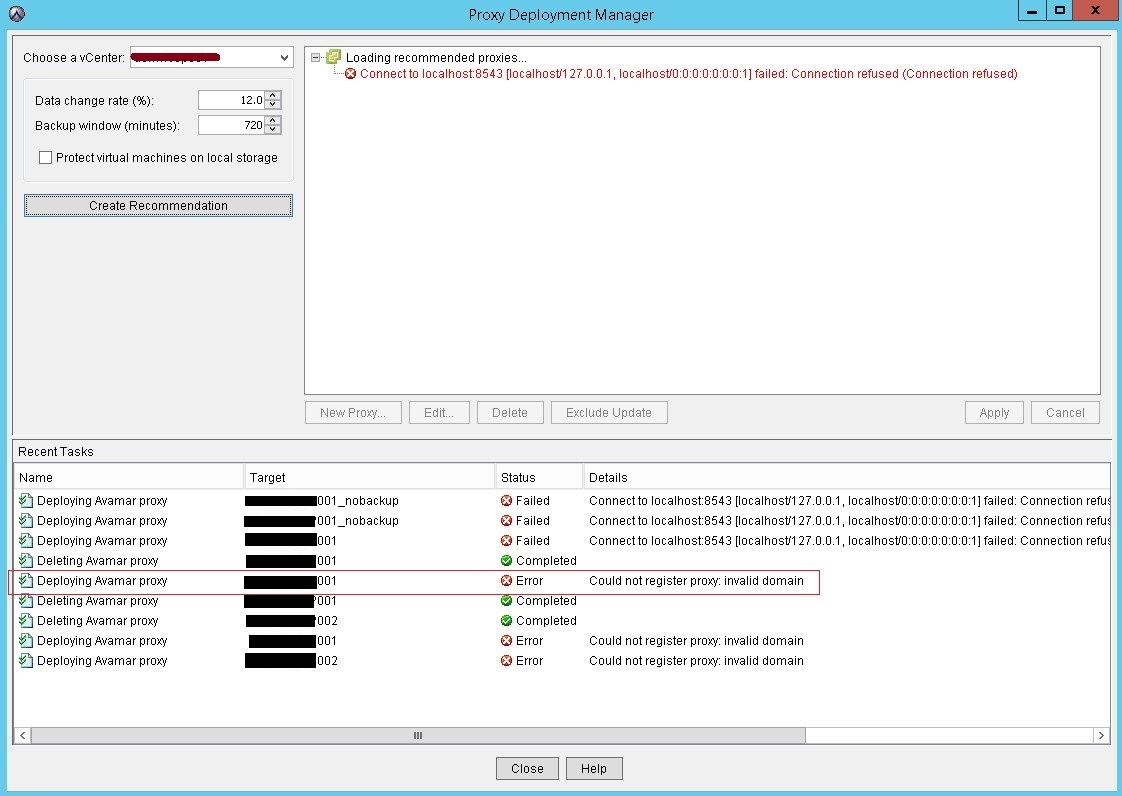
MCS log shows Avamar Server already has this client
mcserver.log.43:FINE: Cl->MC 10.100.1.201:32876<client isclientos="0" type="init" ack="yes" fqhostname="usivnavmp001.sus.local" msgver="1" os_type="Linux" hostname="usivnavmp001.sus.lcal" client_type="VPROXY_GUEST" mcsaddr="10.100.1.200" uuid="4206c9d11fc2d8ef735d2c816c90712c" dpndomain="/" cid="0" version="7.4.101-58" secure-st-version="2"><DNSname>127.0.0.2</DNSame><DNSname>usivnavmp001.sus.local</DNSname><DNSname>usivnavmp001</DNSname><DNSname>10.100.1.201</DNSname></client>
mcserver.log.43:FINE: client connection called id indicates:10.100.1.201
mcserver.log.43:FINE: Paging will be disabled on client connecting from 10.100.1.201 because the client did not provide a paging address when connecting
mcserver.log.43:FINE: MC->Cl 10.100.1.201:32876 <message errno="202" errdesc="Proxy client already exists as a client for image backup." msgver="5" ack="no" type="response" sync="fg"hfsaddr="10.100.1.200" />
deploymanager.log in /usr/local/avamar/var/log/vcs shows the below error:
avagent.d Info: Stopping Avamar Client Agent (avagent)...
avagent.d Info: Client Agent stopped.
avagent Info <5008>: Logging to /usr/local/avamarclient/var/avagent.log
avagent Error <7531>: Unable to register /deab/proxy01.av.local with Administrator 192.167.191.29:28001
'Proxy client already exists as a client for image backup.' (202)
avagent.d Info: Client activation error.
avagent Info <5008>: Logging to /usr/local/avamarclient/var/avagent.log
avagent Info <5417>: daemonized as process id 14474
avagent.d Info: Client Agent started.
原因
The issue occurs for 2 reasons:
reason 1:
On the affected Avamar Server, there was a rule configured to add VMs to Avamar Server automatically. During deploying proxy, the proxy VM is created on vCenter and then it is added to Avamar Server automatically by the rule before proxy tries activating itself to Avamar. Therefore the error "Proxy client already exists as a client for image backup" was logged by MCS when proxy tries register itself later.
reason 2:
There is a dynamic container set on Avamar meaning that any new client created on the vCenter will be added under it thus get added as a VM causing the error "Proxy client already exists as a client for image backup"
Example of a container added as ESXi with proxy added under it as VM image backup client: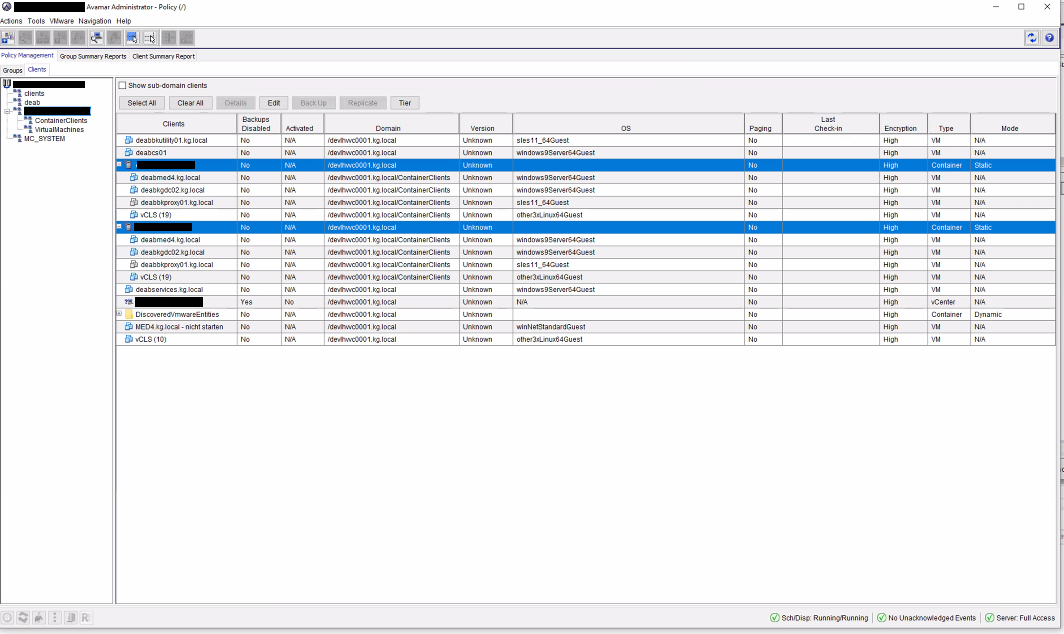
解决方案
For reason 1:
1. Open Avamar GUI, click Tools-->choose Manage Rules
2. Check the rule configured and make sure new deployed proxy is not added to Avamar automatically
For reason 2:
1. Open Avamar GUI, click on Policy tab-->choose Clients (besides Groups) from left pane
2. Click on the container (ESXi in the following example) and click Edit then locate the flag Dynamic Mode:
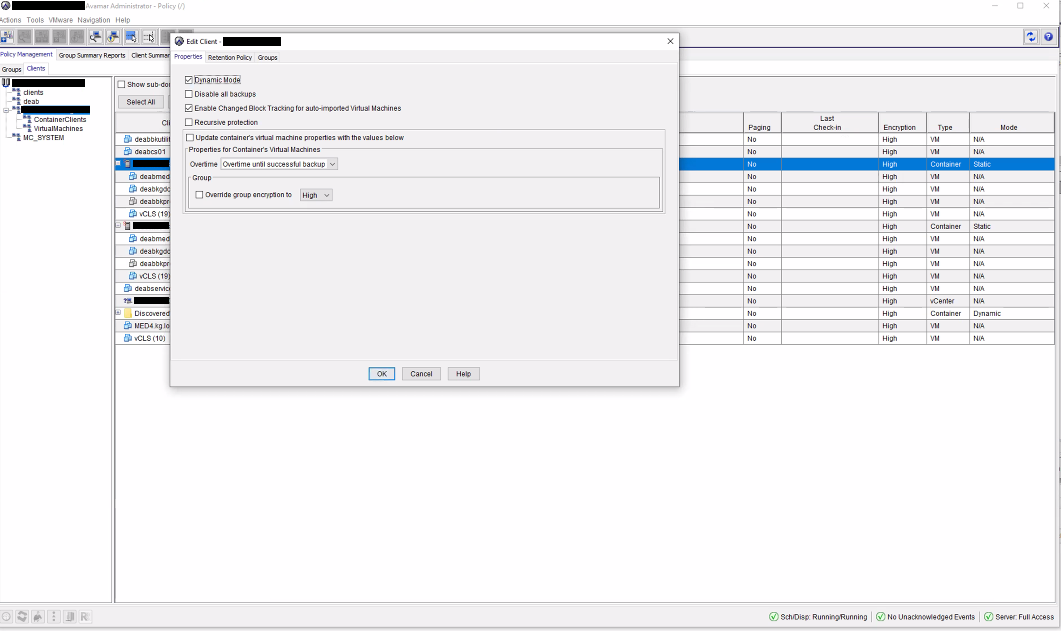
3. Uncheck Dynamic Mode and run the proxy deployment manager task again:
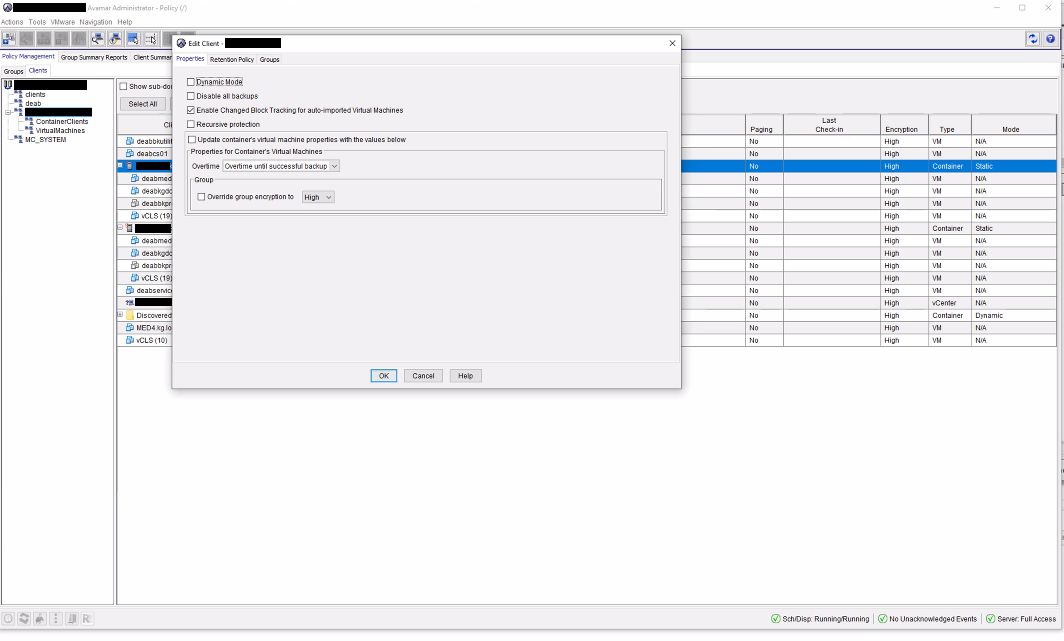
Please note: if Dynamic Mode is needed you can enable it back and the proxy deployed will go underneath the Container Clients but will be functioning normally and disable it when deploying a new proxy
1. Open Avamar GUI, click Tools-->choose Manage Rules
2. Check the rule configured and make sure new deployed proxy is not added to Avamar automatically
For reason 2:
1. Open Avamar GUI, click on Policy tab-->choose Clients (besides Groups) from left pane
2. Click on the container (ESXi in the following example) and click Edit then locate the flag Dynamic Mode:
3. Uncheck Dynamic Mode and run the proxy deployment manager task again:
Please note: if Dynamic Mode is needed you can enable it back and the proxy deployed will go underneath the Container Clients but will be functioning normally and disable it when deploying a new proxy
受影响的产品
Avamar产品
Avamar文章属性
文章编号: 000065122
文章类型: Solution
上次修改时间: 08 1月 2026
版本: 4
从其他戴尔用户那里查找问题的答案
支持服务
检查您的设备是否在支持服务涵盖的范围内。