Avamar: impossibile eseguire il restore dei file dal backup della macchina virtuale con FLR
摘要: impossibile eseguire il restore dei file dal backup della macchina virtuale con FLR poiché il proxy non è in grado di risolvere il nome DNS della destinazione di backup.
本文适用于
本文不适用于
本文并非针对某种特定的产品。
本文并非包含所有产品版本。
症状
N/D
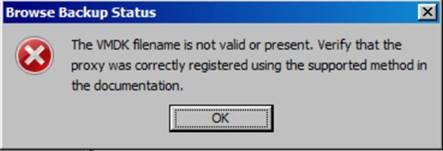
- Durante l'esplorazione dei backup della macchina virtuale con FLR, viene visualizzato il seguente messaggio di errore:
- Anche la macchina virtuale che stiamo esplorando non raggiunge alcun limite FLR.
- Esaminando i log FLR sul proxy, è possibile osservare i seguenti messaggi di errore nel file MountMgr.log situato nella directory /usr/local/avamarclient/bin/logs, che indicano che il proxy non è in grado di ottenere l'elenco dei backup dal backup server di destinazione (DD) e che non esistono in tale posizione:
[MM - DEBUG] TID=140213502355139 MID=30870: sAssetPath = /mnt/dunion/<vCenter_name>/VirtualMachines/<VM_name_UUID>/by-number/0000149 [MM - DEBUG] TID=140213502355139 MID=30871: sClientId = [MM - DEBUG] TID=140213502355139 MID=30872: sMountedAvFS = /mnt/dunion/<vCenter_name>/VirtualMachines/<VM_name_UUID>/by-number/0000149/VMFiles [MM - ERROR] TID=140213502355139 MID=30873: HLPR_ListOfDirectories failed for /mnt/dunion/<vCenter_name>/VirtualMachines/<VM_name_UUID>/by-number/0000149/VMFiles [MM - FUNC] TID=140213502355139 MID=30874: IVmdkManager::GetAllAvailableDiskIndexes LEAVE [MM - ERROR] TID=9923 MID=30875: Unable to find backed up VMDK images for: /mnt/dunion/<vCenter_name>/VirtualMachines/<VM_name_UUID>/by-number/0000149
- Anche se i backup esistono come verificato di seguito nell'utility node Avamar:
mccli backup show --name=/<vCenter_name>/VirtualMachines/<VM_name_UUID>
0,23000,CLI command completed successfully.
Created LabelNum Size Retention Hostname Location Consistent Level Tier
------------------- -------- -------- --------- ---------------------------------- -------- ---------------- ------
yyyy-mm-dd hh:mm PM 149 ##.# GB D <AVAMAR_FQDN> Local file Active
0,23000,CLI command completed successfully.
Created LabelNum Size Retention Hostname Location Consistent Level Tier
------------------- -------- -------- --------- ---------------------------------- -------- ---------------- ------
yyyy-mm-dd hh:mm PM 149 ##.# GB D <AVAMAR_FQDN> Local file Active
- Inoltre, è possibile notare che l'IP Avamar corretto è già nel file axionfs.cmd situato nella directory /usr/local/avamar/var come riportato di seguito:
--server=xxx.xxx.xxx.xxx
--id=restoreonly
--password=#################################
--fuseoptions='-s -r -f -o allow_other,use_ino'
--primarybackupdir=by-number
--inactivity_timeout=172800
--encrypt=tls
--encrypt-strength=high
(END)
--id=restoreonly
--password=#################################
--fuseoptions='-s -r -f -o allow_other,use_ino'
--primarybackupdir=by-number
--inactivity_timeout=172800
--encrypt=tls
--encrypt-strength=high
(END)
原因
-
Il proxy in uso non è in grado di risolvere il backup server di destinazione o il nome di dominio completo (FQDN) Data Domain, come si può notare dal seguente errore nel file axionfs_xxxxxxx_xxxx_xxxx_xxxxxxxxxxxx.log più recente situato nella directory /usr/local/avamar/var:
axionfs Info <10539>: Connecting to Data Domain Server "DD_FQDN"(1) (LSU: avamar-xxxxxxxxxx, User: "ddboost")
[axionfs] netsys::getaddrinfo failed for DD_FQDN: Name or service not known
axionfs Error <10541>: Failed to resolve Data Domain Server name "DD_FQDN" to an IP address. Data Domain login FAILED
axionfs Error <10512>: Problem logging into the DDR server index:1
axionfs Error <11014>: Could not open DDR for /, #146
[axionfs] context::loop: Nothing pending on server, only internal work (pending all=4, ext=0, int=0)
axionfs Warning <19046>: Unable to get ddr_files.xml for clientid <VM_CID> and backupid <backupid>
axionfs Warning <19047>: Unable to retrieve DDR info for 'VMConfiguration'
axionfs Error <41308>: Cannot iterate contents of '': Unable to set location information in direlem_iter for 'VMConfiguration'
[axionfs] netsys::getaddrinfo failed for DD_FQDN: Name or service not known
axionfs Error <10541>: Failed to resolve Data Domain Server name "DD_FQDN" to an IP address. Data Domain login FAILED
axionfs Error <10512>: Problem logging into the DDR server index:1
axionfs Error <11014>: Could not open DDR for /, #146
[axionfs] context::loop: Nothing pending on server, only internal work (pending all=4, ext=0, int=0)
axionfs Warning <19046>: Unable to get ddr_files.xml for clientid <VM_CID> and backupid <backupid>
axionfs Warning <19047>: Unable to retrieve DDR info for 'VMConfiguration'
axionfs Error <41308>: Cannot iterate contents of '': Unable to set location information in direlem_iter for 'VMConfiguration'
解决方案
Per risolvere il problema:
- Assicurarsi che il proxy Avamar sia in grado di risolvere il nome di dominio completo utilizzando il seguente comando sul proxy:
- nslookup <datadomain_FQDN>
- nslookup <datadomain_IP>
- Se non viene generato alcun output valido per Data Domain, modificare il file /etc/resolve.conf sul proxy e aggiungere il nome DNS corretto.
- Aggiungere il nome di dominio completo e l'IP per Data Domain nel file /etc/hosts del proxy.
受影响的产品
Avamar产品
Avamar, Avamar Client for VMware文章属性
文章编号: 000067854
文章类型: Solution
上次修改时间: 06 11月 2025
版本: 3
从其他戴尔用户那里查找问题的答案
支持服务
检查您的设备是否在支持服务涵盖的范围内。