Informazioni generali sulle barre audio Dell AE515 e AE515M
摘要: Informazioni generali sulle barre audio Dell AE515 e AE515M.
本文适用于
本文不适用于
本文并非针对某种特定的产品。
本文并非包含所有产品版本。
症状
原因
Non sono disponibili informazioni sulla causa.
解决方案
Sommario:
- Panoramica
- Specifiche
- Collegamento della barra audio
- Display supportati
- Risoluzione dei problemi
- Ulteriori informazioni
Panoramica
Nota: Per informazioni dettagliate, consultare le Guide utente delle barre audio:
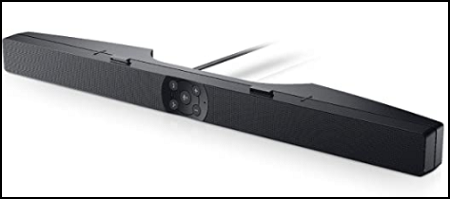
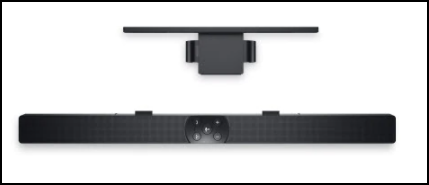
Le barre audio Dell AE515 e AE515M si collegano ad alcuni monitor Dell. Sono disponibili due varianti della barra audio AE515:
- La barra audio Dell AE515 si collega alla parte inferiore di alcuni monitor LCD Dell.
- La barra audio Dell AE515M si collega al supporto di alcuni monitor LCD Dell con una staffa inclusa.
Specifiche
Informazioni tecniche sulle barre audio AE515 e AE515M:
| Funzione | Descrizione |
|---|---|
| Potenza nominale in uscita | 5 watt |
| Risposta di frequenza | 90 - 20.000 Hz |
| Dimensioni (L x P x A) | 44,5 x 6,1 x 2,5 cm |
| Controls | Pressione dei pulsanti |
| Montaggio | AE515: Nella parte inferiore del monitor AE515M: Sul supporto per monitor con una staffa |
| Alimentatore | USB |
Collegamento della barra audio
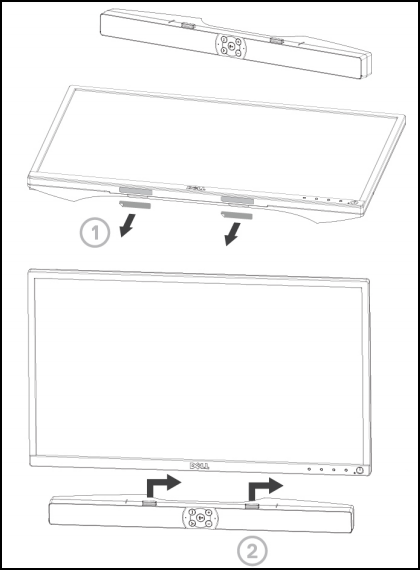
AE515:
Per installare la barra audio su un monitor compatibile con Dell, è possibile utilizzare le istruzioni riportate di seguito.
- Allineare le linguette presenti sulla barra audio agli slot sulla base del monitor.
- Far scorrere la barra audio verso destra per fissarla alla base del monitor.
AE515M:
Per installare la barra audio su un monitor compatibile con Dell, è possibile utilizzare le istruzioni riportate di seguito.
- Tirare il morsetto della staffa.
Nota: Utilizzare il cuscinetto di gomma spesso tra la staffa e il supporto per monitor con base senza rotazione laterale.
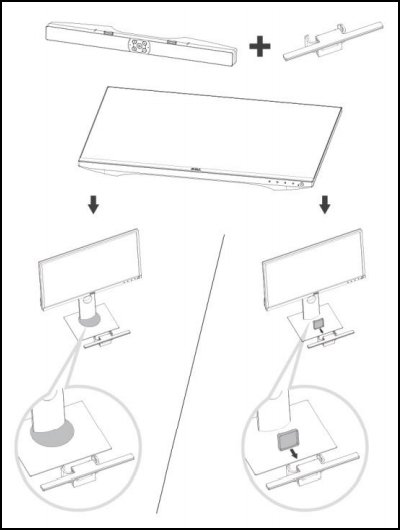
- Fissare la staffa al supporto per monitor.
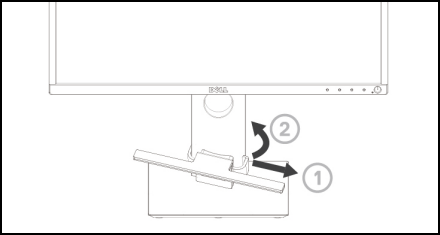
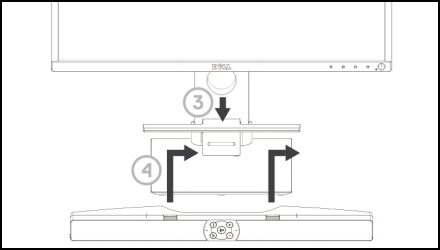
- Premere la staffa verso il basso per allinearla alla base del supporto.
- Allineare le linguette presenti sulla barra audio agli slot sulla staffa. Far scorrere la barra audio verso destra per fissarla alla staffa.
Display supportati
Le barre audio AE515 e AE515M possono essere installate sui seguenti monitor:
| Altoparlante | Modello del monitor |
|---|---|
| AE515 | E1916H, E2016H, E2216H, E2316H, E2417H, P1917S P2016, P2017H, P2214H, P2217, P2217H, P2317H P2415Q, P2416D, P2417H, P2715Q, P2717H, U2415, U2417HJ U2515H, U2917W, UP2516D, UP2716D, UP3017, UP3216Q |
| AE515M | E1914H, E1914He, E1916H, E1916He, E1916HL, E1916HM, E1916HV E2014H, E2014T, E2015HV, E2016, E2016H, E2016HV, E2214H E2214HV, E2215HV, E2216H, E2216HV, E2218HN, E2219HN E2314H, E2316H, E2316Hr, E2318H, E2318HN, E2318HR, E2318HX E2414H, E2414Hr, E2414HX, E2417H, E2418HN, E2715H, P1914S P1917S, P1917SWh, P2014H, P2016, P2017H, P2018H, P2214H P2217, P2217H, P2217Wh, P2219H (con supporto), P2219HC (con supporto) P2314H, P2317H, P2317HWh, P2319H (con supporto), P2414H, P2415Q P2416D, P2417H, P2418D, P2418HZ, P2418HZM, P2419H (con supporto) P2419HC (con supporto), P2714H, P2714T, P2715Q, P2717H P2719H (con supporto), P2719HC (con supporto), S2719HS (con supporto) U2414H, U2415, U2417HJ, U2419H (con supporto), U2419HC (con supporto) U2515H, U2713H, U2715H, U2719D (con supporto), U2719DC (con supporto), U2917W U3219Q (con supporto), UP2516D, UP2716D, UP2718Q, UP3017, UP3216Q, UZ2215H |
Nota: Se un monitor non è presente nell'elenco, è possibile consultare la relativa Guida utente per la compatibilità con la barra audio.
Risoluzione dei problemi
Per risolvere i problemi relativi alle barre audio AE515 e AE515M, è possibile utilizzare le seguenti soluzioni.
| Sintomo | Problema riscontrato | Soluzione possibile |
|---|---|---|
| Audio assente | Nessun suono dalla sorgente audio esterna. |
|
| Suono anomalo | Suono distorto o ronzio. |
|
| Uscita audio non bilanciata | Audio proveniente solo da un lato della barra audio. |
|
| Volume basso | Il volume è troppo basso. |
|
| Assenza di audio in ingresso | Assenza di audio con la modalità di ingresso. |
|
| Distorsione in ingresso | Il cavo in ingresso non è collegato. |
|
| Jack per cuffie collegato, nessun suono udibile | L'audio del sistema è in riproduzione. |
|
| Suono anomalo nelle cuffie | Distorsione audio. |
|
Ulteriori informazioni
受影响的产品
Dell E1914H, Dell E1916H, Dell E1916HL, Dell E1916HM, Dell E1916HV, Dell E2014H, Dell E2014T, Dell E2015Hv, Dell E2016, Dell E2016H, Dell E2016HV, Dell E2214H, Dell E2214Hv, Dell E2215HV, Dell E2216H, Dell E2216HV, Dell E2218HN, Dell E2219HN
, Dell E2314H, Dell E2316H, Dell E2318H, Dell E2318HN, Dell E2318HR, Dell E2318HX, Dell E2414H, Dell E2417H, Dell E2418HN, Dell E2715H, Dell P1914S, Dell P1917S, Dell P1917SWh, Dell P2014H, Dell P2016, Dell P2017H, Dell P2018H, Dell P2214H, Dell P2217, Dell P2217H, Dell P2217Wh, Dell P2219H, Dell P2219HC, Dell P2314H, Dell P2317H, Dell P2317HWh, Dell P2319H, Dell P2415Q, Dell P2416D, Dell P2417H, Dell P2418D, Dell P2418HZ, Dell P2418HZM, Dell P2419H, Dell P2419HC, Dell P2714H, Dell P2714T, Dell P2715Q, Dell P2717H, Dell P2719H, Dell P2719HC, Dell Pro Stereo Soundbar - AE515M, Dell S2719HS, Dell Professional Sound Bar AE515, Dell U2414H, Dell U2415, Dell U2417HJ, Dell U2419H, Dell U2419HC, Dell U2515H, Dell U2713H, Dell U2715H, Dell U2719D, Dell U2719DC, Dell U2917W, Dell U3219Q, Dell UP2516D, Dell UP2716D, Dell UP2718Q, Dell UP3017, Dell UP3216Q, Dell UZ2215H
...
产品
Dell E1914H, Dell E1916H, Dell E1916HL, Dell E1916HM, Dell E1916HV, Dell E2014H, Dell E2014T, Dell E2015Hv, Dell E2016, Dell E2016H, Dell E2016HV, Dell E2214H, Dell E2214Hv, Dell E2215HV, Dell E2216H, Dell E2216HV, Dell E2218HN, Dell E2219HN
, Dell E2314H, Dell E2316H, Dell E2318H, Dell E2318HN, Dell E2318HR, Dell E2318HX, Dell E2414H, Dell E2417H, Dell E2418HN, Dell E2715H, Dell P1914S, Dell P1917S, Dell P1917SWh, Dell P2014H, Dell P2016, Dell P2017H, Dell P2018H, Dell P2214H, Dell P2217, Dell P2217H, Dell P2217Wh, Dell P2219H, Dell P2219HC, Dell P2314H, Dell P2317H, Dell P2317HWh, Dell P2319H, Dell P2415Q, Dell P2416D, Dell P2417H, Dell P2418D, Dell P2418HZ, Dell P2418HZM, Dell P2419H, Dell P2419HC, Dell P2714H, Dell P2714T, Dell P2715Q, Dell P2717H, Dell P2719H, Dell P2719HC, Dell S2719HS, Dell U2414H, Dell U2415, Dell U2417HJ, Dell U2419H, Dell U2419HC, Dell U2515H, Dell U2713H, Dell U2715H, Dell U2719D, Dell U2719DC, Dell U2917W, Dell U3219Q, Dell UP2516D, Dell UP2716D, Dell UP2718Q, Dell UP3017, Dell UP3216Q, Dell UZ2215H
...
文章属性
文章编号: 000125890
文章类型: Solution
上次修改时间: 04 11月 2025
版本: 10
从其他戴尔用户那里查找问题的答案
支持服务
检查您的设备是否在支持服务涵盖的范围内。