Systems Unable to Burn CD/DVD with File Explorer
摘要: The following article provides information about dealing with multiple systems unable to burn CDs or DVDs with Windows integrated tool in File Explorer.
本文适用于
本文不适用于
本文并非针对某种特定的产品。
本文并非包含所有产品版本。
说明
If you have updated/reinstalled Windows, and it is no longer able to burn CDs or DVDs with their ODD - Optical Disk Driver with the Windows integrated tool in File Explorer. Uninstalling recent updates does not resolve the issue. This issue is seen primarily in systems on domains.
The option to burn disks is missing from the context menu in file explorer. If a blank disk is inserted into the drive bay, it indicates that a disk has been inserted but attempting to left-click or right-click. The CD drive in the system locks up for a short period of time and then gives a Cyclic redundancy error. Upper and lower filters do not resolve the issue.
Systems that have been identified with this issue:
- OptiPlex 5050
- OptiPlex 7060
- Precision 3430
- Precision 7820 Tower
NOTE: This list is not all-inclusive as potentially any system with an Optical Disk Drive (ODD) can be affected.
Microsoft has reviewed and stated that the root cause is a Group Policy Object (GPO) that has been changed.
Below are the steps to resolve. However, if the GPO setting changes back again or the setting cannot be changed, contact the Network Administrator.
Steps:
-
Open a run prompt (Windows key + R) and type Regedit. Press enter. Locate and delete the NoCDBurning keys under HKEY_LOCAL_MACHINE (HKLM) (Figure 1).
The keys should be located at the following locations:- HKLM\Software\WOW6432Node\Microsoft\Windows\CurrentVersion\Policies\Explorer
- HKLM\Software\Microsoft\Windows\CurrentVersion\Policies\Explorer
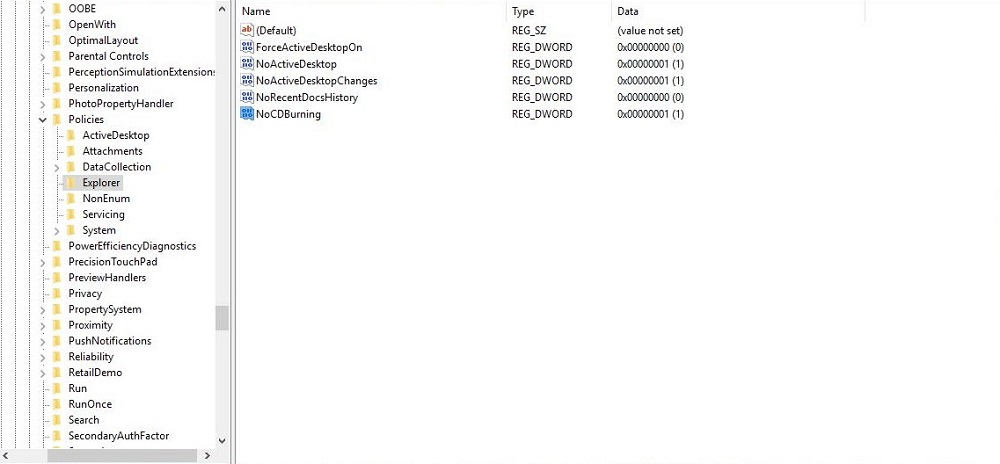
(Figure 1. Registry Editor)
- Restart the computer.
- Enable and then disable the Group Policy for Locally Blocking the Burning Features.
- Open a run prompt (Windows key + R).
- Type gpedit.msc and press Enter.
- Navigate to User Configuration > Administrative Templates > Windows Components > File Explorer > Remove CD Burning features."
- Enable the local policy and then disable it.
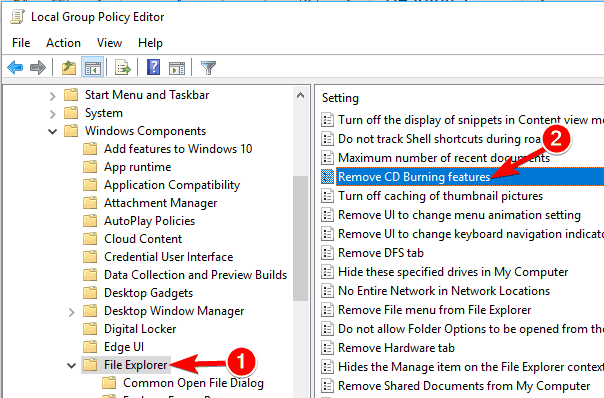
(Figure 2. Local Group Policy Editor)
Restart the computer. According to Microsoft, this should reset the permissions. Once the customer is logged back in test the burning capabilities.
NOTE: If the issue should return, the customer should contact their system Administrator to investigate the GPO setting for the previously mentioned "Remove CD Burning Features."
Optional Workaround
Install a third-party tool to burn CD's/DVD’s if the registry or GPO cannot be modified for security reasons.
受影响的产品
OptiPlex 5050 Tower, OptiPlex 5050 Micro, OptiPlex 5050 Small Form Factor, OptiPlex 7060 Tower, OptiPlex 7060 Micro, OptiPlex 7060 Small Form Factor, Precision 3430 Small Form Factor, Precision 7820 Tower文章属性
文章编号: 000125913
文章类型: How To
上次修改时间: 28 5月 2025
版本: 11
从其他戴尔用户那里查找问题的答案
支持服务
检查您的设备是否在支持服务涵盖的范围内。