Isilon: Using Powershell with Platform API - Creating Objects and RAN
摘要: This article explains how to use Powershell with the OneFS Platform API to create objects and RAN.
本文适用于
本文不适用于
本文并非针对某种特定的产品。
本文并非包含所有产品版本。
症状
Not required
原因
Not required
解决方案
Introduction to JSON
The PAPI uses JSON as the data-interchange format and it's critical to understand how to leverage it to use PAPI to create, modify, or delete resources. You can learn more about JSON at www.json.org but the key principle is that it is complete independent programming language and is built on two structures:- A collection of name/value pairs
- An ordered list of values
Example output from getting a system object would look like this:
{
"<object>": {
"<property>": <value>,
...
}
To know what JSON text we need to POST to create an object, look at the PAPI self documentation by sending the following request:
GET /platform/1/quota/quotas?describe
Here is the relevant Powershell code:
#Get PAPI self documentation for quotas
$resource = "/platform/1/quota/quotas?describe"
$uri = $baseurl + $resource
$ISIObject = Invoke-RestMethod -Uri $uri -Headers $headers -Method Get
$ISIObject
The example output below outlines what you need to POST to create a new quota. Pay attention to the required properties since they may not be the same properties required for the corresponding isi command.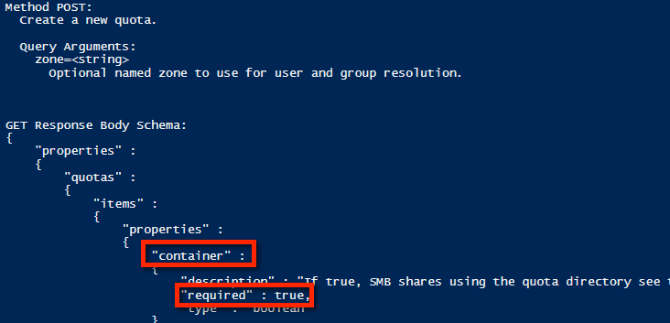
Using the example properties, the following is an example JSON string that can be used to create a directory hard quota:
$QuotaObject = @"
{"type":"directory","include_snapshots": false,"container": true, "path": /ifs/home/user1", "enforced": true, "thresholds": {"hard":10000000},"thresholds_include_overhead": false}
"@
With the JSON string completed, all that's left is to build the Invoke-RestMethod parameters and submit. In the example code below, the JSON string is the body of the POST and that the content type is application/json:
$headers = @{"Authorization"="Basic $($EncodedPassword)"}
$uri = $baseurl + $resource
$ISIObject = Invoke-RestMethod -Uri $uri -Headers $headers -Body $QuotaObject -ContentType "application/json; charset=utf-8" -Method POST
Write-Host " Resulting Quota ID: " $ISIObject.id
$uri = $baseurl + $resource
$ISIObject = Invoke-RestMethod -Uri $uri -Headers $headers -Body $QuotaObject -ContentType "application/json; charset=utf-8" -Method POST
Write-Host " Resulting Quota ID: " $ISIObject.id
Putting It All Together
Using an example, let's assume your environment has many home directories for users under a single parent directory, (example: /ifs/home) and you want to set directory quotas for each of these home directories. Use the Isilon RESTful Access to the Namespace (RAN) API to get the paths to each user home directory. The following code will get the subdirectories of a specified path and then set a directory quota on each subdirectory:
# Get subdirectories of path specified
$resource = '/namespace/' + $path
$uri = $baseurl + $resource
$ISIObject = Invoke-RestMethod -Uri $uri -Headers $headers -Method Get
#Loop through each directory and set the quota
ForEach($folder in $ISIObject.children) {
#Create quota
$resource ="/platform/1/quota/quotas"
Write-Host "Setting a $quotasize byte quota on $quotapath"
$QuotaObject = @"
{"type":"directory","include_snapshots": false,"container": true, "path": "$quotapath", "enforced": true, "thresholds": {"hard":$quotasize},"thresholds_include_overhead": false}
"@
$headers = @{"Authorization"="Basic $($EncodedPassword)"}
$uri = $baseurl + $resource
$ISIObject2 = Invoke-RestMethod -Uri $uri -Headers $headers -Body $QuotaObject -ContentType "application/json; charset=utf-8" -Method POST
Write-Host " Resulting Quota ID: " $ISIObject2.id
}
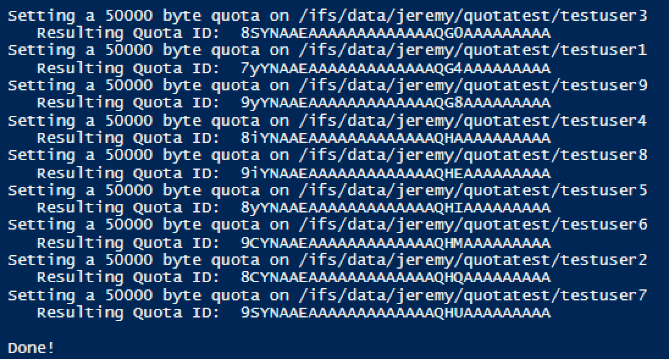
Here is the output from running the script attached to this post:
受影响的产品
Isilon, PowerScale OneFS, Isilon Platform API文章属性
文章编号: 000132770
文章类型: Solution
上次修改时间: 12 10月 2023
版本: 5
从其他戴尔用户那里查找问题的答案
支持服务
检查您的设备是否在支持服务涵盖的范围内。