Dell Wireless Charging Mat: Getting Started
摘要: This article is a guide to getting started using the Dell Wireless Charging mat with the Dell Tablets and Notebooks that have the appropriate charging technology installed.
本文适用于
本文不适用于
本文并非针对某种特定的产品。
本文并非包含所有产品版本。
症状
The following article is a getting started guide to safely using the Dell Wireless Charging Mat with their compatible Dell Notebook or Tablet.
Table of Contents:
- What is the Dell Wireless Charging Mat for?
- How do I use the Charging Mat?
- What should I watch out for using the Charging Mat?
What is the Dell Wireless Charging Mat for?
The Dell Wireless Charging Mat with Adaptor


(Figure.1 Visual Guide to Charging Mat)
| 1 | 60w AC Adaptor | 2 | DC Power Cable |
 |
Power Connector |  |
Charging Area |
This device is a resonant wireless charging mat that is for use with those select Dell Notebooks and Tablets equipped to support 30W wireless charging.
How do I use the Charging Mat?
To safely use the charging mat when it is powered on, ensure the compatible Dell Notebook or Tablet is fully within the charging mat area.

(Figure.2 Correct Usage)
Do not have the compatible Dell Notebook or Tablet overlap the charging area on any edge.
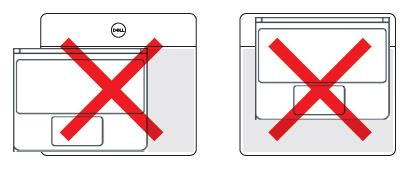
(Figure.3 Incorrect Usage)
There is no status LED on the Charging Mat, however, you can see the charging status LED on the charging device and watch the charge status by turning the charging device on and clicking on the charging icon.
What should I watch out for using the Charging Mat?
Warning: Do not have any objects in between the charging device and the charging mat or between the charging mat and the table surface. You should specifically avoid items such as CD/DVDs, RFID Cards, Credit Cards or other thin metal objects. These devices may be damaged if the charging mat is used in this manner.
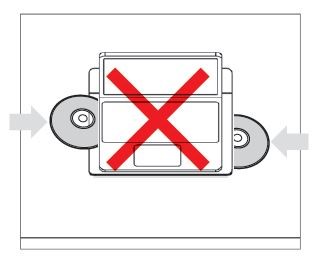
(Figure.4 Keep the Charging Mat and Device clear)
 Caution: The charging mat should not be used on a metal surface. A minimum of 5cm space is required between the bottom of the charging mat and any metal surface before wireless charging will start to work.
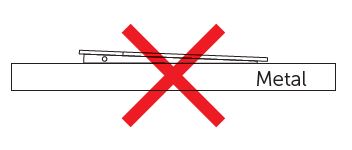
(Figure.5 Keep the charging mat off a metal surface)
Warning: Do not stack a powered or un-powered charging mat on top of a powered charging mat. These devices may be damaged if the charging mats are used in this manner.

(Figure.6 Don't stack powered charging mats)
 Note: Only use the AC power adaptor that came with the Charging Mat.
原因
N/A
解决方案
N/A
受影响的产品
Wireless Charging Mat PM30W17文章属性
文章编号: 000135017
文章类型: Solution
上次修改时间: 15 12月 2025
版本: 5
从其他戴尔用户那里查找问题的答案
支持服务
检查您的设备是否在支持服务涵盖的范围内。