PowerEdge: Dell Systems Management Troubleshooting Tool for network devices
摘要: Dell EMC Troubleshooting Tool you can gather more information about failure to discover a network device (for example: Dell servers, clients, or any other network resources) in the management console such as OpenManage Enterprise. Also, it may help to determine the root cause for discovery-related problems for remote devices; run a protocol-specific test for the remote device and verify the results. It also has tools to: configure emails, check availability of ports, run a command on a remote box, send and listen for SNMP traps, and check for warranty status. ...
本文适用于
本文不适用于
本文并非针对某种特定的产品。
本文并非包含所有产品版本。
说明
About the Dell EMC Troubleshooting Tool
The tool can be used to gather more information about failures and issues with the discovery of the network devices (for example, Dell servers, clients, or any other network resources). The tool can verify Emails, SMTP settings, check for the availability of ports, run a command on a remote device, send and listen for SNMP traps, check warranty status, verify connectivity issues to a network share and iDRAC while deploying files. The tool can debug issues during in-band system update, find detailed information about iDRAC jobs or delete iDRAC jobs, and verify the IP address formed during out-of-band system update. This tool is optional and is only required to debug issues. The tool helps identify issues so they can be manually resolved.
Features and Benefits of the Dell Troubleshooting Tool
The Dell Troubleshooting Tool gathers information about problems that may occur in the datacenter. The tool can be used to diagnose discovery-related problems that may occur while connecting to managed nodes using various protocols such as SNMP, WMI, SSH, WS-Man, PowerVault modular disk-specific connection among others. The tool also verifies the SMTP specific settings, SNMP trap listening, SNMP trap forwarding, and TCP/UDP port availability. It can be used to diagnose issues that may occur while updating patches through in-band method and also verify connectivity issues that may occur during deployment using a network share. See the tool's Help and readme file for more information.
The tool can be downloaded here (Dell Troubleshooting Tool v3.4.8)
Examples:
The following are some example use cases:
- Run the tool and select the SNMP protocol, specify protocol specific settings, and provide remote system IP Address when unable to discover a supported device in OpenManage Essentials or the device is classified as an unknown device while using SNMP protocol. For Dell PowerEdge servers, verify whether the tool provides Server Administrator version in the result area for a successful test (using the SNMP Protocol for an in-band server discovery).
- Verify the ability to ping a remote device (using Ping/ICMP protocol) and the ability to resolve the hostname of the device from the management station (using Name Resolution protocol).
- Verify if the Dell OpenManage Server Administrator services are running on a remote device (using Services protocol).
- Check the warranty status of any Dell server (using Service Tag).
- Run a command on the remote system and verify its output.
- Listen to incoming SNMP traps.
- Use the tool to forward test SNMP traps.
- Use the tool to verify the SMTP settings to ensure that OpenManage Essentials can successfully run the Alert Emails action.
- Use the tool to verify the availability of the local or remote ports.
- Identify the user groups of the active user.
- View or delete the pending system update jobs in an iDRAC.
- Verify connectivity to the deployment file share.
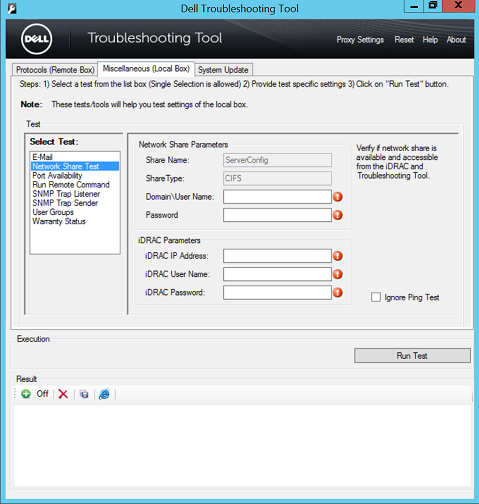
Figure 1: Network Share Test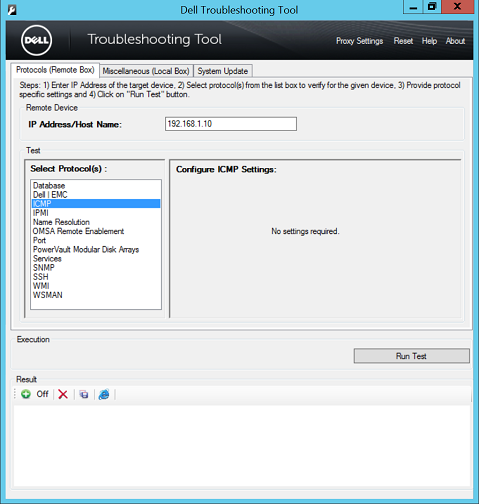
Figure 2: Configure ICMP Settings.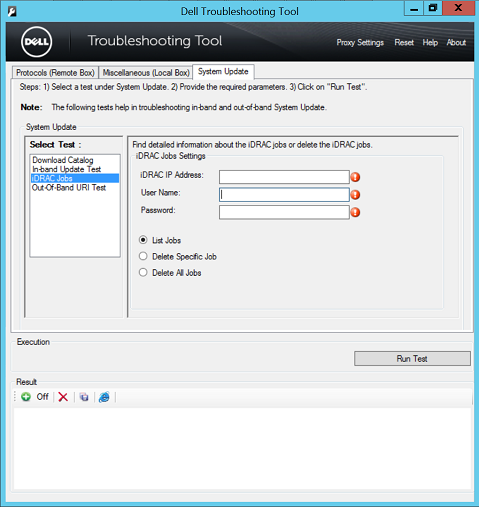
Figure 3: iDRAC Jobs
Installation Requirements:
The Dell Troubleshooting Tool is a 64-bit application that requires the following:
- Supported Operating Systems
- Windows Server 2008 R2, 2012, 2012 R2, 2016 and 2019 Standard and Datacenter Edition
- Windows 7 (x64), 8 (x64), 8.1 (x64) and Windows 10 (x64)
- Microsoft .NET framework 4.0 or later
- Write permission are required on the folder where the Dell Troubleshooting Tool is installed. This is required to perform the required tests and show the results successfully
- Administrator permissions are required to run the tool executable
- IPv4 support only
Review the readme file after you install the utility.
受影响的产品
Dell OpenManage Enterprise, OpenManage Essentials产品
iDRAC8, iDRAC9, Dell EMC OpenManage Enterprise, Secure Connect Gateway - Virtual Edition文章属性
文章编号: 000145268
文章类型: How To
上次修改时间: 05 9月 2025
版本: 9
从其他戴尔用户那里查找问题的答案
支持服务
检查您的设备是否在支持服务涵盖的范围内。