How to Prioritize Multiple MX Records
摘要: This article explains how to prioritize multiple MX records on your domain.
本文适用于
本文不适用于
本文并非针对某种特定的产品。
本文并非包含所有产品版本。
说明
Affected Products:
- Office 365
If your domain has more than one MX record, the mailer must figure out which one to use. MX records use a field called preference to determine the priority.
When you create an MX record, most DNS hosting providers require you to set the preference number, some label the field as preference, and some label the field as priority. Some require a number, and some ask you to select Low, Medium, or High.
If you only have one MX record, any value is fine for priority or preference. However, if you have more than one MX record; for example, if you use an MX record to verify that you own the domain, and an MX record used for mail routing, ensure that the MX record for mail routing is higher priority than the one you used for validating your domain.
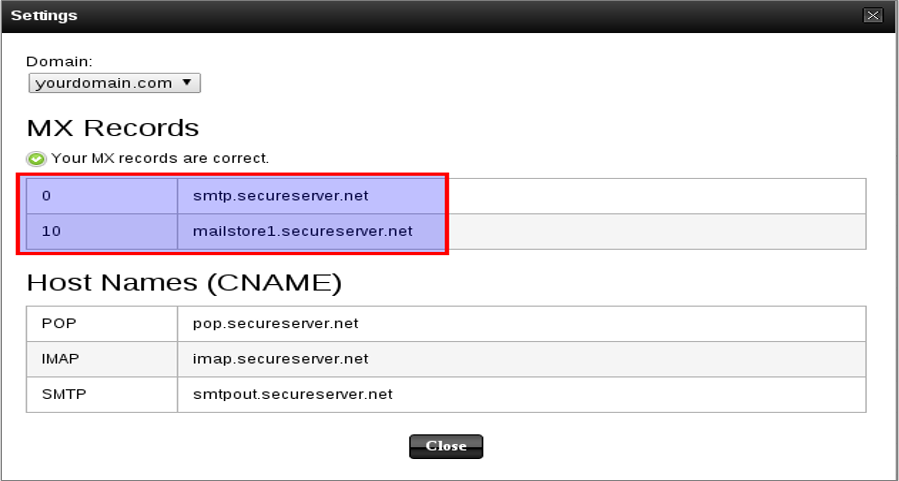
Figure 1: (English Only) MX Records settings
Mail is delivered to the mail exchange server with the lowest preference number (highest priority), so the MX record you use for mail routing should have the lowest preference number, typically 0.
Note: Use 0 for your mail routing record, and 10 for the record for validating that you own your domain. Or, if your DNS hosting provider uses Low, Medium, and High, use High for your mail routing record, and Low for the record for validating that you own your domain.
受影响的产品
Microsoft 365 from Dell产品
Microsoft 365 from Dell文章属性
文章编号: 000184779
文章类型: How To
上次修改时间: 19 3月 2024
版本: 4
从其他戴尔用户那里查找问题的答案
支持服务
检查您的设备是否在支持服务涵盖的范围内。