缓存的用户凭据不适用于具有 Dell Encryption Enterprise 的端点
摘要: 安装 Dell Encryption Enterprise Policy Based Encryption 后,用户无法利用缓存的凭据解锁端点。
本文适用于
本文不适用于
本文并非针对某种特定的产品。
本文并非包含所有产品版本。
症状
受影响的产品:
- Dell Encryption Enterprise
受影响的操作系统:
- Windows
原因
不适用
解决方案
在未连接到域网络且具有 Dell Encryption Enterprise Policy Based Encryption 的计算机上。用户可以在启动时成功登录端点,但在手动锁定端点或者通过屏幕保护程序或休眠锁定后无法解锁端点。
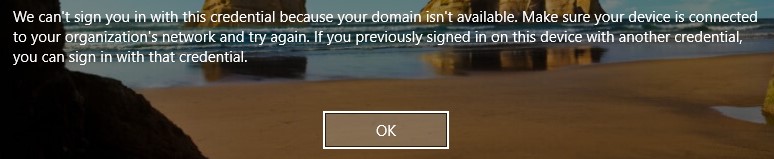
图 1:(仅限英文)Dell Encryption Enterprise 策略基础加密错误
在 Dell Data Security 管理控制台上为此端点启用以下基于策略的加密策略:

图 2:(仅限英文)基于 Polciy 的加密策略
用户使用 username@upn 登录到端点。
由于用户名中的 UPN 未知,未为此用户激活 Shield。Shield 本地控制台中的设备激活 ID 为红色:
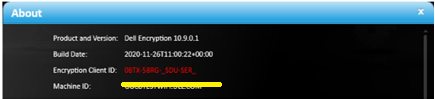
图 3:(仅限英文)关于
在 C:\ProgramData\Dell\Dell Data Protection\Encryption 的CMGShieled.log中,您可能会看到以下错误:
[04.16.21 14:38:16:017 XmlRpcActivate.: 129 H] Activation - Requesting activation for user@upn.com
[04.16.21 14:38:16:126 XmlRpcActivate.: 184 H] Activation - Sending activation request for user@upn.com
[04.16.21 14:38:16:456 XmlRpcActivate.: 207 E] Activation - Activation request failed [device server fault:0x13ec]: Auth failure: Error authenticating user user@upn.com
[04.16.21 14:38:16:456 Activator.cpp: 858 E] Activation - Unable to activate new user DOMAIN\user [MS error = 5100]
[04.16.21 14:38:16:456 Activator.cpp: 871 E] Activation - Verify network connectivity to the Dell Security Server at "servername.DOMAIN.local" and Dell Device Server at "https:// servername.DOMAIN.local:8443/xapi/"
出现此问题的原因是存在 策略阻止对域凭据的非托管访问 和非受管登录用户。
要解决此问题,请按照以下步骤在远程管理控制台上添加缺失的 UPN:
- 从网页浏览器转到位于 https://servername 的 Dell Data Security 管理控制台。DOMAIN.local:8443/webui。
提醒:示例 servername。DOMAIN.local,可能与您环境中的服务器 DNS 不同。端口 8443 可能与环境中的远程管理控制台端口不同。有关访问远程管理控制台的更多信息,请参阅 如何访问 Dell Data Security 或 Dell Data Protection Server 管理控制台。
- 登录到 Dell Data Security 管理控制台。
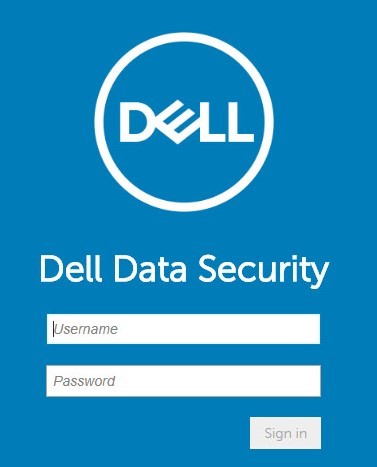
图 4:(仅限英文)Dell Data Security 登录。
- 在左侧菜单窗格中,依次单击 Populations 和 Domains。
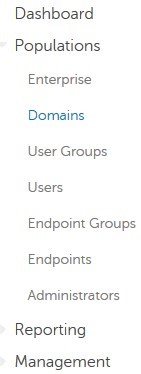
图 5:(仅限英文)单击 Domains。
- 单击 DOMAIN name:
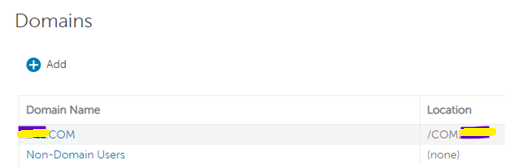
图 6:(仅限英文)单击 Domain name。
- 单击 设置 选项卡,然后按照以下步骤操作:

图 7:(仅限英文)单击 Settings。
- 填充域服务帐户的 密码 。
- 在“别名”字段中输入每个缺失的 UPN 后缀,然后单击添加。
- 单击 Update Domain。
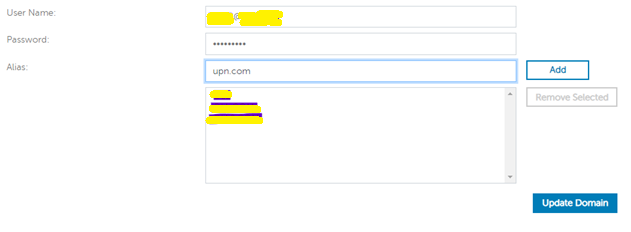
图 8:(仅限英文)更新域信息。
提醒:最佳实践是在 Dell Data Security 管理控制台上列出 AD 域中使用的所有 UPN。
或者,作为解决方法,可以在 Dell Data Security 管理控制台上禁用以下基于策略的加密策略:
阻止对域凭据的非托管访问。
这不会解决用户的激活问题,但允许他们使用缓存的凭据。
要联系支持部门,请参阅 Dell Data Security 国际支持电话号码。
转至 TechDirect,在线生成技术支持请求。
要获得更多见解和资源,请加入戴尔安全社区论坛。
受影响的产品
Dell Encryption文章属性
文章编号: 000185556
文章类型: Solution
上次修改时间: 03 6月 2024
版本: 11
从其他戴尔用户那里查找问题的答案
支持服务
检查您的设备是否在支持服务涵盖的范围内。