CloudLink: A CloudLink node is stuck in emergency mode
摘要: A CloudLink node is stuck in emergency mode.
本文适用于
本文不适用于
本文并非针对某种特定的产品。
本文并非包含所有产品版本。
症状
After booting the CloudLink node, the following message is seen:
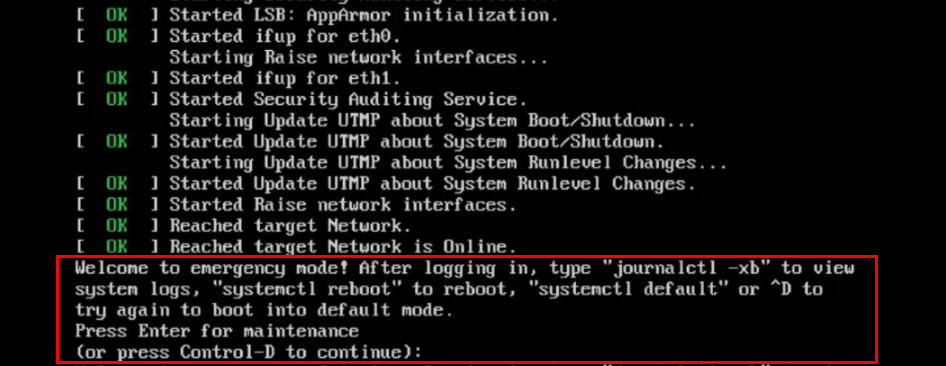
Welcome to emergency mode! After logging in, type "journalctl -xb" to view
system logs, "systemctl reboot" to reboot, "systemctl default" or ^D to
try again to boot into default mode.
Press Enter for maintenance
(or press Control-D to continue):
原因
This issue is due to a file system issue that must be repaired.
解决方案
To resolve the file system issue on the node, perform the following:
If the root filesystem is clean, you can run fsck on the other filesystems using the same procedure above.
Run command journalctl -xb. These logs might indicate if there is a corrupted filesystem that needs repaired.
You can use commands lsblk and blkid to help link a uuid to its filesystem.
Here are some examples of errors that you might see in journalctl -xb:
/dev/sda6: Inodes that were part of a corrupted orphan linked list found.
/dev/sda6: UNEXPECTED INCONSISTENCY: RUN fsck MANUALLY.
Failed to start File System Check on /dev/disk/by-uuid/fd782a8-a70d-045513691c7e
If you are unable to repair the filesystem using fsck or if you have one Cloudlink node that is frequently getting stuck in emergency mode, you should remove that broken Cloudlink node from the cluster. Then you deploy a new Cloudlink node from OVA and join to the existing cluster.
If you can repair the file system, you should check the health of the cluster from the Cloudlink UI.
This is done in SYSTEM > Cluster and ensure incoming, and outgoing sync states are OK.
- You press Control-D to continue, but it remains in emergency mode.
- Press the ENTER key for maintenance.
- Run a file system check on the root ( / ) file system.
root@cloudlink:~#  lsblk    <------------------- Run this command to identify the / filesystem (typically sda10)
root@cloudlink:~#  fsck /dev/sda10  <-------- It complains that /dev/sda10 is still mounted
root@cloudlink:~#  umount /dev/sda10
root@cloudlink:~#  fsck /dev/sda10
- Press y to fix any errors that are found.
- Reboot the node.
If the root filesystem is clean, you can run fsck on the other filesystems using the same procedure above.
Run command journalctl -xb. These logs might indicate if there is a corrupted filesystem that needs repaired.
You can use commands lsblk and blkid to help link a uuid to its filesystem.
Here are some examples of errors that you might see in journalctl -xb:
/dev/sda6: Inodes that were part of a corrupted orphan linked list found.
/dev/sda6: UNEXPECTED INCONSISTENCY: RUN fsck MANUALLY.
Failed to start File System Check on /dev/disk/by-uuid/fd782a8-a70d-045513691c7e
If you are unable to repair the filesystem using fsck or if you have one Cloudlink node that is frequently getting stuck in emergency mode, you should remove that broken Cloudlink node from the cluster. Then you deploy a new Cloudlink node from OVA and join to the existing cluster.
If you can repair the file system, you should check the health of the cluster from the Cloudlink UI.
This is done in SYSTEM > Cluster and ensure incoming, and outgoing sync states are OK.
受影响的产品
CloudLink产品
CloudLink SecureVM文章属性
文章编号: 000197726
文章类型: Solution
上次修改时间: 13 5月 2026
版本: 6
从其他戴尔用户那里查找问题的答案
支持服务
检查您的设备是否在支持服务涵盖的范围内。