PowerVault ME5: No Base unit preference option available while creating a user through PowerVault Manager.
摘要: There is no option to change the base unit preference while creating a user through PowerVault Manager on ME5 series arrays. The previous generation PowerVault Manager on ME4 series presented this option. Use PowerVault command line interface to change this value. ...
本文适用于
本文不适用于
本文并非针对某种特定的产品。
本文并非包含所有产品版本。
症状
In PowerVault ME5, creating a user in PowerVault Manager does not present the option "base preference.”
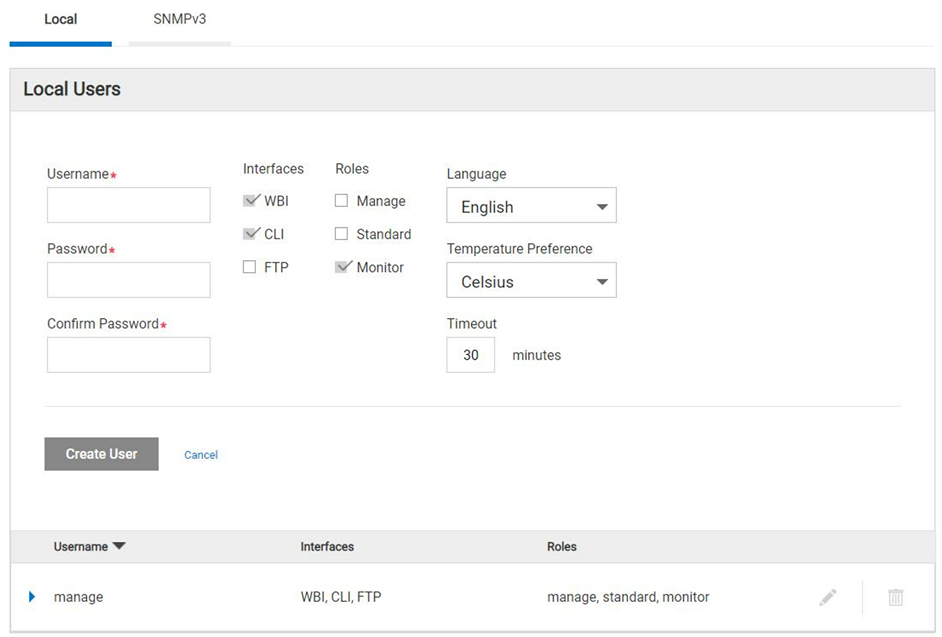
Figure 1 - PowerVault Manager create user dialog.
原因
Dell engineering identified that this feature is not part of the PowerVault Manager web-based interface (WBI) in the ME5 product family and control base preference can only be set using CLI. This is by design.
NOTE: Most host operating systems measure volume capacity using base 2.
解决方案
-
Using command line interface (CLI) the base preference value can be set while creating a new user.
Here is an example showing how to create a user with base 2 preferences:
# create user base 2 interfaces wbi roles monitor Michael
Enter new password: ********
Re-enter new password: ********
Success: Command completed successfully. (Michael) - The new user was created. (2022-04-05 13:16:17)

# show users
Username             Roles                    User Type    User Locale            WBI   CLI   FTP   SNMP  Authentication Type Privacy Type
  Password                         Privacy Password                 Trap Host Address Trap Host Port
-------------------------------------------------------------------------------------------------------------------------------------------
John                 monitor                  Standard     English                x
  ********                         ********
Michael              monitor                  Standard     English                x
  ********                         ********
manage               manage, standard, monitor  Standard     English                x     x     x
  ********                         ********
-------------------------------------------------------------------------------------------------------------------------------------------
Success: Command completed successfully. (2022-04-05 13:16:29)
-
To verify what is the base preference created during user creation through CLI.
Below are the CLI reference commands:
# set CLI json
{
"status":[
  {
    "object-name":"status",
    "meta":"/meta/status",
    "response-type":"Success",
    "response-type-numeric":0,
    "response":"Command completed successfully. (2022-04-05 13:16:36)",
    "return-code":0,
    "component-id":"",
    "time-stamp":"2022-04-05 13:16:36",
    "time-stamp-numeric":1649164596
  }
]
}


# show users Michael
{
"users":[
  {
    "object-name":"user",
    "meta":"/meta/users",
    "username":"Michael",
    "roles":"monitor",
    "user-type":"Standard",
    "user-type-numeric":2,
    "user-locale":"English",
    "user-locale-numeric":0,
    "interface-access-WBI":"x",
    "interface-access-CLI":"",
    "interface-access-FTP":"",
    "interface-access-SMIS":"",
    "interface-access-SNMP":"",
    "storage-size-base":2,
    "storage-size-precision":1,
    "storage-size-units":"Auto",
    "temperature-scale":"Celsius",
    "timeout":1800,
    "authentication-type":"",
    "privacy-type":"",
    "password":"********",
    "default-password-changed":"True",
    "default-password-changed-numeric":1,
    "privacy-password":"********",
    "trap-destination":"",
    "trap-port":""
  }
],
"status":[
  {
    "object-name":"status",
    "meta":"/meta/status",
    "response-type":"Success",
    "response-type-numeric":0,
    "response":"Command completed successfully. (2022-04-05 13:16:44)",
    "return-code":0,
    "component-id":"",
    "time-stamp":"2022-04-05 13:16:44",
    "time-stamp-numeric":1649164604
  }

]
}

# set cli console
Success: Command completed successfully. (2022-04-05 13:19:50)
NOTE: Revert the CLI from *Json to *console.
受影响的产品
PowerVault ME5012, PowerVault ME5024, PowerVault ME5084文章属性
文章编号: 000198077
文章类型: Solution
上次修改时间: 31 5月 2023
版本: 4
从其他戴尔用户那里查找问题的答案
支持服务
检查您的设备是否在支持服务涵盖的范围内。