MHC Azure Stack: Tipo de OEM FirmwareCheckHealth da função O OEM levantou uma exceção
摘要: Type FirmwareCheckHealth of Role OEM raised an exception Error running Test-OEMFirmwareHealth iDRAC has Critical Major faults could not proceed with Firmware update.
本文适用于
本文不适用于
本文并非针对某种特定的产品。
本文并非包含所有产品版本。
症状
Erros de pré-verificação do OEM com falha:

Clique em "Download Summary".
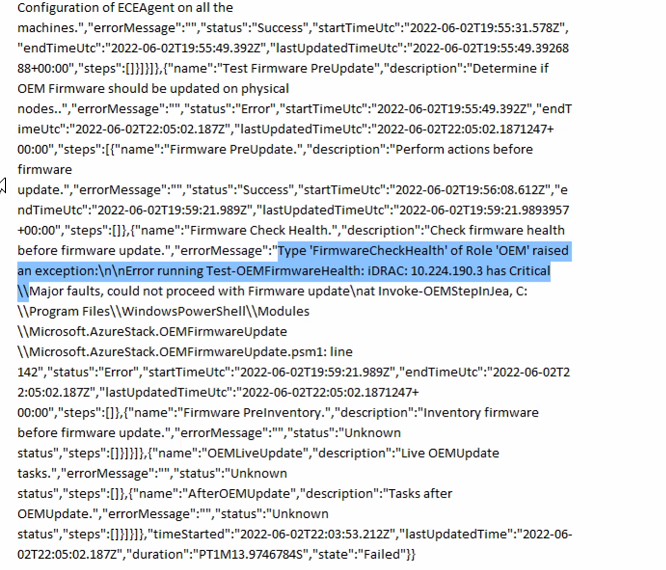
Error.json:
Oem Package Update
Perform Oem Extension update.

BeforeOEMUpdate
Tasks before OEMUpdate.

Test Firmware PreUpdate
Determine if OEM Firmware should be updated on physical nodes.

Firmware Check Health.
Check firmware health before update.
Clique em "Download Summary".
Error.json:
Type ‘FirmwareCheckHealth’ of Role ‘OEM’ raised an exception:\n\nError running Test-OEMFirmwareHealth: iDRAC: 10.224.190.3 has Critical Major faults, could not proceed with Firmware update….
原因
Três dos quatro servidores apresentaram erros de memória. Isso precisa ser resolvido antes de prosseguir.
The memory health monitor feature has detected a degradation in the DIMM installed in DIMM_A6. Reboot system to initiate self-heal process.
解决方案
Para resolver esse problema, corrija os erros de memória.
- Drene o nó com o iDRAC mostrando a memória com falha.
- Depois de drenado, execute os seguintes comandos em uma janela PEP PowerShell.
get-virtualdisk -cimsession "s-cluster"
get-virtualdisk -cimsession "s-cluster" | get-storagejob
- Depois que todos os trabalhos de armazenamento forem concluídos, inicialize o servidor a frio a partir do iDRAC
- Verifique se o DIMM foi recuperado:
The self-heal operation successfully completed at DIMM DIMM_A6.
- Na janela do Azure Stack, inicie o nó.
- Na janela Azure Stack, reinicie o nó.
受影响的产品
Integrated System for Microsoft Azure Stack Hub, Integrated System for Microsoft Azure Stack Hub 14G文章属性
文章编号: 000200301
文章类型: Solution
上次修改时间: 08 9月 2025
版本: 3
从其他戴尔用户那里查找问题的答案
支持服务
检查您的设备是否在支持服务涵盖的范围内。