AppSync: In AppSync UI customer was unable to set the logging mode to debug as Apply button stayed disabled when debug option was selected.
摘要: In AppSync UI customer was unable to set the logging level to debug as Apply button stayed disabled when debug option was selected.
本文适用于
本文不适用于
本文并非针对某种特定的产品。
本文并非包含所有产品版本。
症状
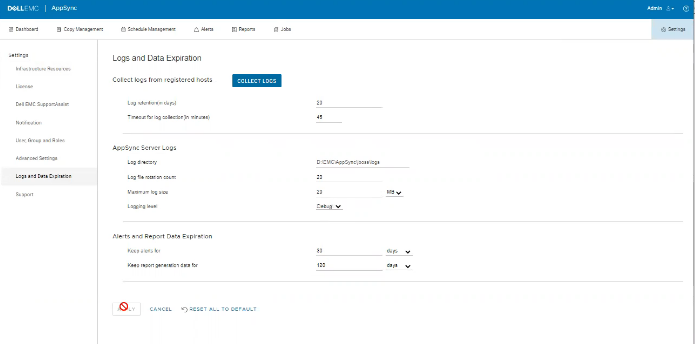
No errors in the logs but the issue can be observed on the UI as shown in the below.
原因
The Issue is because customer on the same screen, had set "Timeout for log collection(in minutes)" option value to 45 which is invalid.
解决方案
Set The value for "Timeout for log collection(in minutes)" option to a valid value of 90 and 120.
其他信息
AppSync 4.5 will not allow an invalid value for "Timeout for log collection(in minutes)."
Valid values can be from 90 to 120.
Valid values can be from 90 to 120.
受影响的产品
AppSync, AppSync文章属性
文章编号: 000203604
文章类型: Solution
上次修改时间: 09 9月 2025
版本: 8
从其他戴尔用户那里查找问题的答案
支持服务
检查您的设备是否在支持服务涵盖的范围内。