Data Domain:使用 DD System Manager 界面诊断 Active Directory 用户并加入 Active Directory
摘要: DDOS 可以在 DD System Manager 界面中诊断 Active Directory 的身份验证问题。
本文适用于
本文不适用于
本文并非针对某种特定的产品。
本文并非包含所有产品版本。
说明
步骤
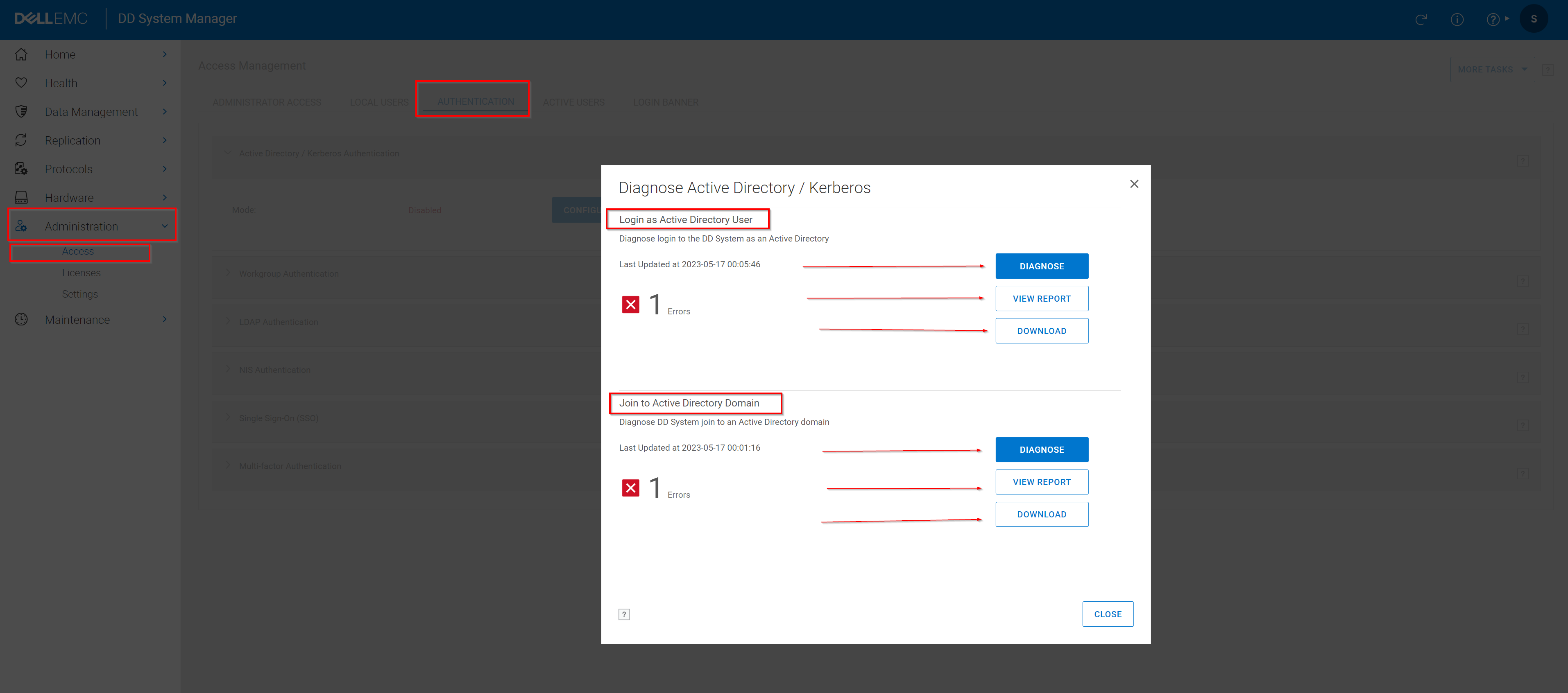
- 选择AdministrationAccessAuthentication >>
- 展开“Active Directory/Kerberos Authentication”面板。
- 单击 Diagnose。
- 选择要调查的问题,然后单击 Diagnose。
- 提供 所需的信息。
要诊断以 Active Directory 用户身份登录 时发生的问题 ,请提供:- Active Directory 服务器 IP 地址
- Active Directory 服务器 FQDN
- Active Directory 服务用户名
提醒:此处指定的 Active Directory 用户帐户需要以下权限:- 对域名标识的基本 DN 的只读访问权限
- 对基本 DN 中所有用户的查询属性的只读访问权限。
- 对保护系统的计算机帐户的查询属性具有只读访问权限。
- Active Directory 服务密码
- 用户名遇到登录失败 要诊断将系统加入 Active Directory 域的问题,请提供:
- Active Directory 服务器 IP 地址
- Active Directory 服务器 FQDN
- Active Directory 服务用户名
- Active Directory 服务密码
- 单击 Diagnose。
- 查看 报告。
- 单击 查看报告 可联机查看报告。可以单击“Action Items”表中的每个项目以了解更多详细信息。
- 单击 下载 以下载报告的拷贝。
- 查看并实施针对该问题 的建议修复, 然后重试此作。
受影响的产品
Data Domain文章属性
文章编号: 000204197
文章类型: How To
上次修改时间: 09 1月 2026
版本: 8
从其他戴尔用户那里查找问题的答案
支持服务
检查您的设备是否在支持服务涵盖的范围内。