Dell Unity: Kan ikke få adgang til Unity-administrationsgrænsefladen ved hjælp af https://FQDN eller https://ip.address (kan rettes af brugeren)
摘要: Kan ikke få adgang til Unity-administrationsgrænsefladen ved hjælp af https://FQDN eller https://ip.address Adgang til Unity foregår ved hjælp af https://FQDN/?casHome=LOCAL og https://ip.address/?casHome=LOCAL ...
本文适用于
本文不适用于
本文并非针对某种特定的产品。
本文并非包含所有产品版本。
症状
Det er ikke muligt at få adgang til Unity-administrationsgrænsefladen ved hjælp af https://FQDN eller https://ip.address
Adgang til Unity finder sted ved hjælp af https://FQDN/?casHome=LOCAL og https://ip.address/?casHome=LOCAL
Adgang til Unity finder sted ved hjælp af https://FQDN/?casHome=LOCAL og https://ip.address/?casHome=LOCAL
原因
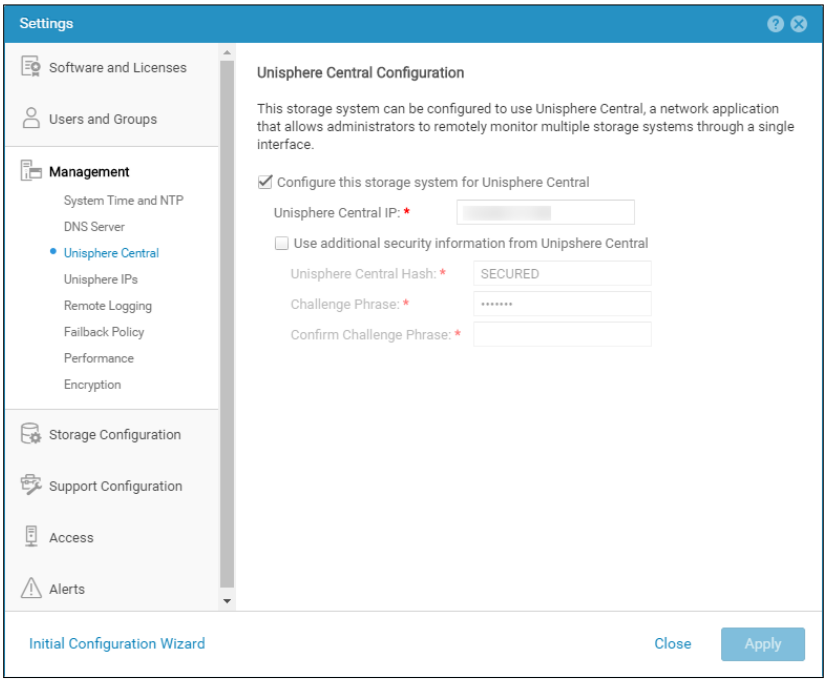
Unisphere Central er aktiveret på Unity, selvom Unisphere Central ikke anvendes.
解决方案
Markér kun "Konfigurer dette lagersystem til Unisphere Central", hvis Unisphere Central er i brug. Hvis det ikke er tilfældet, skal du fjerne markeringen, der aktiverer Unisphere Central.
受影响的产品
Dell EMC Unity文章属性
文章编号: 000205133
文章类型: Solution
上次修改时间: 12 12月 2025
版本: 5
从其他戴尔用户那里查找问题的答案
支持服务
检查您的设备是否在支持服务涵盖的范围内。