Dell Unity: Zugriff auf die Unity-Managementoberfläche über https://FQDN oder https://ip.address nicht möglich (vom Nutzer korrigierbar)
摘要: Zugriff auf die Unity-Managementschnittstelle über https://FQDN oder https://ip.address nicht möglich Der Zugriff auf Unity erfolgt über https://FQDN/?casHome=LOCAL und https://ip.address/?casHome=LOCAL ...
本文适用于
本文不适用于
本文并非针对某种特定的产品。
本文并非包含所有产品版本。
症状
Der Zugriff auf die Unity-Managementschnittstelle kann nicht über https://FQDN oder https://ip.address
Der Zugriff auf Unity erfolgt über https://FQDN/?casHome=LOCAL und https://ip.address/?casHome=LOCAL
Der Zugriff auf Unity erfolgt über https://FQDN/?casHome=LOCAL und https://ip.address/?casHome=LOCAL
原因
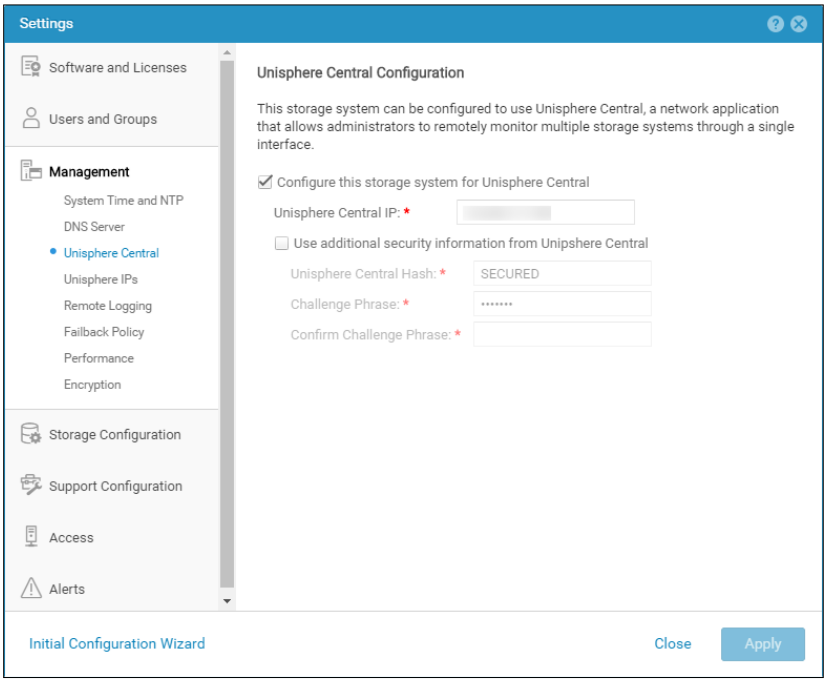
Unisphere Central ist auf Unity aktiviert, obwohl Unisphere Central nicht verwendet wird.
解决方案
Aktivieren Sie "Configure this storage system for Unisphere Central" (Dieses Speichersystem nur für Unisphere Central konfigurieren), wenn Unisphere Central verwendet wird. Wenn dies nicht der Lage ist, entfernen Sie die Überprüfung, mit der Unisphere Central aktiviert wird.
受影响的产品
Dell EMC Unity文章属性
文章编号: 000205133
文章类型: Solution
上次修改时间: 12 12月 2025
版本: 5
从其他戴尔用户那里查找问题的答案
支持服务
检查您的设备是否在支持服务涵盖的范围内。