Avamar:VMware FLR 恢复失败,并显示错误“avvmwfile Error <0000>:Failed to restore files via network”
摘要: .Avamar:VMware FLR 恢复失败,并显示错误“avvmwfile Error” <0000>: Failed to restore files via network”
本文适用于
本文不适用于
本文并非针对某种特定的产品。
本文并非包含所有产品版本。
症状
到虚拟机的 FLR 恢复失败,并显示以下错误:
或此 CURL Ret: 28
avvmwfile Error : Failed to restore files via network, check proxy log for details
avvmwfile Error : assist_restore error. ret: 157
在以下日志中的代理上:
/usr/local/avamarclient/bin/logs/VSphereWebService.log显示此 Curl 错误:CURL Ret:7
[VWS - DEBUG] TID=1959 MID=161118: summary.config.vmPathName = [datastore] vmname/vmname.vmx
[VWS - DEBUG] TID=140595754436519 MID=161279: HTTP PUT: Source = /usr/local/avamarclient/bin/BatchDownload.exe
[VWS - DEBUG] TID=140595754436519 MID=161280: HTTP PUT: Target = D:\Users\Administrator\BatchDownload.exe
[VWS - DEBUG] TID=140595754436519 MID=161281: HTTP PUT: Url = https://esxihostname.example.com:443/guestFile?id=2&token=52f03e19-6b09-94c6-35b8-a8a21cb401f62
[VWS - DEBUG] TID=140595754436519 MID=161282: HTTP PUT: Cert =
[VWS - DEBUG] TID=140595754436519 MID=161283: HTTP PUT: DisableSkipHost = false
[VWS - DEBUG] TID=18446744069414586280 MID=161441: CURL Ret: 7, HTTP Ret: 0
或此 CURL Ret: 28
[VWS - DEBUG] TID=18446744069414586280 MID=161441: CURL Ret: 28, HTTP Ret: 0
原因
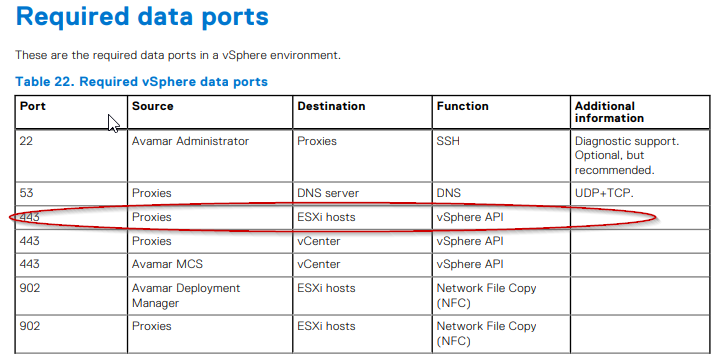
这是防火墙/网络问题。 文件级恢复功能要求在 Avamar Proxy 与目标虚拟机的 ESXi 之间打开 TCP 443。 此要求记录在 Avamar VMware 指南中
解决方案
应接洽客户的网络团队,并根据文档检查端口是否已打开。
要测试端口已打开,可在 Avamar Proxy 上发出以下命令:
失败输出示例:
成功输出示例:
要测试端口已打开,可在 Avamar Proxy 上发出以下命令:
curl -kv https://esxihostname.example.com/
失败输出示例:
198proxy:/home/admin # curl -kv https://esxihostname.example.com:443  && echo sucess || echo failed
* Rebuilt URL to: https://1.2.3.4:443/
*   Trying 1.2.3.4...
* TCP_NODELAY set
* connect to 1.2.3.4 port 443 failed: Connection refused
* Failed to connect to 1.2.3.4 port 443: Connection refused
* Closing connection 0
curl: (7) Failed to connect to 1.2.3.4 port 443: Connection refused
failed
成功输出示例:
198proxy:/home/admin # curl -kv https://10.240.196.10:443 2>/dev/null && echo sucess || echo failedsucess
受影响的产品
Avamar文章属性
文章编号: 000209737
文章类型: Solution
上次修改时间: 26 6月 2023
版本: 3
从其他戴尔用户那里查找问题的答案
支持服务
检查您的设备是否在支持服务涵盖的范围内。